


After several days migrating BizTalk open‑source contributions—such as the BizTalk Mapper Extensions Utility Pack, Pipeline Components Extensions Utility Pack, Mapper Extensions Functoid Project Template, and Functoid Wizard—I returned to one of my favorite topics: errors and warnings, their causes, and solutions.
I also migrated several tools, including BizTalk Filter Finder, Bindings Exporter, and Port Multiplier for BizTalk Server 2020.
During this work, I ran into a small development issue while consuming the Adapter Service to generate Oracle schemas in Visual Studio.
I have performed this task thousands of times, and it is usually straightforward once the Oracle connection is configured. However, this time Visual Studio returned an unexpected error:
Error occurred while creating the BizTalk port configuration file. Index was out of range. Must be non-negative and less than the size of the collection.
Parameter name: index
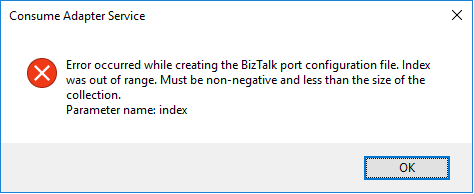
A curious fact is that the Wizard was able to successfully generate the Oracle Schemas. The problem occurred while it was trying to generate the Binding file.
📝 One-Minute Brief
Explains how to resolve the Visual Studio BizTalk Schema Generator Wizard error “Error occurred while creating the BizTalk port configuration file”, which appears when consuming adapter services, even though schemas are generated successfully.
Cause
Unfortunately, I could not determine the exact cause of this error. Based on my analysis, it likely results from special characters in Oracle metadata or incompatibilities between Oracle and .NET data types used during binding file generation.
However, this issue does not block development. The wizard still generates all required BizTalk artifacts, including the Oracle schemas.
The wizard fails only when generating the binding file. Although this file simplifies port creation in the BizTalk Server Administration Console, it is not mandatory.
Even without the binding file, you can manually create the receive or send ports and continue the implementation without further issues.
Solution
Well, you know me, it is possible to manually create the ports without requiring the binding files; however, this is an accelerator that I prefer not to lose. So, I had to investigate and solve this problem before it appeared more often.
And in fact, the solution is quite easy:
- On the Consume Adapter Service Schema Generator Wizard, while you are configuring the connection string to Oracle, configure the URI, select the Binding Properties tab.
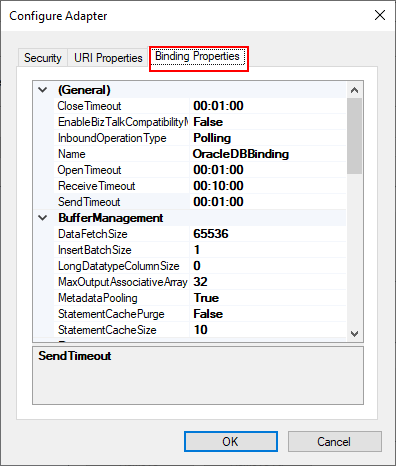
- On the Binding Properties tab, scroll down to the Metadata section. There you will find a property called: EnableSafeTyping.
- This feature controls how the adapter surfaces certain Oracle data types, and by default, this value is false.
- To solve this issue, you need to change the EnableSafeTyping value to true.
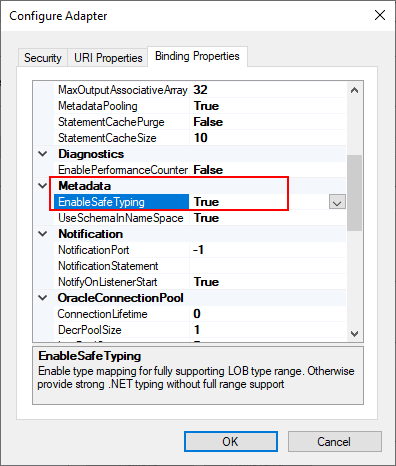
Since not all .NET and Oracle types are created equally, we occasionally need to set the value true for this property to handle some constraints around data types.
This is not a unique Oracle issue; this same error may happen when you are trying to generate schemas from SAP, too.
Hope you find this helpful! If you liked the content or found it useful and would like to support me in writing more, consider buying (or helping to buy) a Star Wars Lego set for my son.



