


Yesterday I was troubleshooting a WCF-OracleDB issue on BizTalk Server 2016, and I got surprised, or not, by the lack of information that I was receiving about the problem that was happening. We usually get some minor help from the adapter that throws a short error message description, like:
- Table or view does not exist.
- The provider is not compatible with the version of the Oracle client.
- This is because either (a) an ambient transaction is present, or (b) the TNS alias is longer than 39 characters.
- PL/SQL: ORA-00917: missing comma.
- Could not load file or assembly ‘Oracle.DataAccess, Version=2.111.7.0, Culture=neutral, PublicKeyToken=89b483f429c47342’ or one of its dependencies. The system cannot find the file specified.
And these are just a few examples that you can find in my blog. Nevertheless, this time, I was getting a simple:
The Messaging Engine failed to add a receive location “TEST” with URL “oracledb://ServerAddress:PortNumber/ServiceName/ServiceType” to the adapter “WCF-OracleDB”. Reason: “Microsoft.ServiceModel.Channels.Common.ConnectionException —> Oracle.DataAccess.Client.OracleException
at Oracle.DataAccess.Client.OracleException.HandleErrorHelper(Int32 errCode, OracleConnection conn, IntPtr opsErrCtx, OpoSqlValCtx* pOpoSqlValCtx, Object src, String procedure, Boolean bCheck, Int32 isRecoverable)
at Oracle.DataAccess.Client.OracleException.HandleError(Int32 errCode, OracleConnection conn, IntPtr opsErrCtx, Object src)
at Oracle.DataAccess.Client.OracleConnection.Open()
at Microsoft.Adapters.OracleCommon.OracleCommonConnectionWrapper..ctor(String connectionString, OracleCommonExecutionHelper executionHelper)
at Microsoft.Adapters.OracleDB.OracleDBConnection.Microsoft.ServiceModel.Channels.Common.IConnection.Open(TimeSpan timeout)
— End of inner exception stack trace —
at Microsoft.Adapters.OracleDB.OracleDBConnection.Microsoft.ServiceModel.Channels.Common.IConnection.Open(TimeSpan timeout)
at Microsoft.ServiceModel.Channels.Common.Design.ConnectionPool.GetConnection(Guid clientId, TimeSpan timeout)
at Microsoft.ServiceModel.Channels.Common.Design.ConnectionPool.GetConnectionHandler[TConnectionHandler](Guid clientId, TimeSpan timeout, MetadataLookup metadataLookup, String& connectionId)
at Microsoft.ServiceModel.Channels.Common.Channels.AdapterChannelListener1.OnOpen(TimeSpan timeout) at System.ServiceModel.Channels.CommunicationObject.Open(TimeSpan timeout) at System.ServiceModel.Dispatcher.ChannelDispatcher.OnOpen(TimeSpan timeout) at System.ServiceModel.Channels.CommunicationObject.Open(TimeSpan timeout) at System.ServiceModel.ServiceHostBase.OnOpen(TimeSpan timeout) at System.ServiceModel.Channels.CommunicationObject.Open(TimeSpan timeout) at Microsoft.BizTalk.Adapter.Wcf.Runtime.WcfReceiveEndpoint.Enable() at Microsoft.BizTalk.Adapter.Wcf.Runtime.WcfReceiveEndpoint..ctor(BizTalkEndpointContext endpointContext, IBTTransportProxy transportProxy, ControlledTermination control) at Microsoft.BizTalk.Adapter.Wcf.Runtime.WcfReceiver2.AddReceiveEndpoint(String url, IPropertyBag adapterConfig, IPropertyBag bizTalkConfig)”.
📝 One-Minute Brief
Connecting BizTalk Server to Oracle databases using the WCF‑OracleDB adapter can fail with cryptic connection exceptions. This article explains the root cause of a Microsoft.ServiceModel.Channels.Common.ConnectionException combined with an Oracle.DataAccess.Client.OracleException, and shows how to fix the configuration to restore database connectivity.
Cause
Diagnosing a problem is typically not an easy task. That becomes even harder if no error details are provided. Nevertheless, if you face this issue, my experience tells that some ORACLE required components are missing in your BizTalk Server environment.
This was the conclusion I got with the help of good ORACLE expert friends who are working with me on the project.
Solution
The solution is to install all the ORACLE necessary components based on Microsoft documentation: the Oracle Data Access Components (ODAC) 32 and 64 bits.
The easier way for you to solve this issue is by simply using Oracle client resources. In my case, I tend to use: Oracle 12C client 32-bit and Oracle 12C 64-bit Client:
- Double-click on setup.exe.
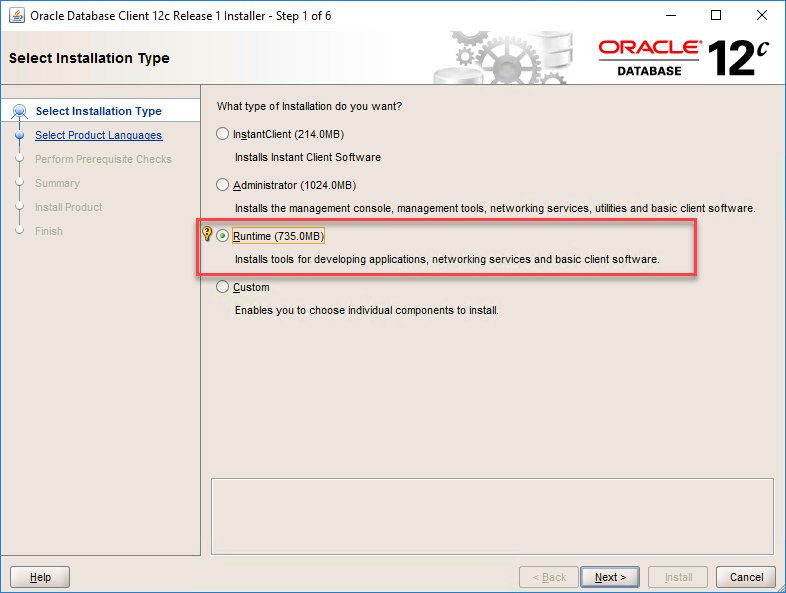
- On the Select Installation Type page, select the Runtime option
- This will probably install more components than you need, but at least it will install all the necessary components.
- On the Select Product Languages page, leave the default language. English, and click Next.
- On the Specify Oracle Home User page, select the option Use Windows Buit-in Account, and click Next.
- On the Specify Installation Folder screen, review the installation paths and click Next.
- On the Perform Prerequisites Checks screen, wait for the wizard to finish doing the checks necessary, and it will automatically jump to the Summary page.
- On the Summary screen, review the summary and click Install.
After that, I was able to successfully communicate with the Oracle database.
Hope you find this helpful! If you liked the content or found it useful and would like to support me in writing more, consider buying (or helping to buy) a Star Wars Lego set for my son.



