


I was thinking of calling this post series Note to myself, only not to always look for these solutions whenever these problems are not related to BizTalk Server or other integration products or technologies. But I decided to call it A Fish Out of Water, which basically is how I feel sometimes. And to start this post series, I chose an ongoing “issue” that happens a lot when I’m trying to do something in SQL Server Management Console: Saving changes is not permitted.
The full warning message would be:
Saving changes is not permitted. The changes that you have made require the following tables to be dropped and re-created. You have either made changes to a table that can’t be re-created or enabled the option Prevent saving changes that require the table to be re-created.
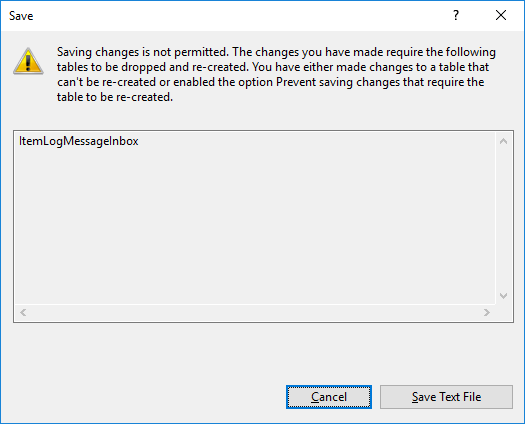
This behavior is very simple to solve and is well documented here: Error message when you try to save a table in SQL Server: “Saving changes is not permitted”. Once again, this is just to help me not always look at this “problem” again. My Blog is the first place I look; it is my personal notes.
📝 One-Minute Brief
Explains why SQL Server Management Studio blocks table changes with the “Saving changes is not permitted” error and shows how to safely disable the setting that prevents table re‑creation.
Cause
This problem occurs when the Prevent saving changes that require the table re-creation option is enabled, and you make one or more of the following changes to the table:
- You change the Allow Nulls setting for a column.
- You reorder columns in the table.
- You change the column data type.
- You add a new column.
When you change a table by altering its metadata structure and then save it, the table must be re-created based on these changes. This may result in the loss of metadata and a direct loss of data during the table’s re-creation. If you enable the Prevent saving changes that require the table re-creation option in the Designer section of the SQL Server Management Studio (SSMS) Options window, you receive the error message: Saving changes is not permitted. The changes that you have made require the following tables to be dropped and re-created.
Solution
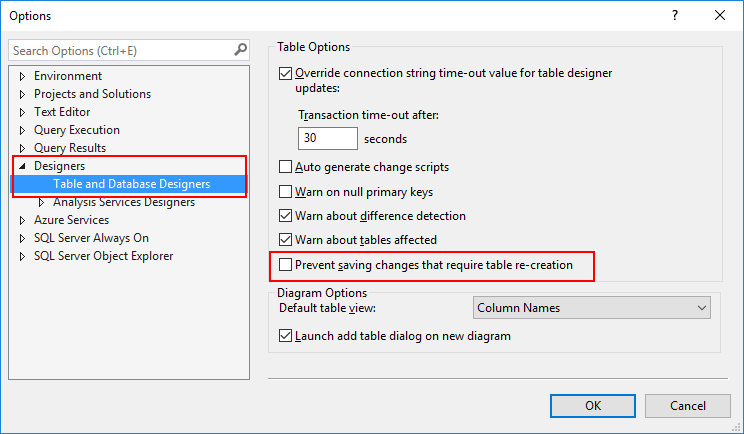
To change the Prevent saving changes that require the table re-creation option, follow these steps:
- Open SQL Server Management Studio (SSMS).
- On the Tools menu, click Options.
- In the navigation pane of the Options window, click Designers.
- Uncheck (clear) the Prevent saving changes that require the table re-creation checkbox, and then click OK.

Hope you find this helpful! If you liked the content or found it useful and would like to support me in writing more, consider buying (or helping to buy) a Star Wars Lego set for my son.




appreciated your article sir.Thanks you so much!
What is going on there? To find out “how to not prevent” took me more time than scripting a complete new database. Generations of developers seem to change … me, I’m trying to stay tune! Thanks for the hint … anyway! It worked out!
thanks.it worked.
Thank you so much sir.
Gracias!! me ayudo mucho este articulo
Super appreciate you taking the time to post this – saved me my time!
Thanks. Saved a whole lot
Thanks a lot!!
Thank you so much!
This will work, but it may take a long time on a big table, and may cause down-time for your system, and may hose things in other ways depending on how many records you’re dealing with. Try it out on a test/dev system before you jeopardize the database health.
That’s obvious. Nobody with common sense, not to mention knowledge of established professional practices would modify a production DB before testing the result on integration/staging/testing environment.
Resolved. Thank you.
very very lots of thanks sir.
I appreciate your great contibution, Resolved. Tks.
Thank you so much
it’s really help me
Thank you soo much… 🙂
thank you bro
Thanks(Teşekkürler)
*thanks so musch ^^
Thanks a lot sir.
By your solution, now I can add some states and postcodes records to table
thanks it worked!
thanks
Thank you so much. It was easy and perfect.
Thank you!
Thank you !!!!!!!
tremendous help, thanks!
HI,
Kindly explain what exactly is happening if we uncheck that option. Does it mean that what ever changes we do to the table columns’ datatype will not be saved permanently and will be available only for that particular instance ?
If you are using change tracking, you will use your historical changes. (https://support.microsoft.com/en-us/help/956176/error-message-when-you-try-to-save-a-table-in-sql-server-saving-change)
lose*
Thanks.. It works
Thank you for the solution.
It’s not work with my instance.
I entrace database from excel to MSSQL SERVER throut MS Visual Studio.
Afer this action, I can’t update not null for a table inside sql server.
What’s another way except delete it and re-create table?
Thanks!
great help, many thanks!
Thanks! Saved my day 🙂
Sando, it was an annoying issue but your simple solution resolved it just like a charm! Thanks
Microsoft needs to add this tip along with their weired error message “Saving Changes is not permitted………..”
You are Awesome, it works like charm 🙂
Thank you
Thank you very much, it was very frustrating message.
thanks solved
oh my god thank you very much! i could not understand why the SQL won’t save my table, but thanks to you now i do. One of the most helpful posts i ever discovered!
Thank you so much. Worked well!
Hello,
I want to extend the character length of the table from 500 to 4000 (max)
I’m making this change
And he wants to keep it bouncing my warning.
If I remove the V from the option
Will not delete all data recorded on the table?
Thanks
THANK UP. I DON´T KNOW ABOUT IT
Wow,an amazing solution.I have managed for hours until finding your post.I appreciate your help!!
Thank you sooooooo muchhhhh… 🙂
not all heroes wear capes thanks a lot .
Sandro, Muchas gracias por el artículo, pude solucionar el problema que tenía. Saludos!!
Well done.
Awesome, great piece of information!
Muchas Gracias!
good
Life saver! Thanks so much!!!
Thanks, saved a lot of time!
Thank you Sandro
Thanks alot sandro
Thank you; this helped a lot!
Muchas gracias, me funciono, te amo
I came here thinking there might be an explanation of the downsides of disabling the option, given the error message already implies the error flags the situation based on a configured option. The Microsoft documentation covers both turning the option off, as well as the risks – https://docs.microsoft.com/en-us/troubleshoot/sql/ssms/error-when-you-save-table#more-information