


Yesterday, while troubleshooting a BizTalk Server developer environment at a client, I encountered an unusual error while trying to configure the BizTalk Server Backup job:
Could not find server ‘server name’ in sys.servers.
Based on the error description, and by the fact that I was trying to run a SQL Server job, I knew that the error should be on the SQL Server side, some incorrect configurations,
📝 One-Minute Brief
Explains how to troubleshoot and fix the BizTalk Server Backup job error stating that the server cannot be found in sys.servers, a common issue caused by SQL Server configuration or environment changes.
Cause
Why this problem started to happen is unclear to me, and at the time, I didn’t have all the information available to understand that. However, after investigating a little into this error type, I realized that we can execute a SQL query to check out what your linked server is:
select * from sys.servers

Or
Select @@SERVERNAME
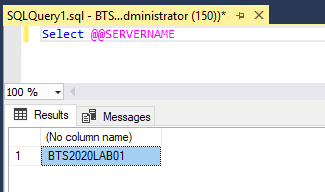
The problem was that once I ran these scripts, I realized the server name was not the expected one; it was incorrect! For example:
- I was expecting BTS2020LAB01.
- But instead, I was seeing VMIMAGE01.
And that was causing the failure on the Backup job and other BizTalk server jobs.
Solution
To solve this issue, we need to fix that server name, and for that, we can apply the following SQL script:
sp_dropserver 'VMIMAGE01'
GO
sp_addserver  'BTS2020LAB01',local
GO
After applying this script, make sure you restart the SQL Server service.
Once you have done these steps, you can successfully start your BizTalk Backup job.
Hope you find this helpful! If you liked the content or found it useful and would like to support me in writing more, consider buying (or helping to buy) a Star Wars Lego set for my son.



