

Today, while trying to deploy an existing Logic App Consumption through Visual Studio 2019 in our development environment, I got the following error message:
"error": {
     "code": "InvalidTemplate",
     "message": "The template validation failed: 'The inputs of template action 'name_of_the_action_with_error' at line '1 and column '5938' cannot reference action 'name_of_the_action_that_is_being_referenced'. Action 'name_of_the_action_that_is_being_referenced' must either be in 'runAfter' path or within a scope action on the 'runAfter' path of action 'name_of_the_action_with_error', or be a Trigger.'."
}
The template validation failed: ‘The inputs of template action ‘name_of_the_action_with_error’ at line ‘1 and column ‘5938’ cannot reference action ‘name_of_the_action_that_is_being_referenced’. Action ‘name_of_the_action_that_is_being_referenced’ must either be in ‘runAfter’ path or within a scope action on the ‘runAfter’ path of action ‘name_of_the_action_with_error’, or be a Trigger.
📝 One-Minute Brief
Explains why Logic Apps Consumption deployments fail with the error “The inputs of template action cannot reference action”, detailing the root cause and how deployment-time evaluation differs from runtime execution in workflow definitions.
Cause
The cause of the problem is quite simple, once you check the underlying code in your Logic App workflow. In my case, because I copied and pasted the properties from another action below into this one, I unintentionally was referring inside the add expression, an action that at that point didn’t exist in that workflow step – the action was only created four steps below, as you see in the picture:
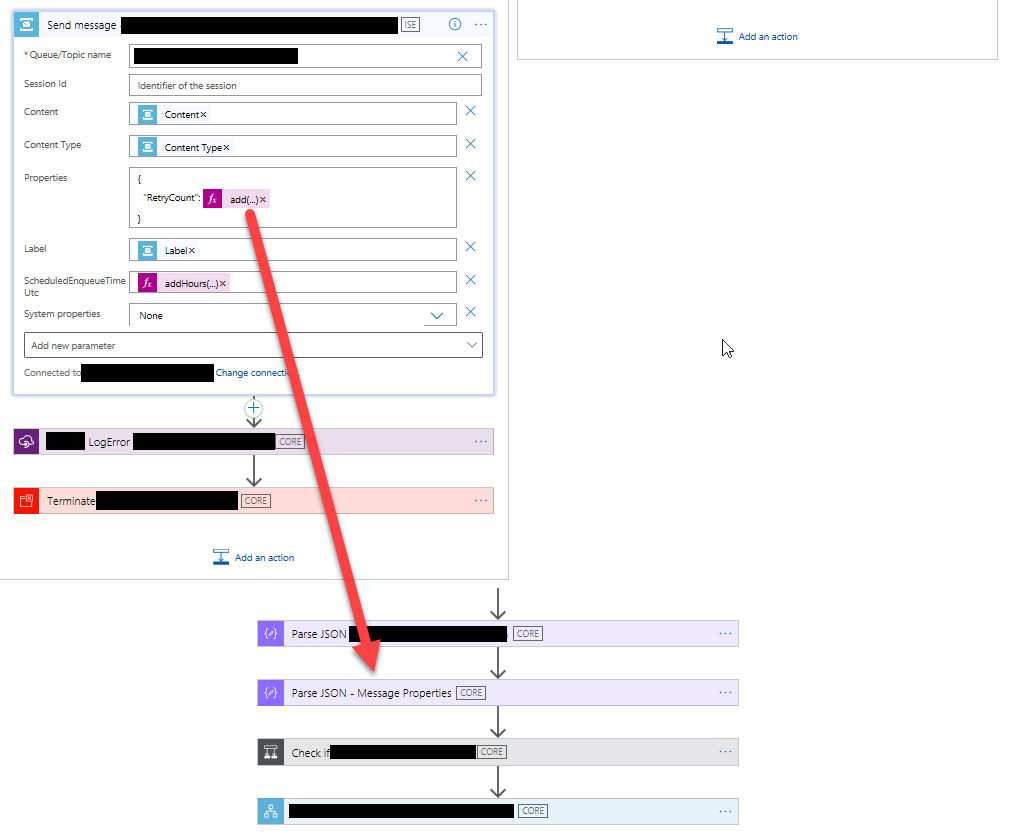
And indeed, the error message is correct. You can only reference actions that exist before the current action – within a scope action on the ‘runAfter’ path – or from the trigger.
Solution
Fixing this issue is simple. In my case, this Parse JSON – Message Properties action is trying to parse the existing Properties of the trigger, so I had two options:
- Move the Parse JSON – Message Properties action just below the trigger or above the Send Message action.
- Or modify the add expression to not reference the Parse JSON – Message Properties action.
Hope you find this helpful! If you liked the content or found it useful and would like to support me in writing more, consider buying (or helping to buy) a Star Wars Lego set for my son.



