


In the previous post, we built a Logic App from scratch and shared a few changes required to prepare it for CI/CD.
In this article, we explain how to prepare your Logic App and ARM template files. We also show how to define and rename parameters and briefly explain how they align with an Azure Pipeline.
Let’s recap. We identified the required prerequisites: Visual Studio, the Azure SDK, the Logic Apps Tools for Visual Studio extension, and an active Azure subscription. We then created a new Azure Resource Group project using the Logic Apps template and added a few simple actions. The goal was not complexity, but to clearly demonstrate what is required.
📝 One-Minute Brief
Implementing CI/CD for Azure Logic Apps requires more than just pipelines. This article explains the preparation steps needed before enabling CI/CD, including environment separation, parameterization, and repository structure, ensuring Logic Apps can be deployed safely and consistently across environments.
Now, let’s look at how we can change the code to prepare it for CI/CD.
Updating the JSON to support CI/CD is straightforward, but it requires attention to detail. If you make a mistake, the template deployment will fail, and troubleshooting can take time. Although Visual Studio provides some guidance through IntelliSense, it does not always explain why the deployment fails.
The first change I usually make is renaming the connection parameters. A name like servicebus_1_connectionString is confusing and provides no context. In this case, because we only have one connection, I renamed it to arm_serviceBus_connectionString. This name clearly reflects both the ARM template usage and the connection type. I also added a template variable called SingleQuote, which, as the name suggests, represents a single quotation mark.
So, we end up with this:
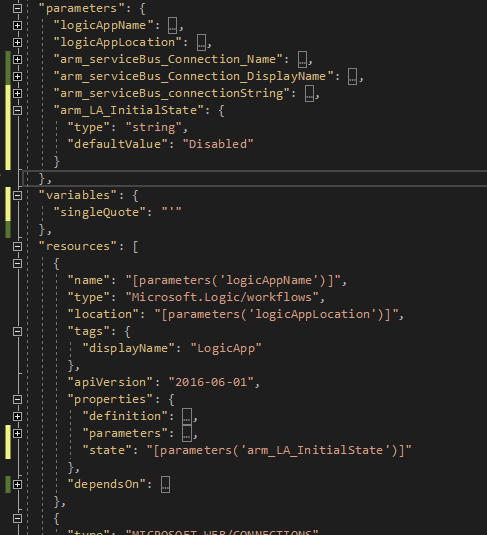
Notice that I also added the initial state control, as discussed in a previous post. You can review that approach here: https://blog.sandro-pereira.com/2020/12/29/controlling-the-initial-state-of-a-logic-app/
If you use additional connectors, I recommend renaming them to follow the same naming convention. Clear and consistent names help both you and others understand the purpose of each connection.
After updating the Logic App file, you must apply the same changes to the parameters file.
By default, this file is almost empty and contains only the logicAppName parameter with a null value. This makes the ARM template invalid and causes the deployment to fail.
In fact, you won’t even be able to start the deployment. Visual Studio detects the missing values and prompts you to provide them, using the defaults defined in the Logic App.
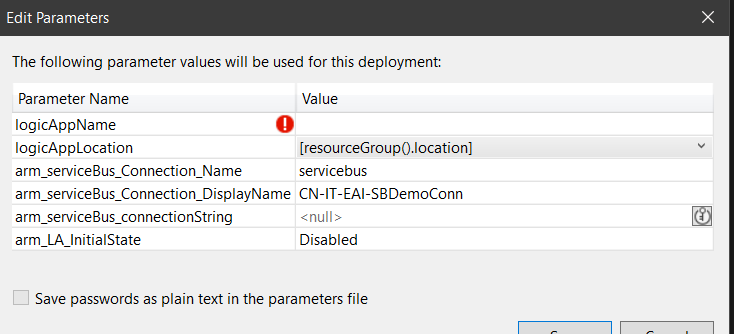
At this stage, we no longer work with the definition itself. Instead, we focus on the values assigned to the Logic App parameters. For that reason, type and defaultValue no longer apply. You should use value it directly or, when working with Azure Key Vault, reference the Key Vault and the secret name.
In this example, I configure the Service Bus connection string in both ways to demonstrate the available options.
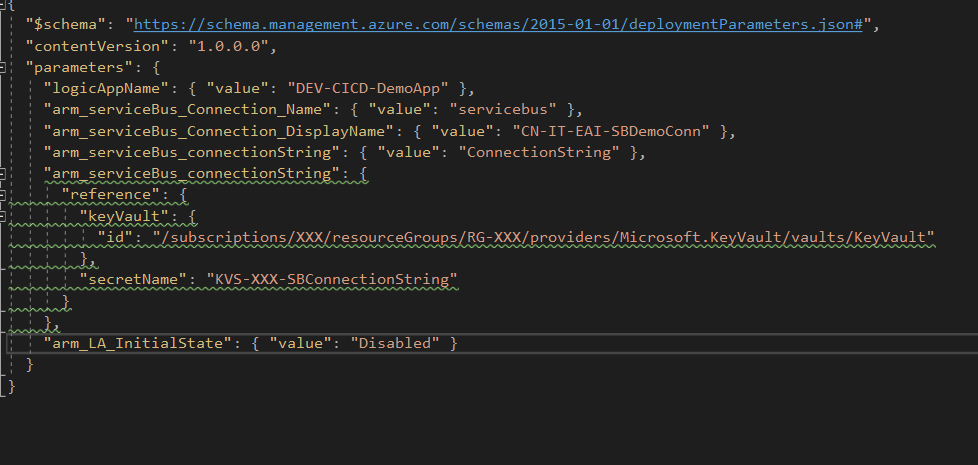
If you’ve done everything right, your Logic App should be deployed without any fuss.
Now comes the fun part, that is dealing with the Parameters Template file. It is incredibly difficult to do this, and it’s going to take several hours. So grab that coffee and get comfortable.
You will need to change your values to a token and an identifier, to later use in the Pipeline and releases.
Wow, that took us… 30 seconds, maybe. I’m exhausted, and I need a break. You can even get that KV value with the token; you just need to change the identifier to the KV secret name.
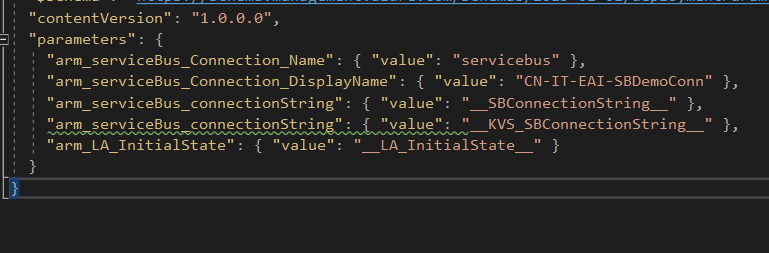
We’re sweating over here with all this work.
In the next blog post, we will build the Pipeline and give hints for the Release as well.
Happy coding!
Hope you find this helpful! If you liked the content or found it useful and would like to support me in writing more, consider buying (or helping to buy) a Star Wars Lego set for my son.



