


I’m back to one of my favorite topics: errors, warnings, causes, and solutions blog posts – I still have plenty in my backlog to publish. I recently installed a new BizTalk Server solution in production for one of my clients that integrates with ORACLE. When I try to activate the Oracle Receive ports, I get the following error inside Event Viewer:
The Messaging Engine failed to add a receive location “ORACLE_RECEIVE_LOCATION_NAME” with URL “oracledb://SERVER_ADDRESS:PORT_NUMBER/SERVICE_NAME/Dedicated?PollingId=polling_id” to the adapter “WCF-Custom”. Reason: “System.TypeInitializationException: The type initializer for ‘Oracle.DataAccess.Client.OracleConnection’ threw an exception. —> Oracle.DataAccess.Client.OracleException: The provider is not compatible with the version of Oracle client
at Oracle.DataAccess.Client.OracleInit.Initialize()
at Oracle.DataAccess.Client.OracleConnection..cctor()
— End of inner exception stack trace —
at Oracle.DataAccess.Client.OracleConnection..ctor()
at Microsoft.Adapters.OracleDB.OracleDBBinding.Initialize()
at Microsoft.Adapters.OracleDB.OracleDBBinding.CreateBindingElements()
at System.ServiceModel.Channels.CustomBinding.SafeCreateBindingElements(Binding binding)
at System.ServiceModel.Channels.Binding.CanBuildChannelListener[TChannel](BindingParameterCollection parameters)
at Microsoft.BizTalk.Adapter.Wcf.Runtime.WcfUtils.IsQueuedReceive(Binding binding)
at Microsoft.BizTalk.Adapter.Wcf.Runtime.BtsServiceHostBase.InitializeRuntime()
at System.ServiceModel.ServiceHostBase.OnBeginOpen()
at System.ServiceModel.ServiceHostBase.OnOpen(TimeSpan timeout)
at System.ServiceModel.Channels.CommunicationObject.Open(TimeSpan timeout)
at Microsoft.BizTalk.Adapter.Wcf.Runtime.WcfReceiveEndpoint.Enable()
at Microsoft.BizTalk.Adapter.Wcf.Runtime.WcfReceiveEndpoint..ctor(BizTalkEndpointContext endpointContext, IBTTransportProxy transportProxy, ControlledTermination control)
at Microsoft.BizTalk.Adapter.Wcf.Runtime.WcfReceiver`2.AddReceiveEndpoint(String url, IPropertyBag adapterConfig, IPropertyBag bizTalkConfig)”.
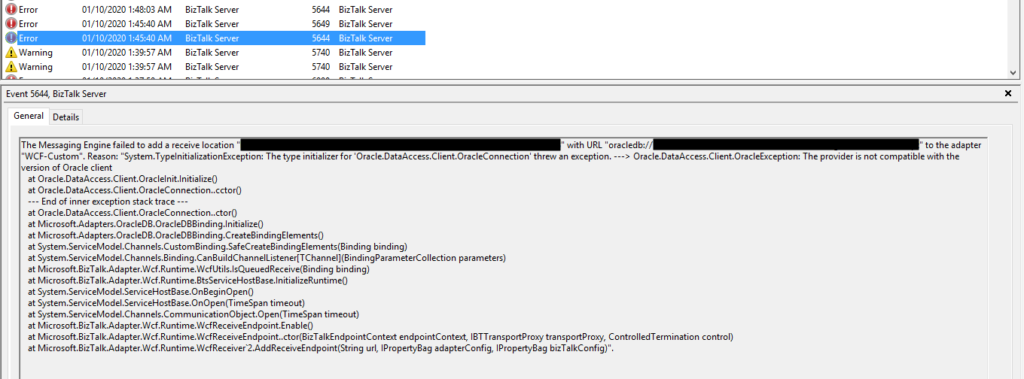
Followed by the following error:
The receive location “ORACLE_RECEIVE_LOCATION_NAME” with URL “oracledb://SERVER_ADDRESS:PORT_NUMBER/SERVICE_NAME/Dedicated?PollingId=polling_id” is shutting down. Details:”The Messaging Engine failed while notifying an adapter of its configuration. “.
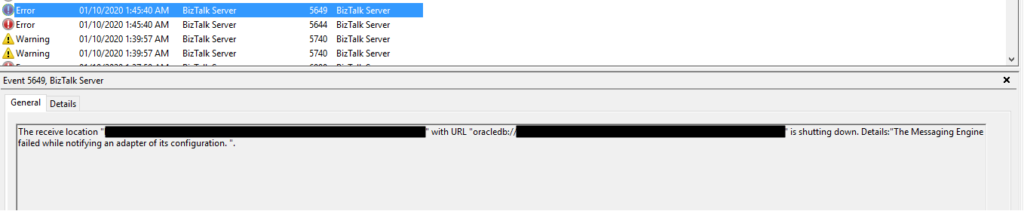
Of course, these two errors are related, but the first one provides more precise information about what is happening.
📝 One-Minute Brief
Explains how to diagnose and fix the BizTalk WCF‑OracleDB error “Oracle.DataAccess.Client.OracleException: The provider is not compatible with the version of Oracle client”, caused by ODAC and Oracle client version mismatches.
Cause
Usually, these types of problems occur when you don’t have the correct versions of the Oracle Data Provider for .NET (ODP.NET) and the Oracle client, which are part of the Oracle Data Access Components (ODAC). Still, it may occur, or similar errors, for several other reasons, for example:
- The Oracle Data Provider DLLs are not properly registered into GAC.
- Mismatch installation versions between the components, for example, between Oracle Client and ODP.NET.
- Mistmach installation versions between 32bit or 64bit ODAC components.
Unfortunately, none of the above reasons justified my issues since I already had several ORACLE receive locations running successfully in the environment.
When I investigated the other running ports, I realized that all of them were running the 64-bit Host Instance. And this one that was getting problems was running in a 32-bit Receive Host Instance. I then realized that ODAC 32-bit components were not properly installed in production.
Even if you don’t use it, it is essential to always have the 32- and 64-bit versions of each adapter installed correctly in your environment. If that’s not possible, make sure to associate the 32-bit and 64-bit Receive Handlers and Send Handlers for each adapter accordingly.
Solution
In my case, the solution was simple, since I already had several ORACLE receive locations successfully running in the environment. I have to access the receive location and configure the Receive Handler to be the 64-bit Host Instance.
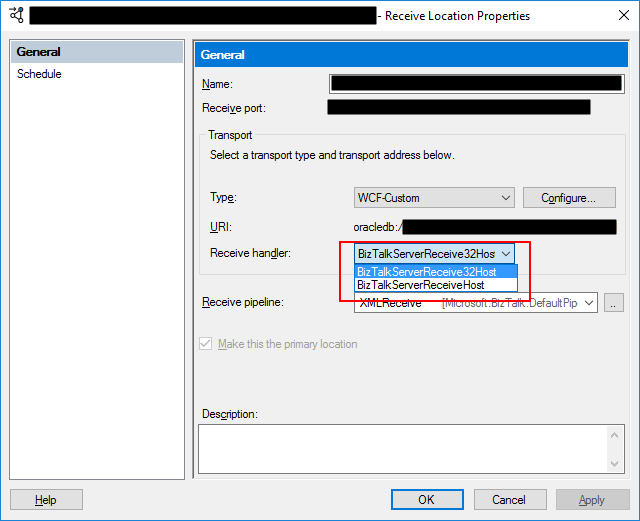
After this modification, the problem was gone, and I could pull data from the ORACLE database. Otherwise, make sure to install the necessary 32-bit or 64-bit ODAC components correctly.
Hope you find this helpful! If you liked the content or found it useful and would like to support me in writing more, consider buying (or helping to buy) a Star Wars Lego set for my son.



