


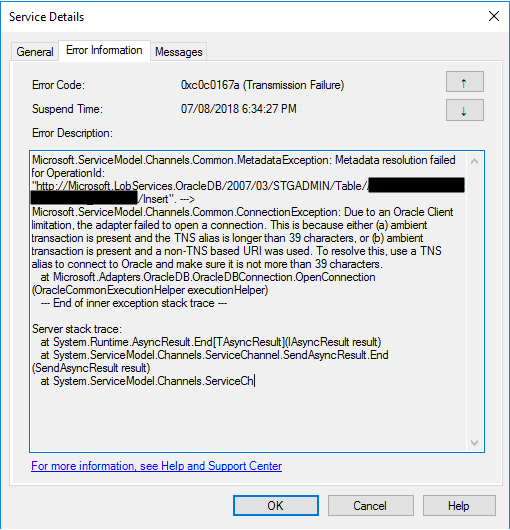
Another day, another error to report – still have plenty of them in my backlog to be published, they are an “easy and quick way” to publish something on my blog when I really don’t have much free time to write something different. Today is about “This is because either (a) ambient transaction is present and the TNS alias is longer than 39 characters” error message that I got when I was initially trying to connect for the first time to the ORACLE database to insert some data:
Microsoft.ServiceModel.Channels.Common.MetadataException: Metadata resolution failed for OperationId: “http://Microsoft.LobServices.OracleDB/2007/03/STGADMIN/Table/TRANSACTIONS/Insert”. —> Microsoft.ServiceModel.Channels.Common.ConnectionException: Due to an Oracle Client limitation, the adapter failed to open a connection. This is because either (a) ambient transaction is present and the TNS alias is longer than 39 characters, or (b) ambient transaction is present and a non-TNS based URI was used. To resolve this, use a TNS alias to connect to Oracle and make sure it is not more than 39 characters.
at Microsoft.Adapters.OracleDB.OracleDBConnection.OpenConnection(OracleCommonExecutionHelper executionHelper)
— End of inner exception stack trace —
Server stack trace:
at System.Runtime.AsyncResult.End[TAsyncResult](IAsyncResult result)
at System.ServiceModel.Channels.ServiceChannel.SendAsyncResult.End(SendAsyncResult result)
at System.ServiceModel.Channels.ServiceCh.
Followed by other similar warning messages:
A message sent to adapter “WCF-Custom” on send port “INSERT_PAYMENTS_WCFORACLE” with URI “oracledb://IP-ADDRESS:PORT-NUMBER/PATH” is suspended.
Error details: Microsoft.ServiceModel.Channels.Common.MetadataException: Metadata resolution failed for OperationId: “http://Microsoft.LobServices.OracleDB/2007/03/STGADMIN/Table/PAYMENTS/Insert”. —> Microsoft.ServiceModel.Channels.Common.ConnectionException: Due to an Oracle Client limitation, the adapter failed to open a connection. This is because either (a) ambient transaction is present and the TNS alias is longer than 39 characters, or (b) ambient transaction is present and a non-TNS based URI was used. To resolve this, use a TNS alias to connect to Oracle and make sure it is not more than 39 characters.
at Microsoft.Adapters.OracleDB.OracleDBConnection.OpenConnection(OracleCommonExecutionHelper executionHelper)
— End of inner exception stack trace —
Server stack trace:
at System.Runtime.AsyncResult.End[TAsyncResult](IAsyncResult result)
at System.ServiceModel.Channels.ServiceChannel.SendAsyncResult.End(SendAsyncResult result)
at System.ServiceModel.Channels.ServiceChannel.EndCall(String action, Object[] outs, IAsyncResult result)
at System.ServiceModel.Channels.ServiceChannel.EndRequest(IAsyncResult result)
Exception rethrown at [0]:
at System.Runtime.Remoting.Proxies.RealProxy.HandleReturnMessage(IMessage reqMsg, IMessage retMsg)
at System.Runtime.Remoting.Proxies.RealProxy.PrivateInvoke(MessageData& msgData, Int32 type)
at System.ServiceModel.Channels.IRequestChannel.EndRequest(IAsyncResult result)
at Microsoft.BizTalk.Adapter.Wcf.Runtime.WcfClient`2.RequestCallback(IAsyncResult result)
MessageId: {DE7ABF70-D6B7-4FC8-A570-5AAE4FFACBB9}
InstanceID: {5842C3C7-6746-4A56-8707-FF53123A4101}
📝 One-Minute Brief
A troubleshooting guide explaining why BizTalk Server fails when an Oracle TNS alias exceeds 39 characters, how this Oracle client limitation impacts BizTalk adapters, and how to resolve the issue safely.
Cause
Non-TNS-based URI is not supported under an ambient transaction. If you have to use transactions, you should use the TNS alias.
Note: TNS Alias needs to be less than 39 characters.
Solution
To solve this problem, you need to:
- Open the send port properties by double-clicking on the port.
- Click on the Configure… button under Transport.
- On the Transport Properties window, select the Message tab and then uncheck the Use Transaction box under Transactions.
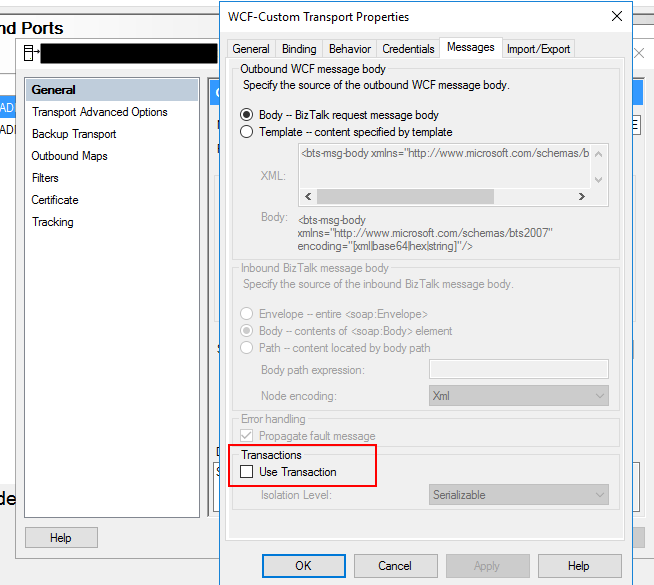
If you try to resend the message, this problem should be solved. Additionally, if this error still persists, you should change the following properties in the oracleDBbinding:
- enableBizTalkCompatibilityMode = True (this is set to false by default).
- And/or useAmbientTransaction = False.
Hope you find this helpful! If you liked the content or found it useful and would like to support me in writing more, consider buying (or helping to buy) a Star Wars Lego set for my son.




Thanks. The another approach that i have tried is, Don’t untick the property UseTransaction AND create the tnsnames.ora file with all Oracle server details and save it to location
\Oracle\product\12.1.0\client_1\Network\Admin\tnsnames.ora
And in the sendport connection URI .
oracledb:\\NameofConnection in the tnsnames.ora file
And in
The problem in receive port side.
please help me to fix this