


Last month I wrote a blog post regarding the An internal failure occurred for unknown reasons (WinMgmt) error in the BizTalk Server Administration Console caused by July 10, 2018, Microsoft Security Updates, you can see the entire blog post here: July 10, 2018, Microsoft Security Updates cause errors on the BizTalk Administration Console: An internal failure occurred for unknown reasons (WinMgmt). In which I document a workaround to solve the following problem:
TITLE: BizTalk Server Administration
——————————
Failed to create a BizTalkDBVersion COM component installed with a BizTalk server.
Class not registered (WinMgmt)
——————————
BUTTONS:
OK
——————————
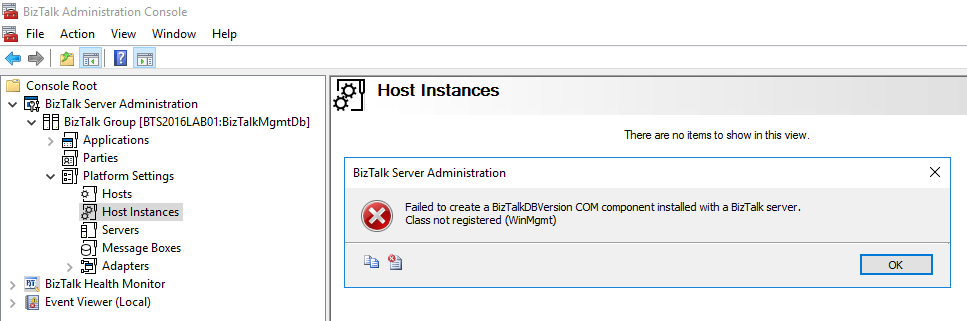
And based on that, you wouldn’t be able to, for example, restart the host instances from the BizTalk Server Administration console.
Happy to inform you that Microsoft has already released a new security update that will fix this problem.
📝 One-Minute Brief
An update confirming that Microsoft security updates released on July 30, 2018 fixed the BizTalk Administration Console error “An internal failure occurred for unknown reasons (WinMgmt)” caused by earlier July updates, and explaining how to apply the official resolution.
Cause
As official documentation (https://support.microsoft.com/en-gb/help/4345913/access-denied-errors-after-installing-july-2018-security-rollup-update) states: Applications that rely on .NET Framework to initialize a COM component and that run with restricted permissions may fail to start or run correctly after you install the July 2018 Security and Quality Rollup updates for .NET Framework.
Microsoft .NET Framework runtime uses the process token to determine whether the process is running within an elevated context. These system calls can fail if the required process inspection permissions are not present. This causes an “access denied” error.
After you install any of the July 2018 .NET Framework Security Updates, a COM component fails to load because of “access denied,” “class not registered,” or “internal failure occurred for unknown reasons” errors.
So, the cause of these problems was the security updates released by Microsoft on July 10, 2018.
Solution
On July 30, 2018, Microsoft released new Security Updates https://www.catalog.update.microsoft.com/Search.aspx?q=4346877 that will fix these issues.

To solve my problem, I:
- Applied/installed all the available updates on my BizTalk Server machine.
- I manually downloaded and installed the Security Update marked in the picture above.
After I restarted my BizTalk Server machine, this problem was fixed.
Hope you find this helpful! If you liked the content or found it useful and would like to support me in writing more, consider buying (or helping to buy) a Star Wars Lego set for my son.




1 thought on “BizTalk Administration Console: An internal failure occurred for unknown reasons (WinMgmt) fixed by July 30, 2018 Microsoft Security Updates”