


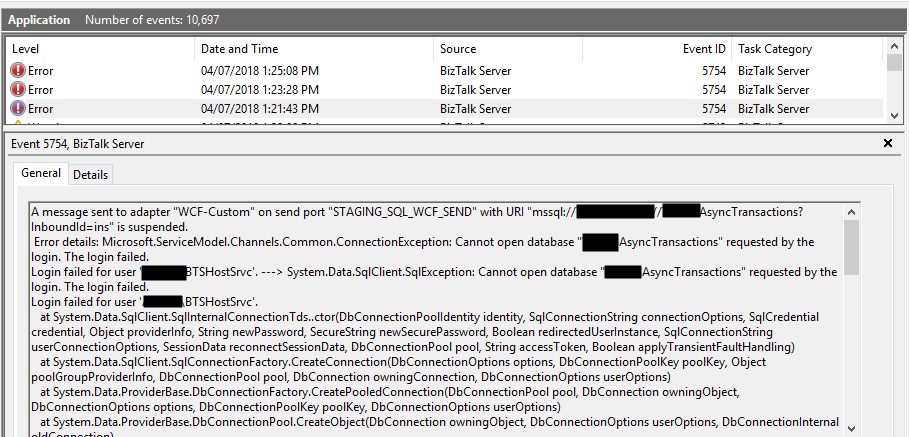
To finalize, maybe, this series of Errors and Warnings… Causes and Solutions, let’s describe and address a fairly simple one that, from time to time, appears: Login Failed. While trying to communicate to a SQL Server database to invoke a stored procedure through BizTalk WCF-SQL adapter, I got the following error:
A message sent to adapter “WCF-Custom” on send port “STAGING_SQL_WCF_SEND” with URI “mssql://SQL-SERVER-NAME//AsyncTransactions?InboundId=ins” is suspended.
Error details: Microsoft.ServiceModel.Channels.Common.ConnectionException: Cannot open database “AsyncTransactions” requested by the login. The login failed.
Login failed for user ‘DOMAIN\BTSHostSrvc’. —> System.Data.SqlClient.SqlException: Cannot open database “AsyncTransactions” requested by the login. The login failed.
Login failed for user ‘DOMAIN\BTSHostSrvc’.
at System.Data.SqlClient.SqlInternalConnectionTds..ctor(DbConnectionPoolIdentity identity, SqlConnectionString connectionOptions, SqlCredential credential, Object providerInfo, String newPassword, SecureString newSecurePassword, Boolean redirectedUserInstance, SqlConnectionString userConnectionOptions, SessionData reconnectSessionData, DbConnectionPool pool, String accessToken, Boolean applyTransientFaultHandling)
at System.Data.SqlClient.SqlConnectionFactory.CreateConnection(DbConnectionOptions options, DbConnectionPoolKey poolKey, Object poolGroupProviderInfo, DbConnectionPool pool, DbConnection owningConnection, DbConnectionOptions userOptions)
at System.Data.ProviderBase.DbConnectionFactory.CreatePooledConnection(DbConnectionPool pool, DbConnection owningObject, DbConnectionOptions options, DbConnectionPoolKey poolKey, DbConnectionOptions userOptions)
at System.Data.ProviderBase.DbConnectionPool.CreateObject(DbConnection owningObject, DbConnectionOptions userOptions, DbConnectionInternal oldConnection)
at System.Data.ProviderBase.DbConnectionPool.UserCreateRequest(DbConnection owningObject, DbConnectionOptions userOptions, DbConnectionInternal oldConnection)
at System.Data.ProviderBase.DbConnectionPool.TryGetConnection(DbConnection owningObject, UInt32 waitForMultipleObjectsTimeout, Boolean allowCreate, Boolean onlyOneCheckConnection, DbConnectionOptions userOptions, DbConnectionInternal& connection)
at System.Data.ProviderBase.DbConnectionPool.TryGetConnection(DbConnection owningObject, TaskCompletionSource`1 retry, DbConnectionOptions userOptions, DbConnectionInternal& connection)
at System.Data.ProviderBase.DbConnectionFactory.TryGetConnection(DbConnection owningConnection, TaskCompletionSource`1 retry, DbConnectionOptions userOptions, DbConnectionInternal oldConnection, DbConnectionInternal& connection)
at System.Data.ProviderBase.DbConnectionInternal.TryOpenConnectionInternal(DbConnection outerConnection, DbConnectionFactory connectionFactory, TaskCompletionSource`1 retry, DbConnectionOptions userOptions)
at System.Data.ProviderBase.DbConnectionClosed.TryOpenConnection(DbConnection outerConnection, DbConnectionFactory connectionFactory, TaskCompletionSource`1 retry, DbConnectionOptions userOptions)
at System.Data.SqlClient.SqlConnection.TryOpenInner(TaskCompletionSource`1 retry)
at System.Data.SqlClient.SqlConnection.TryOpen(TaskCompletionSource`1 retry)
at System.Data.SqlClient.SqlConnection.Open()
at Microsoft.Adapters.Sql.SqlAdapterConnection.OpenConnection()
— End of inner exception stack trace —
Server stack trace:
at Microsoft.Adapters.Sql.SqlAdapterConnection.OpenConnection()
at Microsoft.Adapters.Sql.ASDKConnection.Open(TimeSpan timeout)
at Microsoft.ServiceModel.Channels.Common.Design.ConnectionPool.GetConnection(Guid clientId, TimeSpan timeout)
at Microsoft.ServiceModel.Channels.Common.Design.ConnectionPool.GetConnectionHandler[TConnectionHandler](Guid clientId, TimeSpan timeout, MetadataLookup metadataLookup, String& connectionId)
at Microsoft.ServiceModel.Channels.Common.Channels.AdapterRequestChannel.OnOpen(TimeSpan timeout)
at System.ServiceModel.Channels.CommunicationObject.Open(TimeSpan timeout)
at Microsoft.BizTalk.Adapter.Wcf.Runtime.OneWayOperationSendPortRequestChannel`1.OnOpen(TimeSpan timeout)
at System.ServiceModel.Channels.CommunicationObject.Open(TimeSpan timeout)
at System.ServiceModel.Channels.ServiceChannel.OnOpen(TimeSpan timeout)
at System.ServiceModel.Channels.CommunicationObject.Open(TimeSpan timeout)
at System.ServiceModel.Channels.CommunicationObject.Open()
Exception rethrown at [0]:
at System.Runtime.Remoting.Proxies.RealProxy.HandleReturnMessage(IMessage reqMsg, IMessage retMsg)
at System.Runtime.Remoting.Proxies.RealProxy.PrivateInvoke(MessageData& msgData, Int32 type)
at System.ServiceModel.ICommunicationObject.Open()
at Microsoft.BizTalk.Adapter.Wcf.Runtime.WcfClient`2.GetChannel[TChannel](IBaseMessage bizTalkMessage, ChannelFactory`1& cachedFactory)
at Microsoft.BizTalk.Adapter.Wcf.Runtime.WcfClient`2.SendMessage(IBaseMessage bizTalkMessage)
MessageId: {71CDC883-AE8D-4303-A72E-ADA9ECE91981}
InstanceID: {1EA7B77C-924F-4C74-87DE-BCC4D1AD8E6A}
📝 One-Minute Brief
A troubleshooting guide that explains why the BizTalk WCF‑SQL adapter fails with a “Cannot open database requested by the login” error and how to fix SQL Server authentication, permissions, and connection configuration issues.
Cause
The cause of the problem is quite obvious, and the error message, this time, is clearly identifying the origin of the problem, as we saw in my last post.
This problem occurs because the user account that you used to access the database, in my case, the BizTalk Host Instance Account, doesn’t have permissions to connect to the database.
Solution
Simple problem, simple solution. You need to grant permission to the user to access the database:
- In SQL Server Management Studio, open Object Explorer and expand it to the database that you want to give access to.
- Right-click on the Security folder, select New, and then click User.
- On the General page, enter your username and log in to the Login name box.
- And depending on what you want to do, you may configure the Database role memberships, such as db_datareader and/or db_datawriter.
- Or, on the Securables page, under Securables, click on the Search button.
- On the Add Objects window, select Specific objects… and click OK, and choose the object type, which can be:
- Grant access to a specific database, such as Connect.
- Grant access only to certain database tables, with read and write permissions.
- Execute stored procedures.
- And so on.
- On the Add Objects window, select Specific objects… and click OK, and choose the object type, which can be:

- After you select the objects, on the Securables page, you need to give proper permissions; in this case, grant Connect to the database.

- Click OK.
Once again, giving sysadmin or db_owner would solve all our problems, but it goes against security best practices, and sometimes these tables contain sensitive data or personal data, and nowadays, with General Data Protection Regulation (GDPR) in the EU, this sometimes can be a backdoor for other possible problems, and teams need to start taking into consideration these security policies.
You should always grant the minimum rights to a user to perform the necessary tasks. Nothing more, nothing less… as things should be.
Hope you find this helpful! If you liked the content or found it useful and would like to support me in writing more, consider buying (or helping to buy) a Star Wars Lego set for my son.




Have you encountered this error before with BT 2010 connecting to SQL Server 2017? I am having the DBAs, check the setting in this article too about “connect”. But still wanted to see if you have any advice or instruction for this issue?
The Messaging Engine failed to add a receive location “XXXXXXXXXs_WCF-Custom” with URL “mssql://XXXX_btc//EBXXXX?InboundId=UnsentAuthorizations” to the adapter “WCF-Custom”. Reason: “Microsoft.ServiceModel.Channels.Common.ConnectionException: A connection was successfully established with the server, but then an error occurred during the login process. (provider: SSL Provider, error: 0 – One or more of the parameters passed to the function was invalid.) —> System.Data.SqlClient.SqlException: A connection was successfully established with the server, but then an error occurred during the login process. (provider: SSL Provider, error: 0 – One or more of the parameters passed to the function was invalid.) —> System.ComponentModel.Win32Exception: One or more of the parameters passed to the function was invalid