


Some clients have strict rules about what content can be installed to the C (the default) hard drive. For some of them, the C drive is just for the operating system and other components related to the operating system. All the rest should be installed or kept on different hard drives.
The goal of this post is not to say whether that is the proper or best approach, but to document this error, understand the reason, and know what to do. Personally, I usually install BizTalk Server on the C (the default) hard drive, which is why I never encountered this error/warning before.
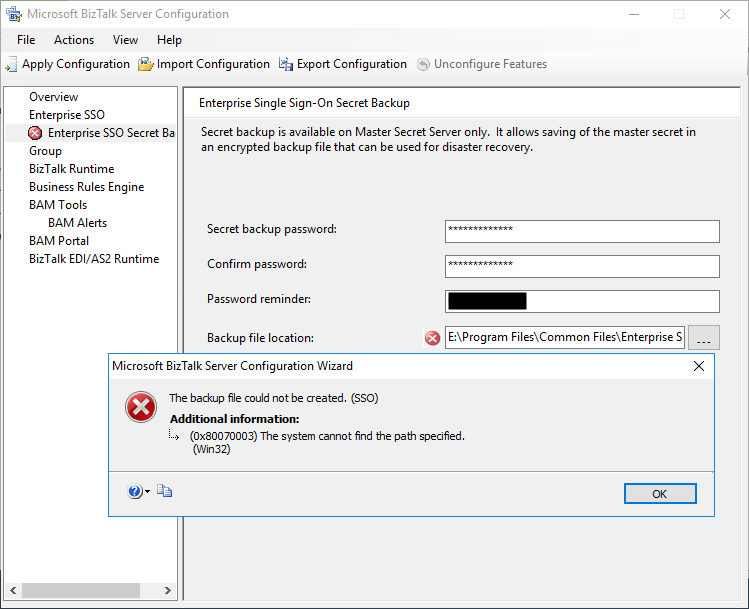
So, during one of my recent installations, where I have the need to install and keep all BizTalk Server installation and configuration components on a non-default (C:), I encountered the following error message while trying to configure the local Backup file location of the SSO Master Secret Key:
TITLE: Microsoft BizTalk Server Configuration Wizard
——————————
The backup file could not be created. (SSO)For help, click: http://go.microsoft.com/fwlink/events.asp?ProdName=Microsoft+BizTalk+Server+2016&ProdVer=3.12.774.0&EvtSrc=SSO&EvtID
——————————
ADDITIONAL INFORMATION:
(0x80070003) The system cannot find the path specified.
(Win32)For help, click: http://go.microsoft.com/fwlink/events.asp?ProdName=Microsoft+BizTalk+Server+2016&ProdVer=3.12.774.0&EvtSrc=Win32&EvtID
——————————
BUTTONS:
OK
——————————
📝 One-Minute Brief
A troubleshooting guide that explains why BizTalk Server configuration fails with the error “The backup file could not be created” during SSO setup, and how to fix permission and path issues that prevent the SSO backup from being generated.
Cause
I don’t know whether this can be considered an error or a bug in the BizTalk Server Configuration Wizard, because, for me, the wizard should be responsible for creating the specified path.
By default, the SSO Master Secret Key Backup file location is set as C:\Program Files\Common Files\Enterprise Single Sign-On, with the following name structure SSO****.bak:
- where **** is a randomly generated name by the BizTalk Server Configuration Wizard.
The BizTalk Server Configuration Wizard has an option for you to open an annoying Folder Browser Dialog windows that force you to iterate through a Directory Tree (you cannot manually set the path) instead of using a more fancy, elegant, and practical dialog box or way to achieve the same result, like suing SaveFileDialog component instead
So, if you try to manually set the path according to your requirement, for me, it was just changing the hard drive letter from C: to E:. You need to be sure to first manually create the full folder path on the desired destination hard drive; otherwise, you will get this problem.
Solution
Make sure the folder path is created on the desired hard drive. If it is not, create it before you specify the path in the BizTalk Server Configuration Wizard tool; otherwise, the backup file may not be created.
If you already specify the path in BizTalk Server Configuration Wizard, that is, before you have created the folder:
- Create a folder path on the desired hard drive.
- And refresh the Enterprise SSO Secret backup page.
And the SSO error message will be gone.
Hope you find this helpful! If you liked the content or found it useful and would like to support me in writing more, consider buying (or helping to buy) a Star Wars Lego set for my son.




Can you please help us for the following-
1- We have cluster database server and one web server and we are using BizTalk 2016 standard edition to setup on production. so Is it mandatory to have BizTalk server 2016 Enterprise edition to use ? or BizTalk 2016 standard edition will work on server? Please suggest. Because I don’t want to purchase enterprise edition due to heavy cost.
2- On web server While doing setup the configuration of BizTalk server 2016 standard edition we are getting the following error log-“[Group] Failed to configure with error message [Exception of type ‘System.EnterpriseServices.TransactionProxyException’ was thrown.]”, Can you please help what is the problem. some saying we have to install BizTalk 2016 Enterprise edition, starred edition will not work.
is that correct ? Please suggest.