


This strange error does not occur often, perhaps from time to time, or in different environments, but in reality, I already had the “privilege” of encountering it more than once while I was trying to open the SQL Server Management Studio (SSMS):
The Visual Studio component cache is out of date. Please restart Visual Studio.
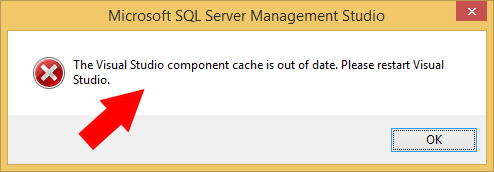
Not really a BizTalk Server problem, but you know that behind the curtains, BizTalk Server relies on SQL Server
📝 One-Minute Brief
A troubleshooting note that explains why SQL Server Management Studio fails with the error “The Visual Studio component cache is out of date” and how clearing temporary files or using Disk Cleanup quickly resolves the issue.
Cause
The cause of this problem is unclear, and I wish I could provide a better explanation. In fact, there is an issue open in MSFT about this.
I just assume that something may have happened, maybe an update or something similar, that left something in a corrupt or incorrect state… but despite that, the resolution to this problem is quite simple.
Solution
As I said above, the resolution to this problem is quite simple, and you may have several approaches to accomplish that. One of them is to manually remove all the temporary files from the Windows operating system by:
- Exit all programs and then hold down the WINDOWS key and type R to open the Run window.
- In the Run window, type %TMP% and then click OK.
- This will open the TEMP directory, which is normally C:\Users\<your_user_name>\AppData\Local\Temp.
- Select and delete all the content of the TEMP folder.
This approach always solved my problem.
But you can also try a different approach to do the same operations as:
- Open the Disk Cleanup utility.
- Make sure you select the Temporary files option, then click OK.
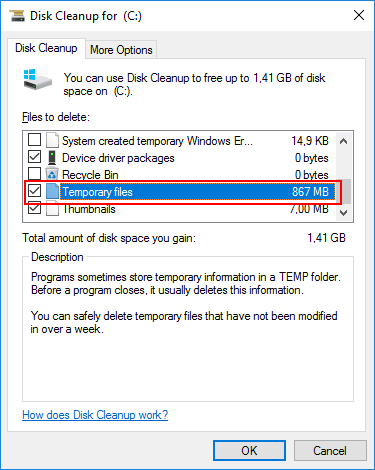
- When prompted, select Delete Files.
Again, if you try to open Microsoft SQL Server Management Studio now, the Visual Studio component cache is out of date. Please restart the Visual Studio solution error message will have disappeared.

Hope you find this helpful! If you liked the content or found it useful and would like to support me in writing more, consider buying (or helping to buy) a Star Wars Lego set for my son.




for me simply reconnecting to the sql server solved this issue
Thank you! clearing the temporary files worked for me!
Thank you! Deleting temp files also solved my problem 🙂
Thanks, Deleting temp files sorted this for me too.
Thanks. Getting rid of temp files work for me
Clearing temp files worked in my case…Thanks
this worked for me as well.
Thank you, this worked for me as well.
Thank you
Thank you it worked for me as well
Thank you. The solution you outlined (deleting files/folders in %TMP%) worked for me as well.
Thank you so much. Even the solution of deleting temporary files resolved my problem!!
Thank you worked for me as well
Gracias.
Perfect solution! I moved the temporary files into a new “Deleted” folder within the Temp folder just in case I needed any of those 100s of temporary files. After the move, everything seems fine. The issue occurred because Windows restarted unexpectedly after some updates.
thanks a lot, deleting temp file worked for me
Thank you so much.
Thanks a lot.
Clearing the temporary files worked for me.
Worked for me too,
Thanks Sandro!
Thank you! Clearing the temporary files worked for me.
Thank you Sandro. Deleting the Temp files worked for me.
Thanks 🙂 Deleting temp files solved the issue.
Why doesn’t the Operating System remove these so called temporary files?
Works like a charm, and its more faster than before!!!
Thank you!
It work for me Thanks for all the support
Are you kidding me? This is due to temp files? WTF MS…
Thanks a lot!!It works for me!!
Thank you,
deleting the temp files solved my problem.
Thankyou!
Thank you is still working!
It’s really useful.
Thanks! This worked for me.
Repair also worked for me:
Control PanelAll Control Panel ItemsPrograms and Features>>Microsoft Sql Server 2016 setup>> Repair
Thanks
Close Visual Studio and SQL Server and run the Disk Cleanup. it will be fine.
Clearing up the temp files folder worked. Thank you.
Thanks to upload solution for this problem, by the way first step helpful to resolve my problem. You are real guy that helps of world without any benefit. That’s real thing which isolate and make a real man.
Very Very thank you
Thanks! It worked. 🙂
Thanks. It worked for me.
Thank you!
Thanks, only deleting the SSMS folder work for me.
Deleted temp cache, fixed!! Thanks! (You’d think MS could detect and cleanup as needed.)
Muy puntual y practico tu solución, saludos.
Thanks so much. Deleting temp files solved hte issue for me.
Thanks! It worked
Thanks..
Hope allah lead you to win the parados in the second life.
solved my problem ! thnx