


In the past, I released a PowerShell script to help BizTalk administrators identify and control which BizTalk Server Feature Pack was installed in their environment. Recently, Niclas Öberg—a fellow BizTalker I met at the Integrate London event—pointed out an important limitation.
Specifically, the script did not detect Feature Pack 3 (FP3). After reviewing the issue, I confirmed that he was absolutely right.
📝 One-Minute Brief
The post clarifies the technical and functional differences between Distinguished Fields and Promoted Properties in BizTalk Server. While Distinguished Fields are lightweight and ideal for internal orchestration logic (with no 256-character limit), Promoted Properties are essential for message routing, correlation, and tracking, despite their higher performance overhead and size constraints.
Limitations of Existing Tools
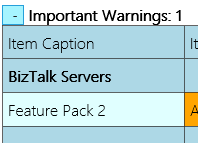
I also considered using BHM as an alternative. However, the current version does not detect Feature Pack 3 (FP3) and only recognizes Feature Packs 1 or 2. As a result, BHM may display a warning indicating that no CU or FP is installed. In other cases, it may incorrectly report that only FP2 is present, which is exactly what happened in my environment.
Why This Was a Problem
Despite these warnings, FP3 was already installed in my environment.
Of course, you can always verify this manually by navigating to Control Panel → Programs and Features → View Installed Updates. However, this approach is time‑consuming and quickly becomes frustrating, especially when managing multiple servers.
Script Update and Resolution
Therefore, I decided to fix my PowerShell script and release an updated version. With this update, the script correctly detects installed BizTalk Server Feature Packs, including FP3. Now, when you run the script, it clearly reports which Feature Pack is installed in your environment:
Microsoft BizTalk Server 2016 Feature Pack 1 is installed
Microsoft BizTalk Server 2016 Feature Update 2 with CU3 [KB4054819]LDR is installed
Microsoft BizTalk Server 2016 Feature Update 2 with CU4 [KB4077058]LDR is installed
Microsoft BizTalk Server 2016 Feature Update 3 [KB4103503]LDR is installed
The beauty of this script is that it is now prepared to detect any future PF Microsoft may release, without you having to change it.
...
    foreach ($Property in $key.Property)
    {
        if ($Property -like '*Microsoft BizTalk Server 2016 Feature Update *')
        {
            $findF2 = 1
            Write-Host "$($Property) is installed"
        }
    }
...
This script follows the sequence of scripts I released previously to check which Cumulative Updates were installed on the machines.
- How to check what BizTalk Server 2016 Cumulative Updates are installed in your Servers with PowerShell
- How to Check what BizTalk Server 2013 R2 Cumulative Updates are installed in your Servers with PowerShell
- How to check what BizTalk Server 2013 Cumulative Updates are installed in your Servers with PowerShell
- How to check what BizTalk Server 2010 Cumulative Updates are installed in your Servers with PowerShell
Download
THIS POWERSHELL SCRIPT IS PROVIDED “AS IS”, WITHOUT WARRANTY OF ANY KIND.
You can download BizTalk Pipeline Components Extensions Utility Pack from GitHub:
Hope you find this helpful! If you liked the content or found it useful and would like to support me in writing more, consider buying (or helping to buy) a Star Wars Lego set for my son.



