


Welcome once again to another Power Automate Best Practices, Tips, and Tricks. In my previous blog posts, I talked about some of the most essential best practices you should have while working with the Power Automate:
And some tips and tricks:
- #4 Copy to my clipboard
- #5 Using Scopes
- #6 Error handling… configure run after settings
- #7 Delete notes
Today I’m going to speak about another critical Best practice, Tip, and Trick that is often overlooked: learning from failures.
📝 One-Minute Brief
Power Automate flows will fail — and that’s not a bad thing. Failures help you understand weaknesses, uncover missing validations, and improve reliability. This best practice explains how to review failures, interpret run history, and apply lessons learned to build stronger, more resilient automated workflows.
#8 Learn from failures
It’s important to regularly review your existing Power Automate flows, especially when they fail. Look at the business process to identify improvements, but also check the run history to understand what went wrong. By analyzing these failures, you can learn from mistakes and make your flows more reliable.
Based on my long experience in Enterprise Integration, I can certainly say: Failure is critical! And we need to understand why it is failing and address that issue so it doesn’t occur again.
And don’t be offended — we all make mistakes. Failures and errors will always happen: maybe a requirement was missed, a developer introduced a bug, or an external system went offline. The goal is to stay transparent, honest, and concrete. Instead of looking for who to blame, focus on making your Power Automate flows more resilient. Each failure becomes a learning opportunity, similar to aviation. Unfortunately, every accident teaches the industry something new, and because of that, aviation becomes safer over time.
If investigators discover that a component without redundancy caused the issue, they enforce a rule that requires companies to add a backup component. That ensures the same failure doesn’t happen again. You can apply the same mindset to Power Automate. If a system isn’t always available, implement a re‑entrant pattern to handle these situations. For example, store the message in a SharePoint list and process it later when the system recovers..
In some cases, in traditional programming languages like C#, we call it defensive code:
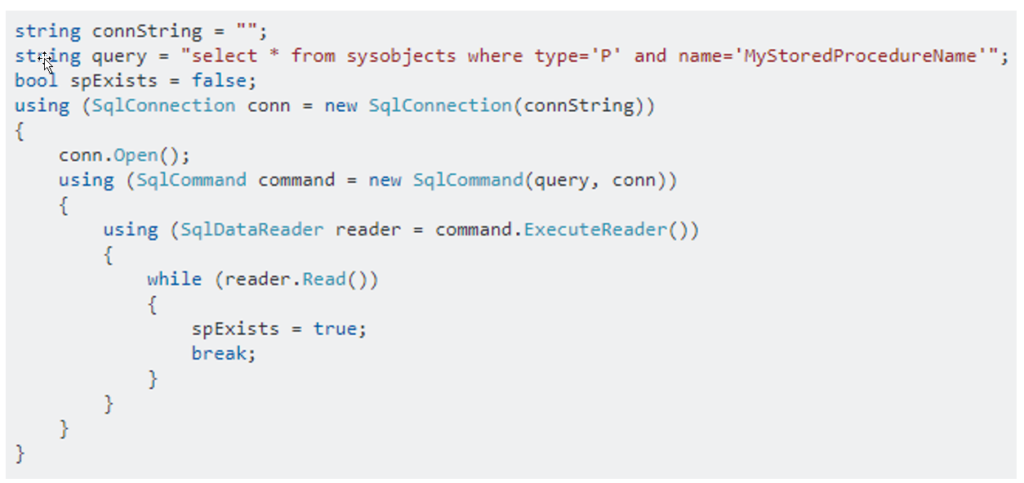
Note: Maybe this is not the best C# code, but that is not the goal here.
In this case, when we try to read something from SQL Server, we don’t assume that the query will always bring back records, or at least we shouldn’t; we first see if there are any records to read, and only then do we try to read them.
So, why not apply the same principles and best practices to our Power Automate?
One time, I was passing by in the hallway at DevScope for coffee, and I noticed that one of my colleagues was working on a Logic App, which is similar to Power Automate. Out of curiosity, I went to see what he was doing, and after a few minutes, I asked him to show me. I immediately noticed in the run history that from time to time the Logic App was failing, so I asked him: Why is this failing on a regular basis? He replies to me that “this is normal, there are no records on the SQL, so it fails“! This is quite normal to see also happening in Power Automate flows. I even go further and say that it will occur more often inside Power Automate than Logic Apps:
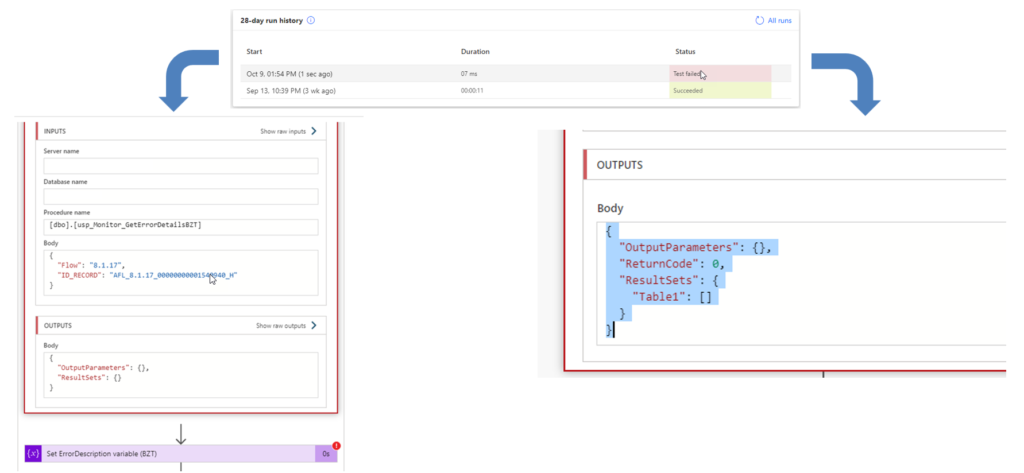
Again, Failure is critical! If it is failing due to expected behavior, then you must redesign your business logic so it doesn’t end up in a failure status!
And to fix this sample above is as simple as adding a condition to check, for example:
- If a particular field exists or contains a certain value:
- first(body(‘Exec_SP_-_GetLastExecutionTime’)?[‘resultsets’]?[‘Table1’])?[‘LastRun’]
- Or if the Table1 structure is empty
- empty(body(‘Exec_SP_-_GetLastExecutionTime’)?[‘resultsets’]?[‘Table1’])
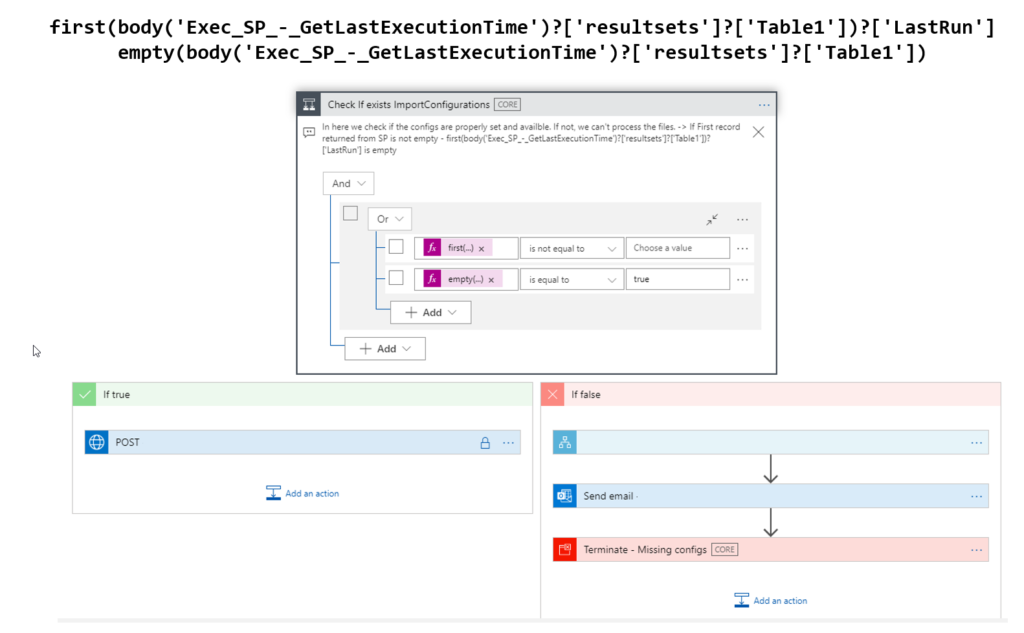
This is just a simple case, but I think you got the point!
Stay tuned for the following Power Automate Best practices, Tips, and Tricks.
Hope you find this helpful! If you liked the content or found it useful and would like to support me in writing more, consider buying (or helping to buy) a Star Wars Lego set for my son.



