

Following up on our previous blog post: From Generic Error to Root Cause: Debugging Local Functions in Logic App Standard
Let’s continue with the second part of this topic:
- How can you get the real error from a local function and manage it inside a Logic App Standard workflow?
We already checked that debugging local functions inside Azure has some hidden tricks, but not only on Azure, local functions can also be tricky to debug on VS Code. Usually, this should not be a problem, but sometimes VS Code has some moments where even though Azurite is running properly, you would catch some errors like:
[Tag=''] Process reporting unhealthy: Unhealthy. Health check entries are {"azure.functions.web_host.lifecycle":{"status":"Healthy","description":null},"azure.functions.script_host.lifecycle":{"status":"Healthy","description":null},"azure.functions.webjobs.storage":{"status":"Unhealthy","description":"Unable to create client for AzureWebJobsStorage"}}This happens because when developing Logic App Standard with local functions in VS Code, there are several moving parts starting at the same time: the VS Code extension, Azure Functions Core Tools, the Logic Apps runtime, Azurite, local.settings.json, the lib/custom folder, and the workflow designer. Sometimes, if one of these starts in the wrong order, keeps old cache, or the host gets stuck in a previous state, you may see strange errors like Unable to create client for AzureWebJobsStorage, even when AzureWebJobsStorage is correctly configured, and Azurite is already running. In this case, it was probably something simple like the runtime starting before Azurite was fully ready, VS Code using an old background host, cached metadata in the extension, or a restart/reload clearing a stuck state.
📝 One-Minute Brief
This post shows how to turn local Functions failures into controlled, meaningful errors inside Azure Logic Apps Standard. It explains why default failures are hard to debug and demonstrates a clean pattern to propagate custom errors that improve observability, consistency, and supportability.
But let’s get back to our purpose here: How can you get the real error from a local function and manage it inside a Logic App Standard workflow?
In the previous post, we talked about a local function that we were using to check the real error on Azure, and as shown, it is possible to check it in more than one way.
Nonetheless, what if we want to catch the real error at runtime?
Let me tell you, as of today, the local functions keep failing and presenting a generic error message like:
The function 'func_build_response_xml_plum007_out' failed to execute. Please verify function code is valid.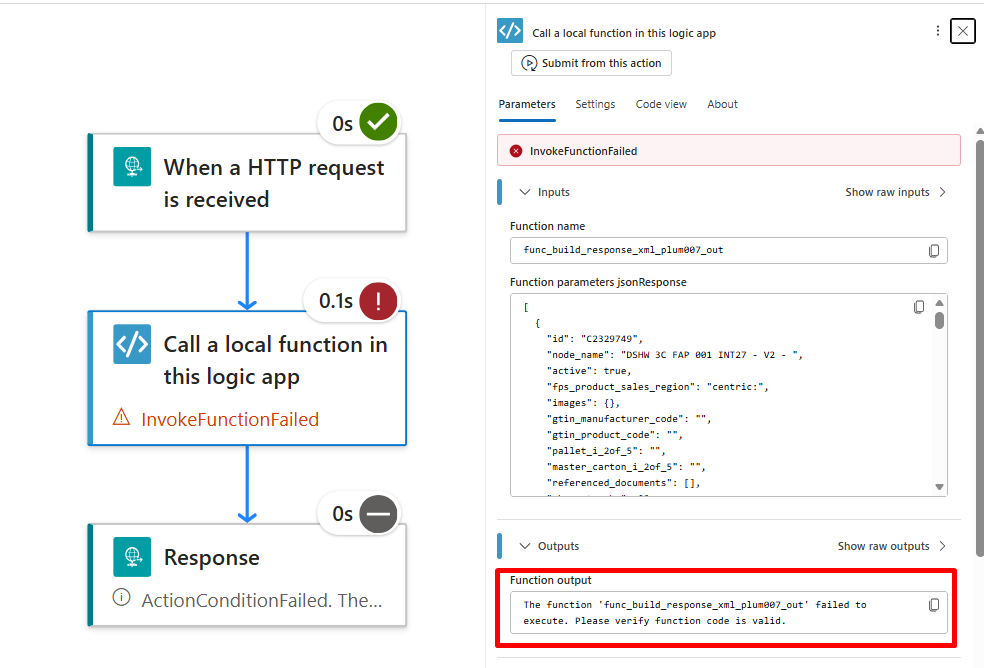
This, in runtime, does not help us at all; it only states that our function failed to execute, prompting us to verify if the function code is valid.
Our function was a simple one for testing purposes; the function received a JSON response as input and converted it into a ProductResponse XML.
namespace ParseToken
{
    using System;
    using System.Collections.Generic;
    using System.Threading.Tasks;
    using System.Xml.Linq;
    using System.Linq;
    using Microsoft.Azure.Functions.Extensions.Workflows;
    using Microsoft.Azure.Functions.Worker;
    using Microsoft.Extensions.Logging;
    using Newtonsoft.Json;

    public class func_build_response_xml_plum007_out
    {
        private readonly ILogger<func_build_response_xml_plum007_out> logger;

        public func_build_response_xml_plum007_out(ILoggerFactory loggerFactory)
        {
            logger = loggerFactory.CreateLogger<func_build_response_xml_plum007_out>();
        }

        [Function("func_build_response_xml_plum007_out")]
        public Task<string> Run([WorkflowActionTrigger] string jsonResponse)
        {
            const string ROOT = "ProductResponse";
            const string NAMESPACE = "http://GenericCompany.Integration.API.GETProduct";
            XElement xmlResult;

            if(jsonResponse == "[]"||jsonResponse == "[ ]")
            {
                xmlResult = new XElement(XName.Get(ROOT,NAMESPACE), new XElement("id","NOTFOUND"));
            }
            else if (jsonResponse.StartsWith("["))
            {
                string json = jsonResponse.Replace("\"\":", "\"key\":");
                string wrappedJson = $"{{\"{ROOT}\":{json}}}";

                xmlResult = JsonConvert.DeserializeXNode(wrappedJson).Root;

                xmlResult = new XElement(
                    XName.Get(xmlResult.Name.LocalName, NAMESPACE),
                    xmlResult.Attributes().Where(a => !a.IsNamespaceDeclaration),
                    xmlResult.Elements()
                );
            }
            else
            {
                xmlResult = JsonConvert.DeserializeXNode(jsonResponse, ROOT).Root;

                xmlResult = new XElement(
                    XName.Get(xmlResult.Name.LocalName, NAMESPACE),
                    xmlResult.Attributes().Where(a => !a.IsNamespaceDeclaration),
                    xmlResult.Elements()
                );
            }

            return Task.FromResult(xmlResult.ToString());
        }
    }
}
If the JSON response was empty, it returned a ProductResponse XML with:
<id>NOTFOUND</id>If the response contained data, it converted that JSON into XML and added the expected namespace.
However, if something failed during the conversion, the function simply threw the exception back to the Logic App runtime, which resulted in the generic error message shown by the Call a local function action.
To improve this, we wrapped the original logic inside a try/catch block. On success, we kept the original behavior and still returned the pure XML response:
try
            {
                const string ROOT = "ProductResponse";
                const string NAMESPACE = "http://GenericCompany.Integration.API.GETProduct";
                XElement xmlResult;

                if (jsonResponse == "[]" || jsonResponse == "[ ]")
                {
                    xmlResult = new XElement(
                        XName.Get(ROOT, NAMESPACE),
                        new XElement("id", "NOTFOUND")
                    );
                }
                else if (jsonResponse.StartsWith("["))
                {
                    string json = jsonResponse.Replace("\"\":", "\"key\":");
                    string wrappedJson = $"{{\"{ROOT}\":{json}}}";

                    xmlResult = JsonConvert.DeserializeXNode(wrappedJson).Root;

                    xmlResult = new XElement(
                        XName.Get(xmlResult.Name.LocalName, NAMESPACE),
                        xmlResult.Attributes().Where(a => !a.IsNamespaceDeclaration),
                        xmlResult.Elements()
                    );
                }
                else
                {
                    xmlResult = JsonConvert.DeserializeXNode(jsonResponse, ROOT).Root;

                    xmlResult = new XElement(
                        XName.Get(xmlResult.Name.LocalName, NAMESPACE),
                        xmlResult.Attributes().Where(a => !a.IsNamespaceDeclaration),
                        xmlResult.Elements()
                    );
                }

                return Task.FromResult(xmlResult.ToString());
            }
            catch (Exception ex)
            {
                logger.LogError(ex, "Error while executing func_build_response_xml_plum007_out.");

                var errorResponse = new
                {
                    success = false,
                    error = new
                    {
                        code = ex.GetType().Name,
                        message = ex.Message,
                        details = ex.ToString()
                    }
                };

                return Task.FromResult(JsonConvert.SerializeObject(errorResponse));
            }
        }
    }
}
However, on failure, the local function action will return a structured error response instead of hiding the real exception behind the generic runtime message:
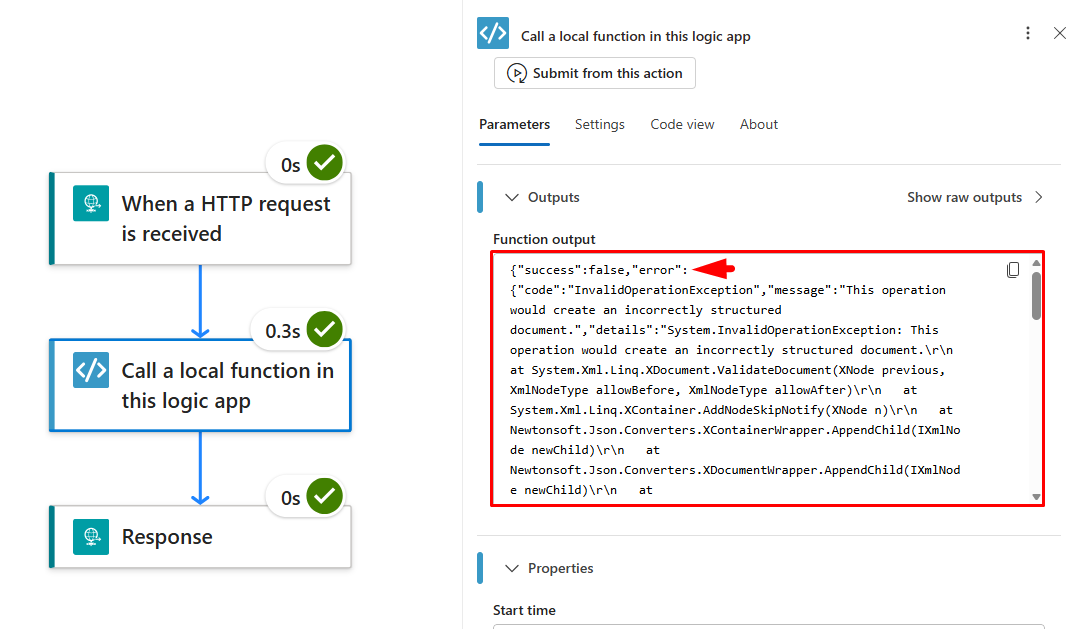
{
    "success": false,
    "error": {
        "code": "InvalidOperationException",
        "message": "This operation would create an incorrectly structured document.",
        "details": "System.InvalidOperationException: This operation would create an incorrectly structured document.\r\n   at System.Xml.Linq.XDocument.ValidateDocument(XNode previous, XmlNodeType allowBefore, XmlNodeType allowAfter)\r\n   at System.Xml.Linq.XContainer.AddNodeSkipNotify(XNode...at Newtonsoft.Json.JsonConvert.DeserializeObject(String value, Type type, JsonConverter[] converters)\r\n   at Newtonsoft.Json.JsonConvert.DeserializeXNode(String value, String deserializeRootElementName, Boolean writeArrayAttribute, Boolean encodeSpecialCharacters)\r\n   at Newtonsoft.Json.JsonConvert.DeserializeXNode(String value, String deserializeRootElementName, Boolean writeArrayAttribute)\r\n   at Newtonsoft.Json.JsonConvert.DeserializeXNode(String value, String deserializeRootElementName)\r\n   at Newtonsoft.Json.JsonConvert.DeserializeXNode(String value)\r\n   at ParseToken.func_build_response_xml_plum007_out.Run(String jsonResponse)..."
    }
}
At this point, the local function action is no longer failing because we are catching the exception and returning a controlled response. This is expected. The important part is that now the workflow has access to the real error details.
Since the successful response is still returned as pure XML, and only the error response is returned as JSON, we can easily identify the failure scenario in the workflow. For example, we can check if the function output starts with “{”, parse it as JSON, and then use the error.code and error.message values in a Terminate action, or check if the success is equal to false, and log that error.
This gives us the best of both worlds: we keep the original XML contract when everything works, and when something fails, we expose the real exception in a way the Logic App can manage.
But, as you can see, this creates a small problem for us: the function had a functional failure, but the action itself is still marked as successful because the exception was handled inside the code.
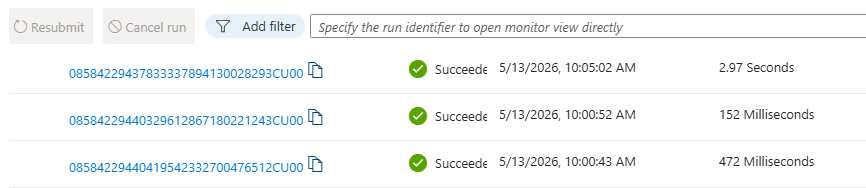
And there is no way to make this action fail and state the real error, and that is because, like we said previously:
“as of today the local functions keep failing and presenting a generic error message”
So we added a Condition that would check if the property succeeds from the payload, returned success is equal to false, and if so, the Condition should follow the true path.
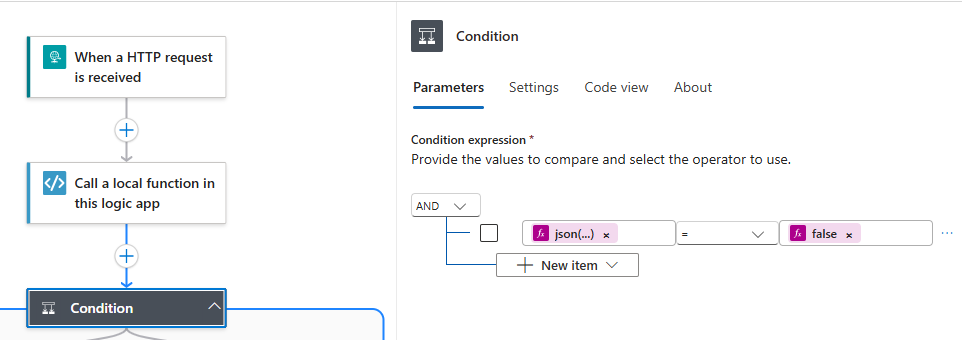
At this point, we can add a terminate on the true path of the condition and force it to fail with the real error.
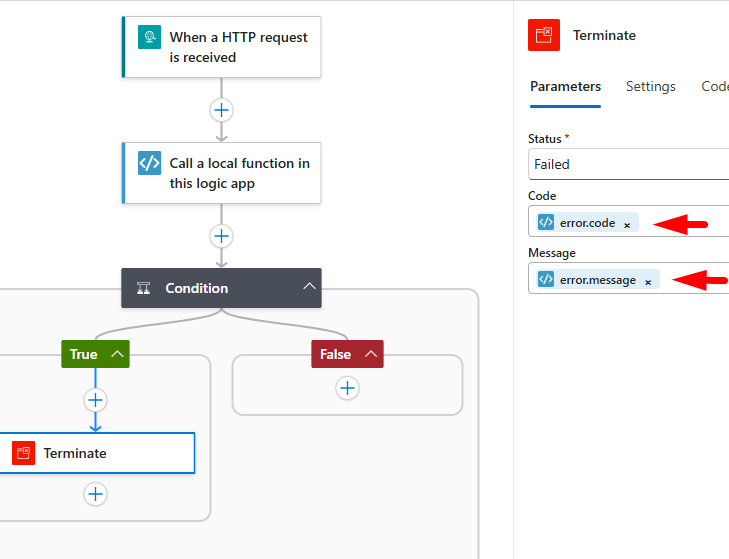

Now you can terminate your Logic App with confidence, exposing the real error message when something goes wrong instead of relying only on the generic local function failure.
This approach does not make the local function action fail by itself with the real exception. The action still succeeds because the error is handled inside the function. However, it gives the workflow enough information to fail intentionally, using a Terminate action, with the real error code and message.
That makes troubleshooting much clearer and gives us better control over how local function failures are handled inside Logic App Standard.
Hope you find this helpful! If you enjoyed the content or found it useful and wish to support our efforts to create more, you can contribute towards purchasing a Sauron’s Action Figure for Sandro’s son, yep, not for me!



