

While working with local functions in Logic App Standard, developed in VS Code, we faced an issue that is not new, but has been bugging me for a while.
How can we identify and control errors inside these functions from the Azure Portal when the Call a local function in this Logic App action returns a generic error every time?
For example:
The function 'func_build_response_xml_plum007_out' failed to execute. Please verify function code is valid.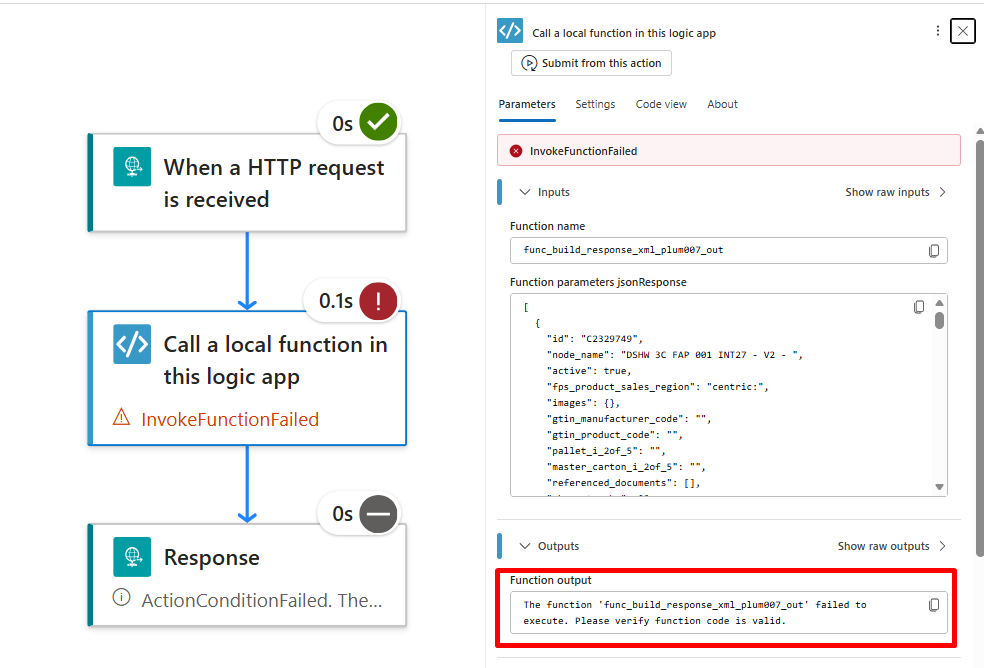
This error does not really help us identify the actual problem. It is generic and, honestly, it can be frustrating when you are trying to understand the root cause of the failure.
So let’s divide this topic into two posts:
- How can you identify errors from a local function in Azure Portal?
- How can you get the real error from a local function and manage it inside a Logic App Standard workflow?
After developing your local function alongside your Logic App in a Logic App workspace in VS Code, the next step is, of course, to deploy it.
Then, when you send a request that you already know might fail, for example for testing purposes, the response in the workflow run history will probably be the generic one we saw above.
And that does not really help us get closer to the real reason for the failure.
If you have Log stream enabled, you can use it. If you have Application Insights configured, you can also query it, either with a simple query or a more advanced one.
exceptions
| where timestamp > ago(24h)
| project
    timestamp,
    operation_Name,
    exceptionType = coalesce(innermostType, outerType, type),
    realError = coalesce(innermostMessage, outerMessage, message),
    operation_Id,
    problemId,
    details,
    customDimensions
| order by timestamp desc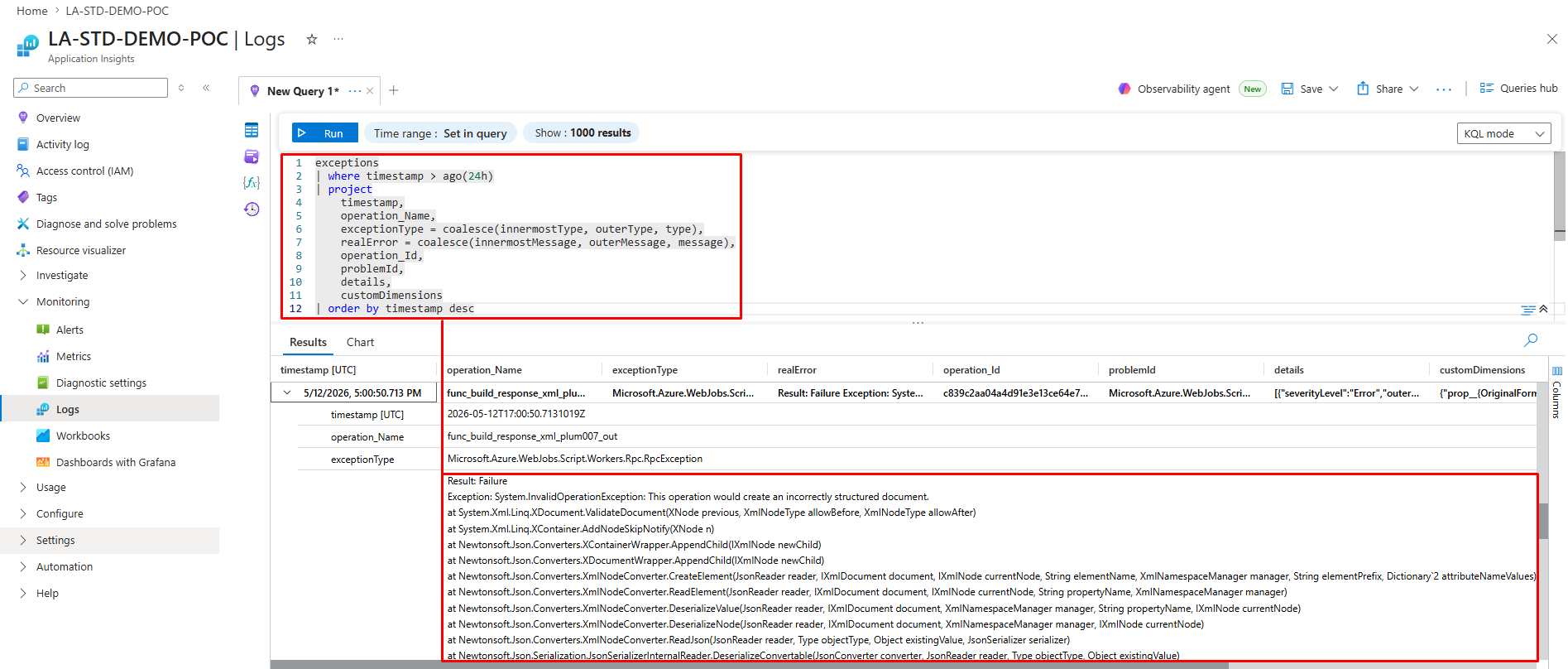
And yes, with Application Insights, we were able to find the real error thrown by our local function.
But there is another way to find it, even without querying Application Insights, using something that Logic App Standard already provides.
To do that, open your Logic App Standard resource in the Azure Portal and click on Advanced Tools.
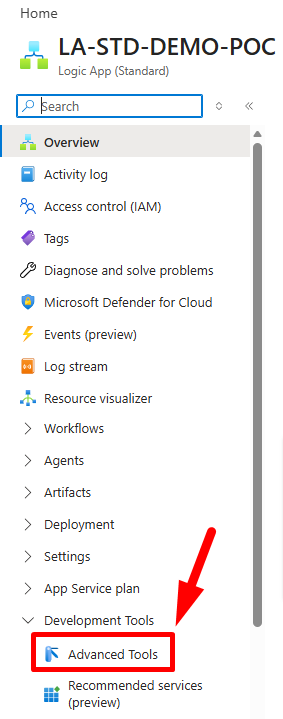
Next, click Go.

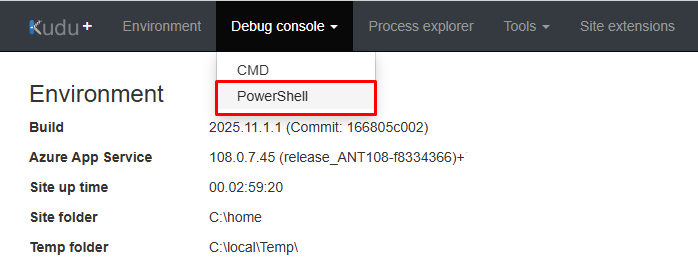
This opens the Kudu instance associated with your Logic App Standard. From there, you can open either CMD or PowerShell from the Debug console menu. For what we are doing here, it does not really matter which one you choose.
Kudu will show you the file structure of the App Service behind your Logic App Standard. The folder we want is: C:\home\LogFiles

From there, navigate to: C:\home\LogFiles\Application\Functions\Function
Or, from the terminal, you can run:cd “C:\home\LogFiles\Application\Functions\Function”
Inside this folder, choose the folder with the name of the local function you deployed.

Inside that folder, you should find a .log file.

Open the file, or click Edit, and you should be able to see the real exception thrown by the local function.
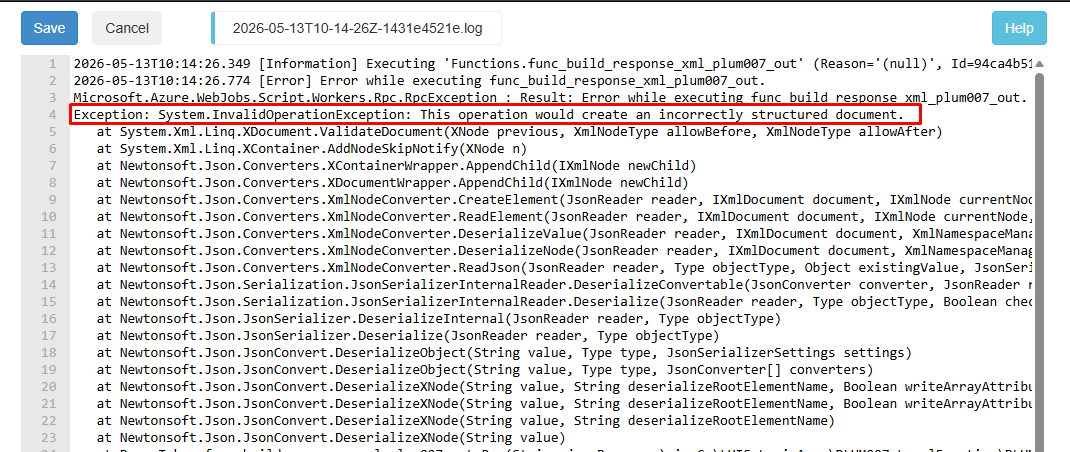
In our case, instead of only seeing the generic error from the Logic App run history, we were finally able to see the real error:
System.InvalidOperationException: This operation would create an incorrectly structured document.And this pointed us directly to the actual failing operation in the code:
JsonConvert.DeserializeXNode(...)This is much more useful than the generic message shown in the workflow run history.
With this, you can quickly understand why your Logic App Standard local function failed and act much faster, instead of trying to guess the root cause from a generic message.
One important note: filesystem logs in Kudu are useful, but they are not always the most complete or reliable source for every execution. Depending on logging configuration, restarts, instances, or log rotation, some newer executions may not appear in the same file. For a more reliable troubleshooting experience, we still recommend having Application Insights enabled.
On the next post, we will cover:
How can you get the real error from a local function and manage it inside a Logic App Standard workflow?
Hope you find this helpful! If you enjoyed the content or found it useful and wish to support our efforts to create more, you can contribute towards purchasing a Sauron’s Action Figure for Sandro’s son, yep, not for me!



