


When working with Azure API Management (APIM) policies, troubleshooting can feel like navigating a maze in the dark. Complex inbound and outbound transformations often hide the root cause of a 401 Unauthorized or a 500 Internal Server Error.
Thankfully, APIM includes a powerful, built-in Trace feature that acts as an “X-ray” for your request execution pipeline. Tracing provides a step-by-step execution log of every policy triggered during a single request. Instead of trial-and-error redeployments, you can see exactly how your data is being manipulated in real-time.
📝 One-Minute Brief
Stop guessing why your Azure API Management (APIM) policies are failing. This guide explains how to use the built-in “Trace” feature to inspect the full request pipeline. By enabling tracing, you can see real-time execution logs for JWT validation, header transformations, and backend response times, allowing you to debug complex policies like and in minutes rather than hours.
How it works
When you enable tracing and send a request (for example, from Postman), APIM provides a detailed execution log that shows:
- Which policies were executed?
- How headers and body were transformed.
- Authentication and authorization steps.
- Backend response times.
- Where errors occurred.
This is especially helpful when working with policies like:
<validate-jwt><set-header><rewrite-uri><choose>
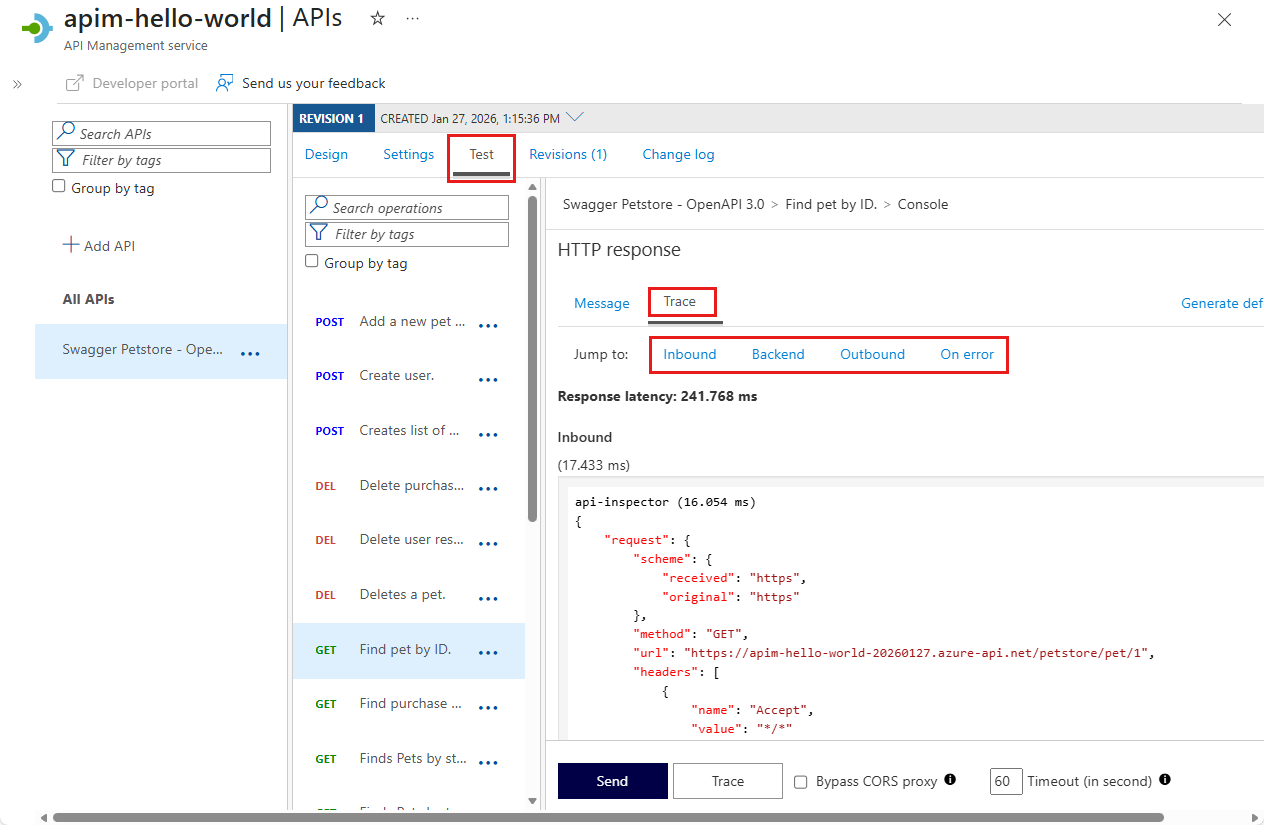
Instead of guessing why something failed, you can inspect the full request pipeline step by step. The following image contains the specified spot where you can trace your messages.
Why this matters
API policies are powerful but invisible during runtime unless you trace them. Using Trace can reduce debugging time dramatically and prevent unnecessary redeployments.
Security Tip: Never allow tracing for general users in production. Limit tracing permissions to administrative or developer subscription keys to prevent the leakage of sensitive transformation logic.
To lazy to read? We’ve got you covered! Check out our video version of this content!
Hope you find this helpful! If you enjoyed the content or found it useful and wish to support our efforts to create more, you can contribute towards purchasing a Sauron’s Action Figure for Sandro’s son, yep, not for me!



