


While trying to implement a Logic App proof-of-concept that connects to a Storage account, I found that while trying to access to a old Storage Account, which I’m Owner, I was getting the following disclaimer message:
You do not have permissions to list the data using your user account with Microsoft Entra ID. Click to learn more about authenticating with Microsoft Entra ID. This request is not authorized to perform this operation using this permission. RequestId:9d758b8a-c01e-003f-7470-85b569000000 Time:2026-01-14T16:08:29.5229220Z

Cause
This is a very common (and confusing) Azure Storage issue: being the owner of the Storage Account does NOT automatically give you permission to read the data in it.
Being an Owner means:
- You can create/delete the storage account
- Change settings
- Assign roles
- Manage networking
- Configure keys
But it does NOT grant access to the blobs/files/queues/tables themselves.
Solution
To be able to read or write data, you need to assign yourself a Storage Data role:
- Storage Blob Data Owner: Full control over blobs
- Storage Blob Data Reader: Read + list blobs
- Storage Blob Data Contributor: Read, write, delete blobs
In my case, I had to:
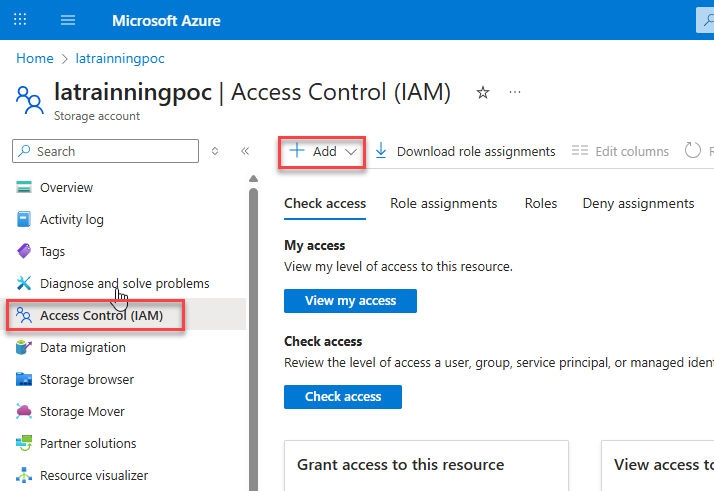
- Go to the Storage Account in the Azure Portal
- Click Access Control (IAM)
- Click Add → Add role assignment
- In my case, I selected Storage Blob Data Owner
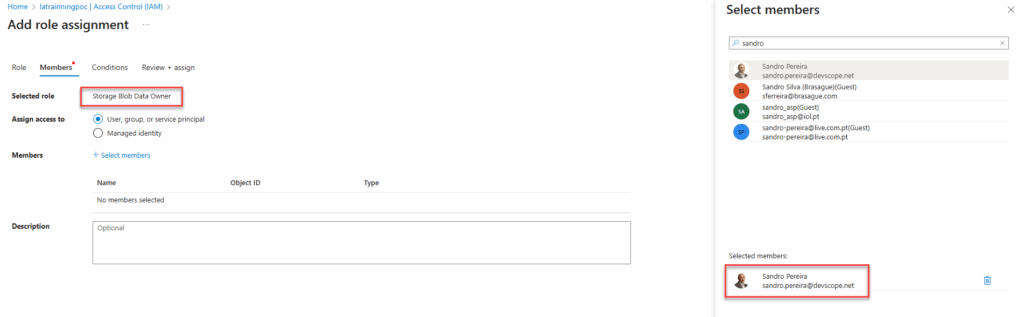
After that, I was able to send files to the container.
Hope you find this helpful! If you liked the content or found it useful and would like to support me in writing more, consider buying (or helping to buy) a Star Wars Lego set for my son.



