


Last week, we published a post on Logic Apps Best Practices, Tips, and Tricks exploring how to resubmit multiple runs at once. However, that process can still feel tedious and, at times, unnecessarily complex. Fortunately, Microsoft recently introduced new features that help streamline this experience. Even so, the overall workflow can remain a bit confusing.
At the same time, while we were exploring these new capabilities, we were also finalizing a tool designed to solve this exact problem. Since the tool was already complete, we decided to make it publicly available to simplify bulk resubmission scenarios.
📝 One-Minute Brief
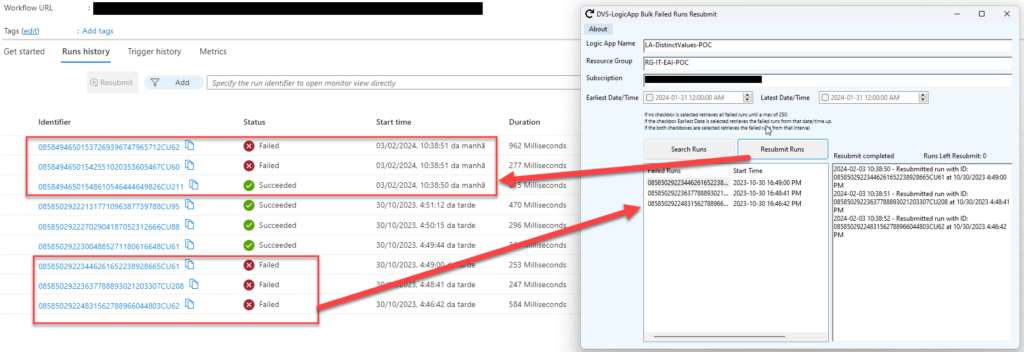
Recover from a backlog of failed Logic Apps (Consumption) runs in minutes. This simple .NET Windows app lets you list and resubmit multiple failed runs at once by providing the Logic App name, Resource Group, and Subscription ID. You can optionally filter by a DateTime range, and if you don’t, the tool shows failed runs (up to 250) for fast bulk resubmission.
Logic App Consumption Bulk Failed Runs Resubmit Tool
This is a simple .NET Windows application that allows you to easily resubmit multiple Logic App Consumption runs at once.
To achieve that, you need to be already authenticated on your Azure Portal, and you need to provide the following parameters:
- Logic App name;
- Resource Group;
- and Subscription ID;
- Optionally, you can select a DateTime range to filter the failed runs you need to resume.
- If you don’t select a range, all failed runs until a max of 250 will be presented.
Where can I download it?
You can download the complete Logic App Consumption Bulk Failed Runs Resubmit tool source code here:
Hope you find this helpful! So, if you liked the content or found it useful and want to help me write more, you can buy (or help me buy) my son a Star Wars Lego!

Thanks to my team member, Luís Rigueira, for being the mentor of this idea.


