

You may know, and many of you may be familiar with Logic Apps REST APIs that are very well documented by Microsoft here: Azure Logic Apps. However, for those who didn’t know about this, I recommend that you to look. They may be handy in specific scenarios. One of these cases is the strategy I documented to get the error message from a particular failure inside Logic App Consumption. You can read more about it here: How to get the Error Message with Logic App Try-Catch (Part II) – Using an Azure Function.
📝 One-Minute Brief
An introduction to the undocumented REST APIs available for Azure Logic Apps Standard. This first part explains why Logic Apps Standard requires different REST endpoints than the Consumption model and walks through the available REST operation groups. It focuses on the Workflow Run Actions APIs, showing how to retrieve action histories and execution details when native tooling isn’t enough.
Another great thing about this Microsoft documentation is the availability to try these REST APIs directly from the documentation page!
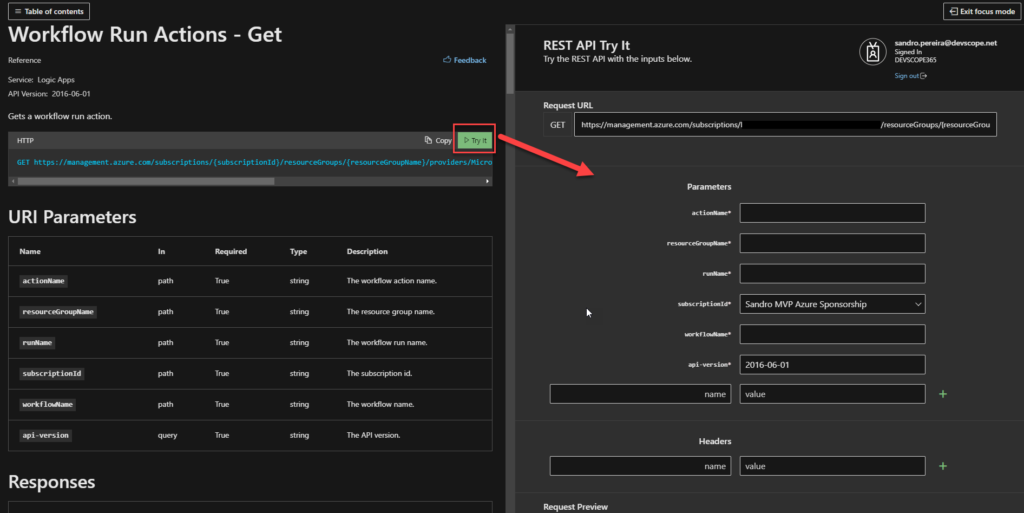
But there is one major problem! These REST APIs can be applied only to Logic Apps Consumption. There isn’t any REST APIs documentation available for Logic Apps Standard… and yes, they are different. There isn’t until now!
We are going to use the following workflow to test these APIs:
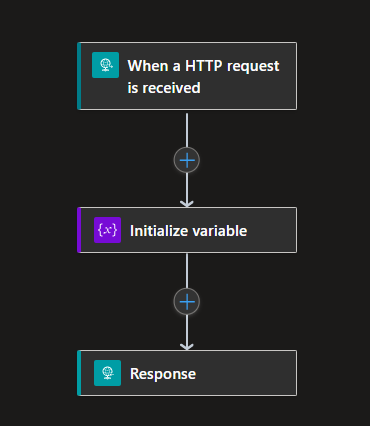
Of course, this is a very simple sample just to demonstrate the APIs.
REST Operation Groups
Like Logic Apps Consumption, Logic App Standard REST APIs are organized in these REST Operation Groups:
- Workflow Run Actions: Lists workflow run actions.
- Workflow Runs: Provides operations for listing and canceling workflow runs.
- Workflow Trigger Histories: Lists workflow trigger histories.
- Workflow Triggers: Provides operations for listing and running workflow triggers.
- Workflow Versions: Lists workflow versions.
- Workflows: Provides operations for creating and managing workflows.
Today, we are going to address the first Operation Group: Workflow Run Actions.
Workflow Run Actions
These are the available operations:
- Get: Gets the history of a specific workflow run action.
- List: Gets the list history of all workflow run actions.
- List Expression Traces: Lists a workflow run expression trace.
This list may change since this is not the official list, and many things under the hood are different from Consumption to Standard
Get
Request URL:
GET https://management.azure.com/subscriptions/{subscriptionId}/resourceGroups/{resourceGroupName}/providers/Microsoft.Web/sites/{logicAppStdName}/hostruntime/runtime/webhooks/workflow/api/management/workflows/{workflowName}/runs/{runId}/actions/{actionName}?api-version=2018-11-01
URI Parameters:
| Name | In | Required | Type | Description |
| subscriptionId | path | True | string | The subscription id. |
| resourceGroupName | path | True | string | The resource group name. |
| logicAppStdName | path | True | string | The Logic App Standard name. |
| workflowName | path | True | string | The workflow name. |
| runId | path | True | string | The workflow run id (name). |
| actionName | path | True | string | The workflow action name. |
| api-version | query | True | string | The API version. |
Response:
| Name | Type | Description |
| 200 OK | WorkflowRunAction | OK |
Sample Request:
https://management.azure.com/subscriptions/xxxxxxxx/resourceGroups/RG-SPMSDN-LASTD-POC/providers/Microsoft.Web/sites/LASTD-SPMSDN-EAI-POC/hostruntime/runtime/webhooks/workflow/api/management/workflows/DemoHTTP/runs/08585286433641737811956886654CU00/actions/Initialize_variable?api-version=2018-11-01
Sample Response:
Status Code: 200
{
    "properties": {
        "inputsLink": {
            "uri": "https://lastd-spmsdn-eai-poc.azurewebsites.net:443/runtime/webhooks/workflow/scaleUnits/prod-00/workflows/77611e515f054951b892c7da37d37e8c/runs/08585286433641737811956886654CU00/actions/Initialize_variable/contents/ActionInputs?api-version=2018-11-01&code=xxxxxxx%3d%3d&se=2023-01-06T04%3A00%3A00.0000000Z&sp=%2Fruns%2F08585286433641737811956886654CU00%2Factions%2FInitialize_variable%2Fcontents%2FActionInputs%2Fread&sv=1.0&sig=xxxxxxxxx",
            "contentSize": 69
        },
        "startTime": "2023-01-06T00:05:22.8183475Z",
        "endTime": "2023-01-06T00:05:23.4705888Z",
        "correlation": {
            "actionTrackingId": "b8af094f-acd0-48ad-9d08-acee1d10360b",
            "clientTrackingId": "08585286433641737811956886654CU00"
        },
        "status": "Succeeded",
        "code": "NotSpecified"
    },
    "id": "/workflows/DemoHTTP/runs/08585286433641737811956886654CU00/actions/Initialize_variable",
    "name": "Initialize_variable",
    "type": "workflows/runs/actions"
}
List
Request URL:
GET https://management.azure.com/subscriptions/{subscriptionId}/resourceGroups/{resourceGroupName}/providers/Microsoft.Web/sites/{logicAppStdName}/hostruntime/runtime/webhooks/workflow/api/management/workflows/{workflowName}/runs/{runId}/actions?api-version=2018-11-01
URI Parameters:
| Name | In | Required | Type | Description |
| subscriptionId | path | True | string | The subscription id. |
| resourceGroupName | path | True | string | The resource group name. |
| logicAppStdName | path | True | string | The Logic App Standard name. |
| workflowName | path | True | string | The workflow name. |
| runId | path | True | string | The workflow run id (name). |
| api-version | query | True | string | The API version. |
| $filter | query | False | string | The filter to apply on the operation. Options for filters include: Status. |
| $top | query | False | integer int32 | The number of items to be included in the result. |
Response:
| Name | Type | Description |
| 200 OK | WorkflowRunActionListResult | OK |
Sample Request:
https://management.azure.com/subscriptions/xxxxxxxx/resourceGroups/RG-SPMSDN-LASTD-POC/providers/Microsoft.Web/sites/LASTD-SPMSDN-EAI-POC/hostruntime/runtime/webhooks/workflow/api/management/workflows/DemoHTTP/runs/08585286433641737811956886654CU00/actions?api-version=2018-11-01
Sample Response:
Status Code: 200
{
    "value": [
        {
            "properties": {
                "inputsLink": {
                    "uri": "https://lastd-spmsdn-eai-poc.azurewebsites.net:443/runtime/webhooks/workflow/scaleUnits/prod-00/workflows/77611e515f054951b892c7da37d37e8c/runs/08585286433641737811956886654CU00/actions/Initialize_variable/contents/ActionInputs?api-version=2018-11-01&code=xxxxx%3d%3d&se=2023-01-06T04%3A00%3A00.0000000Z&sp=%2Fruns%2F08585286433641737811956886654CU00%2Factions%2FInitialize_variable%2Fcontents%2FActionInputs%2Fread&sv=1.0&sig=xxxxxx",
                    "contentSize": 69
                },
                "startTime": "2023-01-06T00:05:22.8183475Z",
                "endTime": "2023-01-06T00:05:23.4705888Z",
                "correlation": {
                    "actionTrackingId": "b8af094f-acd0-48ad-9d08-acee1d10360b",
                    "clientTrackingId": "08585286433641737811956886654CU00"
                },
                "status": "Succeeded",
                "code": "NotSpecified"
            },
            "id": "/workflows/DemoHTTP/runs/08585286433641737811956886654CU00/actions/Initialize_variable",
            "name": "Initialize_variable",
            "type": "workflows/runs/actions"
        },
        {
            "properties": {
                "inputsLink": {
                    "uri": "https://lastd-spmsdn-eai-poc.azurewebsites.net:443/runtime/webhooks/workflow/scaleUnits/prod-00/workflows/77611e515f054951b892c7da37d37e8c/runs/08585286433641737811956886654CU00/actions/Response/contents/ActionInputs?api-version=2018-11-01&code=xxxxx%3d%3d&se=2023-01-06T04%3A00%3A00.0000000Z&sp=%2Fruns%2F08585286433641737811956886654CU00%2Factions%2FResponse%2Fcontents%2FActionInputs%2Fread&sv=1.0&sig=xxxxx",
                    "contentSize": 46
                },
                "outputsLink": {
                    "uri": "https://lastd-spmsdn-eai-poc.azurewebsites.net:443/runtime/webhooks/workflow/scaleUnits/prod-00/workflows/77611e515f054951b892c7da37d37e8c/runs/08585286433641737811956886654CU00/actions/Response/contents/ActionOutputs?api-version=2018-11-01&code=xxxxx%3d%3d&se=2023-01-06T04%3A00%3A00.0000000Z&sp=%2Fruns%2F08585286433641737811956886654CU00%2Factions%2FResponse%2Fcontents%2FActionOutputs%2Fread&sv=1.0&sig=xxxxxx",
                    "contentSize": 46
                },
                "startTime": "2023-01-06T00:05:23.6343337Z",
                "endTime": "2023-01-06T00:05:23.7654387Z",
                "correlation": {
                    "actionTrackingId": "9fc1530d-a50e-450b-9792-e785462ebfba",
                    "clientTrackingId": "08585286433641737811956886654CU00"
                },
                "status": "Succeeded",
                "code": "OK"
            },
            "id": "/workflows/DemoHTTP/runs/08585286433641737811956886654CU00/actions/Response",
            "name": "Response",
            "type": "workflows/runs/actions"
        }
    ]
}
List Expression Traces
Request URL:
GET https://management.azure.com/subscriptions/{subscriptionId}/resourceGroups/{resourceGroupName}/providers/Microsoft.Web/sites/{logicAppStdName}/hostruntime/runtime/webhooks/workflow/api/management/workflows/{workflowName}/runs/{runId}/actions/{actionName}/listExpressionTraces?api-version=2018-11-01
URI Parameters:
| Name | In | Required | Type | Description |
| subscriptionId | path | True | string | The subscription id. |
| resourceGroupName | path | True | string | The resource group name. |
| logicAppStdName | path | True | string | The Logic App Standard name. |
| workflowName | path | True | string | The workflow name. |
| runId | path | True | string | The workflow run id (name). |
| actionName | path | True | string | The workflow action name. |
| api-version | query | True | string | The API version. |
Response:
| Name | Type | Description |
| 200 OK | ExpressionTraces | OK |
Note: I wasn’t able to successfully test this API. But I assume it will exist.
Stay tuned for the next Operation Group: Workflow Runs.
For those looking to learn more about the Logic App Standard REST API.
Download the full whitepaper here: Logic Apps Standard Rest API’s a Comprehensive Guide
Hope you find this helpful! If you liked the content or found it useful and would like to support me in writing more, consider buying (or helping to buy) a Star Wars Lego set for my son.




Hey Sandro,
I tried to call https://management.azure.com/subscriptions/{subscriptionId}/resourceGroups/{resourceGroupName}/providers/Microsoft.Web/sites/{logicAppStdName}/hostruntime/runtime/webhooks/workflow/api/management/workflows/{workflowName}/runs/{runId}/actions?api-version=2018-11-01
endpoint when implementing error handling for my Workflows in the same LogicApp Standard
As a result I always get empty array of Actions
value: []
Do you maybe know why – what do I wrong?