


Last week, I was adding new processes to an existing and old project for a client, a project that I started a few years ago, and I was caught by surprise with the following error while trying to generate a new SAP schema from Visual Studio:
Error occurred while browsing the LOB system. Adapter Message: Could not load file or assembly ‘Microsoft.Adapters.SAP.SAPGInvoker.dll’ or one of its dependencies. The specified module could not be found.
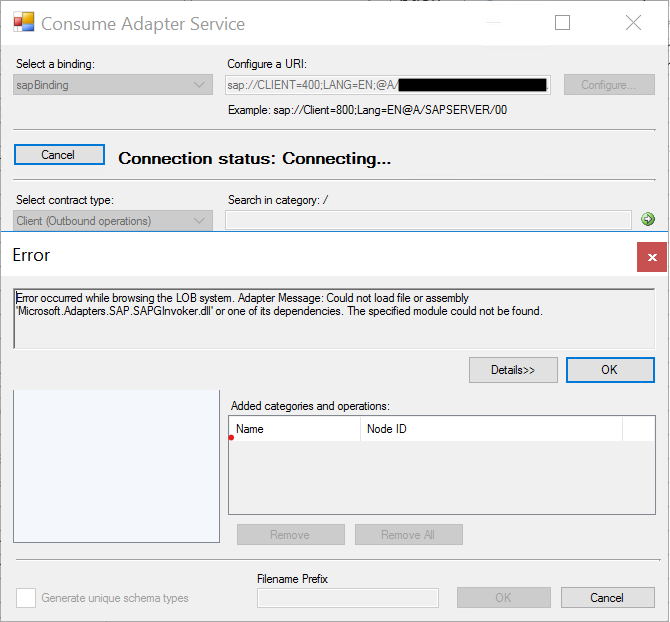
At first sight, the cause of the error is simple, and I have explained the main causes above; in my case, the problem was that I had all the prerequisites for the WCF-SAP adapter to work, and again, that was an existing project where I had already generated several SAP Schemas.
📝 One-Minute Brief
A quick troubleshooting guide for a common BizTalk WCF‑SAP Adapter error caused by missing or incorrectly installed SAP .NET Connector (NCo) components. The article explains why BizTalk fails to load SAPGInvoker.dll, what dependencies the adapter requires, and how to fix the issue by installing or repairing the correct SAP NCo version for your BizTalk environment. It helps administrators resolve connectivity errors fast and restore the WCF‑SAP adapter’s functionality.
Cause
Normally, the main reason for this error is that the pre-requirements to run the WCF-SAP adapter are not installed in the environment. Even if you see the WCF-SAP adapter present and configured in the BizTalk Server Administration console, it doesn’t mean that it is ready to work. This adapter requires you to install the following SAP resources to run the adapter in the BizTalk Server box:
- NCo3018_Net40_x64.msi.
- NCo3018_Net40_x86.msi.
You can download these resources from the SAP Service Marketplace.
It is required (mandatory) to install the x86 version of the SAP Connector for Microsoft .NET. However, if you want to run the adapter under a 64-bit Host Instance, you need to install both the x86 and x64 versions of the SAP Connector for Microsoft .NET (recommended).
But once again, I knew I had all these resources installed, and I double-checked.
In my case, for unknown reasons, some of these DLLs became corrupted, which is why I was getting this error.
Solution
To fix this issue, the solution is quite simple:
- Reinstall the x86 and x64 versions of the SAP Connector for Microsoft .NET.
- NCo3018_Net40_x64.msi
- NCo3018_Net40_x86.msi
- When asked, repair the components’ installation.
After that, I was once again able to generate SAP Schemas from my BizTalk Server Visual Studio project.
This applies to:
- BizTalk Server 2020
- BizTalk Server 2016
Hope you find this helpful! If you liked the content or found it useful and would like to support me in writing more, consider buying (or helping to buy) a Star Wars Lego set for my son.




Hello
I am Priya. I would like to know whether the installed SAP NCo dll’s were gaced in GAC32 and GAC 64 or GACMSIL