


Yesterday, I spoke about how you can apply custom pattern restrictions to properly validate DateTime, Date, and Time formats inside elements or attributes. You can see more about it here:
And I mention that these Regular Expressions can be simple and relatively easier to read if you have some basic knowledge, like this one below:
- \d{4}\d{2}\d{2} – that is a simple format that expects 4 digits followed by 2 additional digits and another 2 digits, which is the date in the YYYYMMDD format without validating the accuracy of months or days, and where:
- YYYY is the four-digit year, like 2022.
- MM is the 2-digit month, like 01.
- DD is the 2-digit day, like 21.
But it can get highly complex, so that even people with good knowledge have difficulty translating the expression to the expected pattern, like the one below:
- ^(?:(?:31(\/|-|.)(?:0?[13578]|1[02]))\1|(?:(?:29|30)(\/|-|.)(?:0?[1,3-9]|1[0-2])\2))(?:(?:1[6-9]|[2-9]\d)?\d{2})$|^(?:29(\/|-|.)0?2\3(?:(?:(?:1[6-9]|[2-9]\d)?(?:0[48]|[2468][048]|[13579][26])|(?:(?:16|[2468][048]|[3579][26])00))))$|^(?:0?[1-9]|1\d|2[0-8])(\/|-|.)(?:(?:0?[1-9])|(?:1[0-2]))\4(?:(?:1[6-9]|[2-9]\d)?\d{2})$
It is not simple to look to this RegEx and say: “yep, we are expecting this Date format: MM/DD/YYYY like 12/11/1999, and by the way, it validates the Leap Year!”
Imagine users who don’t have strong know-how about RegEx!
📝 One-Minute Brief
Learn practical best practices for working with pattern restrictions in BizTalk schemas. Discover how to make complex Regex‑based Date, Time, and DateTime validations easier to understand, maintain, and document—especially when dealing with advanced patterns and schema constraints.
So, what can we do to improve this experience? What are the best practices in these cases?
Best practices
A good best practice to improve readability while documenting your schemas is to add notes to these elements or attributes.
We can and should use the Notes property to enter notes, such as comments related to the business process, that you would like to make about the selected Record, Field Element, or Field Attribute node. In these DateTime, Date, and Time cases, we can simply add the expected format in the Notes property, like:
- Format: YYYY-MM-DD
- Format: HH:mm:ss
- Format: YYYYMMDD
- Format: HHmm
- Format: YYYY-MM-DD – It validates Leap Year
To accomplish this, we need to
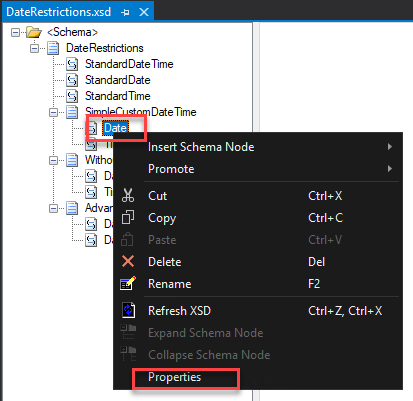
- Right-click on the Element or Attribute fields in the schema tree view and select the Properties option.
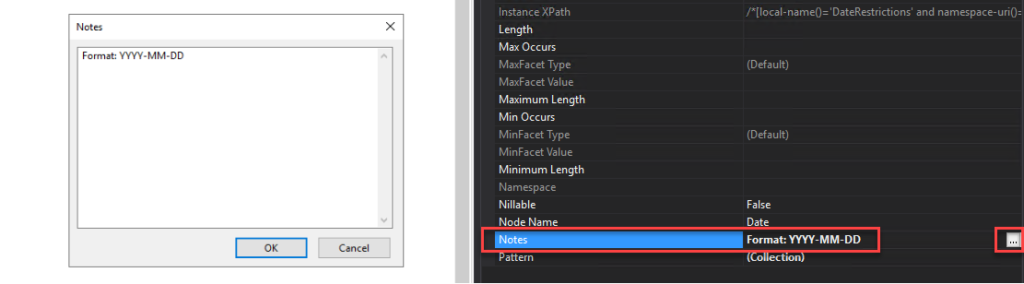
- On the Properties window, click on the … (three dots) on the Notes property. This action will open a Notes window where you can add all your relevant notes.
Do that to all your elements and fields that are using pattern restrictions.
Even non-technical guys can understand the Schema specification you provide or are consuming. This best practice implementation will also help you improve productivity since you will not spend too much time decompiling Regular Expressions.
Download
THIS SAMPLE CODE IS PROVIDED “AS IS”, WITHOUT WARRANTY OF ANY KIND.
You can download the POC: BizTalk Schemas Handle Restrictions on Date from GitHub here:
Hope you find this helpful! If you liked the content or found it useful and would like to support me in writing more, consider buying (or helping to buy) a Star Wars Lego set for my son.



