

It’s been some time since I created the BizTalk Server SSO Application Configuration tool. The tool is available for several versions of BizTalk Server. It provides the ability to add and manage applications, add and manage key-value pairs in the SSO database, and import and export application configurations to be deployed to different environments.
However, although I love this tool, there is a significant limitation. It is a Windows application tool. So, most of the time, we need remote access to the BizTalk Server machines to access the tool to be able to read or change these values inside the SSO Applications.
📝 One-Minute Brief
Discover a lightweight web-based tool that lets administrators and developers easily manage SSO Application Configuration values in BizTalk Server environments. It modernizes the traditional SSO Configuration Editor by offering a browser interface, simplifying edits, reducing friction in CI/CD pipelines, and improving team productivity.
To bypass this limitation, we create a Web version of this tool. The tool has almost the same features available as the traditional Windows tool:
- You can securely export and import Application configurations, and it is compatible with MSFT SSO snap-in.
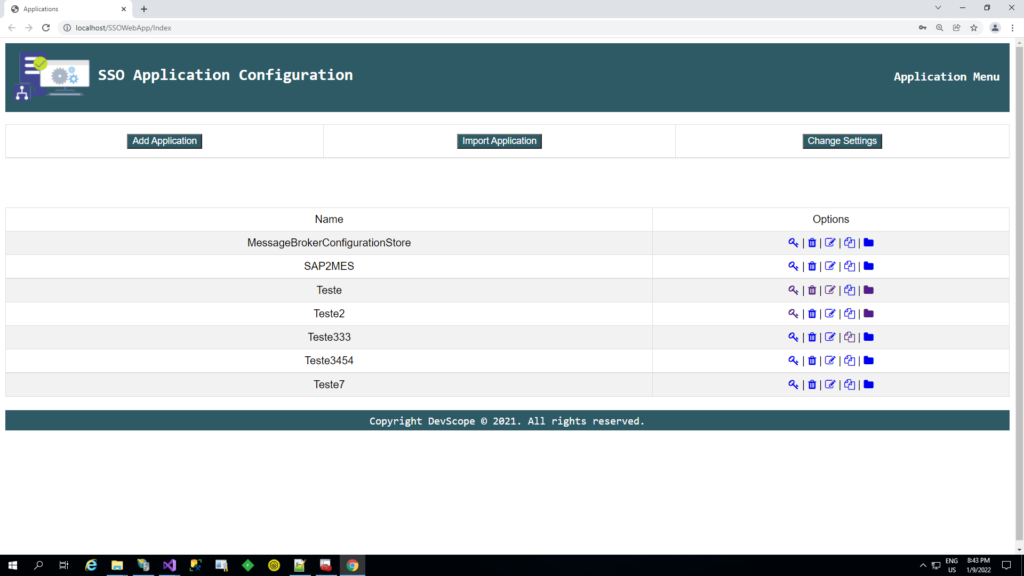
- You can duplicate Applications (copy and paste).
- You can rename Applications.
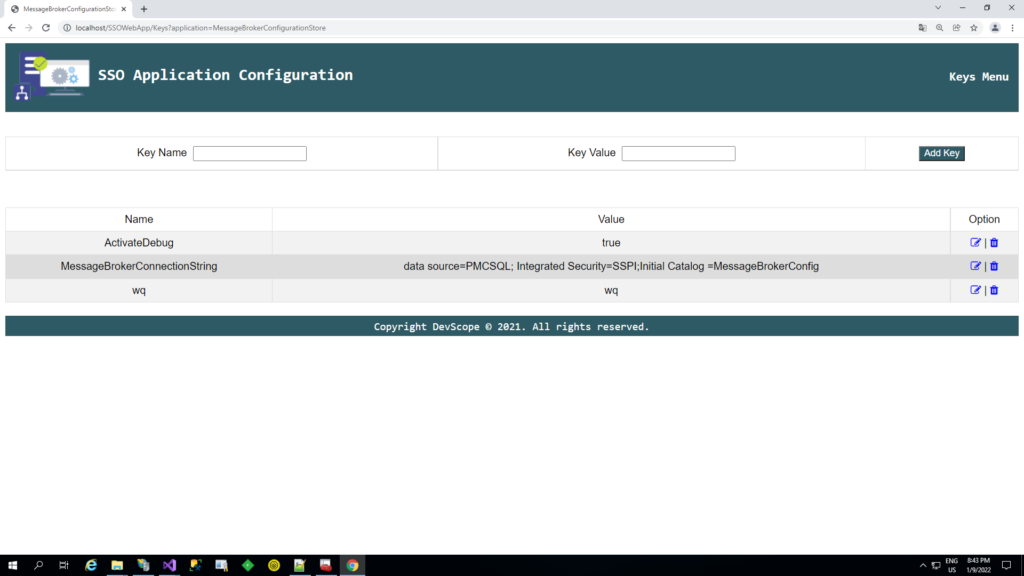
- You can easily add new key-values.
- You can edit key-values.
Other versions
This tool is also available in the format of a Windows Application for the following BizTalk Server versions:
- BizTalk Server SSO Application Configuration Tool for BizTalk Server 2020
- BizTalk Server SSO Application Configuration Tool for BizTalk Server 2016
- BizTalk Server SSO Application Configuration Tool for BizTalk Server 2013 R2
Download
THIS TOOL IS PROVIDED “AS IS”, WITHOUT WARRANTY OF ANY KIND.
You can download BizTalk Server SSO Application Configuration Web Tool from GitHub here:
Hope you find this helpful! If you liked the content or found it useful and would like to support me in writing more, consider buying (or helping to buy) a Star Wars Lego set for my son.




web tool link is broken, not sure if it is available in biztalkcommunity on github
I check and it is correct.
https://github.com/BizTalkCommunity/BizTalk-Server-SSO-Application-Configuration-Web-Tool
Link is broken for me too Sandro. I would appreciate if link can be fixed
I don’t see any broken link but the link is https://github.com/BizTalkCommunity/BizTalk-Server-SSO-Application-Configuration-Web-Tool
I got the issue, I unintentionally set the repo as private. I already fixed the problem
Hi
I have successfully installed BizTalk server 2020 along with Enterprise SSO in components.
I was not able to configure BizTalk since it’s getting failed while configuring Enterprise SSO.
There is no Enterprise SSO is present in services.msc
Error:
Could not find the account name ‘SSO Administrators’ on computer ‘SRV****’. Configuration can proceed, but it might fail. (SSO)