


We published a REST web service in BizTalk Server a long time ago that exposes a BizTalk Server Orchestration. Basically, we receive a JSON payload, convert it to XML on the receive pipeline, and apply some logic. If everything goes well, we had this message in a queue to be processed and delivered to an internal system. And this has been working fine until recently, the business reported that a few cases were getting stuck on the source system with the following error message:
413 Request Entity Too Large

The above picture was a test we did using Postman with a sample message that was failing on the source system to validate if the problem was related to BizTalk Server. And in this case, it was.
You should always try to validate if the error is a BizTalk Server issue or not, and only then try to solve the problem. Because most of the time, the business tries to blame the middleware system, and a lot of times, it’s other components that are failing.
📝 One-Minute Brief
Receiving large messages through a WCF‑WebHttp receive location in BizTalk Server can fail with a 413 – Request Entity Too Large error. This article explains why the error occurs, how IIS and WCF limits affect message size, and which configuration settings you need to adjust to successfully process large payloads.
Cause
Based on the HTTP status 413 and error description is easy to understand that the server is refusing to process a request because the request payload is larger than the server is willing or able to process.
The most complex part is understanding where and what properties to change to solve these issues. Some solutions that you will find on the internet will tell you that the quickest and easiest solution is to increase the upload size limit on IIS: the uploadReadAheadSize property.
Others will tell you to put a maxRequestLength in the system.web to allow, for example, a 2MB message size. Or add a binding section on the config and set maxReceivedMessageSize and readerQuotas.
And all of these options, at some point, make sense. The service is running in IIS as a web application and indeed has a web.config, so that should be, in theory, the first place to look for tuning. But none of these solutions will solve the problem.
Note: This doesn’t mean that for specific scenarios, these will be helpful.
Solution
To solve this issue once and for all, you need to:
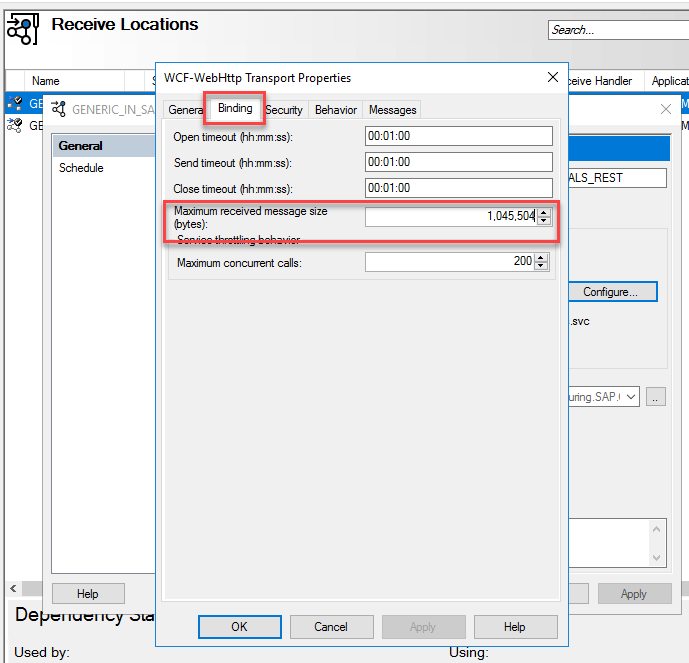
- On the BizTalk Server Administration Console, access to the WCF-WebHTTP Received Location is bound to this service that is having issues.
- On the Receive Location properties window, select Configure.
- On the WCF-WebHTTP Transport Properties, select the Binding tab.
- And increase the Maximum received message size (bytes) property.
- The default value is 65,536 bytes.
- Select OK twice.

Hope you find this helpful! If you liked the content or found it useful and would like to support me in writing more, consider buying (or helping to buy) a Star Wars Lego set for my son.



