


I have to say that I saw bizarre error messages during these long years as a consultant, but this one gained direct entry into my TOP 10 for a straightforward fact: there isn’t a SQL Adapter on BizTalk Server 2020. The adapter was deprecated since BizTalk Server 2006 R2, and they decided to remove it in this last version of the product. So, when I saw this error message appearing on the BizTalk Server Configuration Console:
Host (BizTalkServerApplication) is an invalid Receive Handler for SQL Adapter. Please go to BizTalk Administration Console to add BizTalkServerApplication as a new Receive Handler (Microsoft.BizTalk.Configuration.EDIAS2Config)
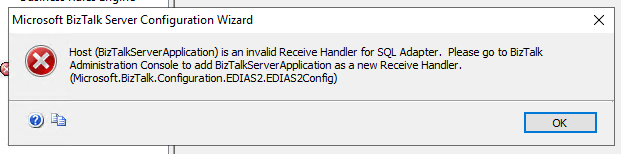
Humm… what? Humm…
I have done hundreds of installations during more than 15 years working in BizTalk Server, and many of these installations were BizTalk Server 2020, but I never faced this issue before.
On a small note, because of issues happening during the configuration process, I didn’t perform a full configuration in one shot. In this case, we took the approach of configuring feature by feature, step-by-step.
📝 One-Minute Brief
Configuring EDI/AS2 in BizTalk Server 2020 can fail with a misleading validation error referencing the deprecated SQL Adapter. This article explains why the “invalid Receive Handler for SQL Adapter” message appears during runtime configuration and shows that starting the Enterprise SSO service resolves the issue.
Cause
BizTalk Server 2020 Cumulative Update 2, and then try again to configure this feature. But I soon realized that this wasn’t the issue, nor the solution, since the problem continues to happen. But again, I have done several BizTalk Server 2020 installations since this last version was released, and I have never gotten this error. And some of them were available almost immediately when 2020 was announced.
I was almost ready to install the old and deprecated SQL Adapter in BizTalk Server 2020 to see if that solved the issue when I decided to have a look at the services and see if all the services were running. Shocking surprise, Enterprise Single Sign-On Service wasn’t running… So again, this time I decided to start the SSO service and then try again to configure this feature… and everything worked. I was able to configure this feature in BizTalk Server 2020.
Yes, for sure, you need the Enterprise Single Sign-On (ENTSSO) Service running to perform the BizTalk Server configuration. This is the first step of the BizTalk Server configuration, and without it, you cannot configure the rest of the features. However, clearly this problem, or in this case, the error message description presented to the user making the configuration, is what I call a problem between the chair and the keyboard. Someone forgot to fix these validations or update the validations made by the BizTalk Server Configuration Console.
Solution
The solution is simple:
- Ensure that the Enterprise Single Sign-On (ENTSSO) Service is running before you perform any configuration in BizTalk Server, because all the features will rely on it.

Hope you find this helpful! If you liked the content or found it useful and would like to support me in writing more, consider buying (or helping to buy) a Star Wars Lego set for my son.



