


This week, during a BizTalk Server 2016 installation – yes, I know it wasn’t my choice, otherwise, it was a BizTalk Server 2020 – I got for the very first time an issue regarding the Redistributable CAB file. Of course, during the installation process, you can choose “Automatically install the redistributable prerequisites from the web”, but in this case, the machine didn’t have access to the internet and had several security restrictions, so we ended up selecting the option: “Automatically install the redistributable prerequisites from a CAB file”.
Notice that we have already downloaded the CAB file, and I personally have used this file on several occasions.
So while we were trying to install the pre-requirements, the installation failed, and we got the following error in the error log file:
“The redistributable CAB file does not have a valid signature.“
📝 One-Minute Brief
Installing BizTalk Server 2016 in restricted environments can fail when using offline prerequisites. This article explains why the error “The redistributable CAB file does not have a valid signature” occurs and shows how manually installing the prerequisites resolves the installation issue.
Cause
Honestly, I don’t precisely know the causes for this issue. However, as I mentioned before, I used this strategy and this CAB file in other installations with success without ever facing this error. I think that was related to security constraints on the machine.
Solution
The solution is simple: this screen to select the CAB files only shows if the pre-requirements are missing – if you have all necessary components installed, the installation wizard will skip the step to install the components. So, what we can do is manually install the pre-requirements before we start the BizTalk Server installation. And to do that, we need to:
- Open the CAB file by double-clicking it.
- And install all the 3 files inside:
- owc11.
- SQLServer2016_AS_ADOMD.
- sqlxml.
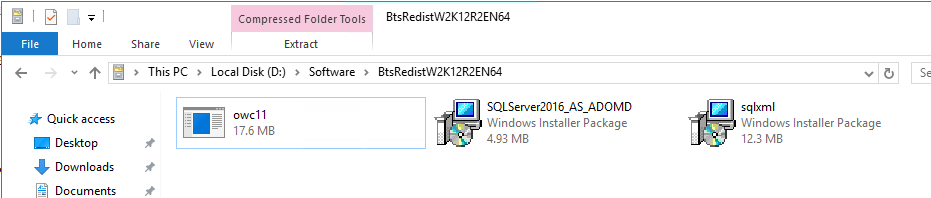
After that, you can run the BizTalk Server installation wizard. This problem will already be solved.
Hope you find this helpful! If you liked the content or found it useful and would like to support me in writing more, consider buying (or helping to buy) a Star Wars Lego set for my son.




Hi,
Even after manually installing the file, I am not able to BizTalk Server because BizTalk installation again asks for redistributable installation and I get the same error.
I have tried all 4 options, still I get the error.
1) Manually install redistributable prerequisites.
2) Automatically install…
3) Download the redistributable…
4) Automatically install…from CAB file
Can you tell me in detail how you managed to install BizTalk 2016 ?
Thanks in Advance
joee
I got the same issue, any solution for this?