

A few days ago, I released the latest version of the BizTalk Scheduled Task Adapter optimized for BizTalk Server 2020. Today, I merged the changes and improvements made on that version and made it available for BizTalk Server 2016.
What is new?
New schedule capabilities:
- Capability to set the DateTime you want to use on the Timespan schedule type: DateTime.Now or DateTime.UtcNow.
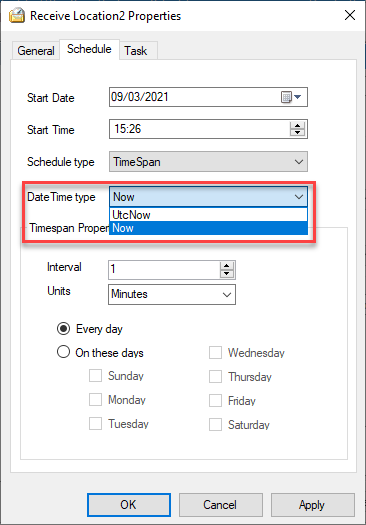
- By adding the option to choose between DateTime.Now and DateTime.UtcNow, the adapter now prevents the issue where Timespan schedules trigger unlimited messages when servers run in different time zones than UTC.
- In addition, the adapter now always triggers messages at 00 seconds and preserves the original scheduled time. I also improved the GetNextActivationTime method to correct all previously reported unexpected behaviors, which were originally treated as features by design.
📝 One-Minute Brief
BizTalk Scheduled Task Adapter 7.0.2 is now available for BizTalk Server 2016, bringing improved Timespan scheduling, better time handling, and fixes for previously reported triggering issues. This release ensures more reliable scheduling behavior while maintaining full compatibility with existing BizTalk 2016 environments.
BizTalk Scheduled Task Adapter
The BizTalk Scheduled Task Adapter works as an in‑process receive adapter. It executes predefined tasks on a daily, weekly, or monthly schedule. You configure the adapter entirely inside BizTalk, and BizTalk stores all settings in the SSODB. As a result, you can easily export and import configurations using binding files.
Moreover, the scheduling capabilities closely match those of the Windows Scheduled Task Service.
The adapter includes four built‑in tasks:
- XmlStringStreamProvider – generates a BizTalk message from a configured XML string.
- FileStreamProvider – generates a BizTalk message from the contents of a file
- HttpDownload – generates a BizTalk message from data downloaded from a website.
- SQLStreamProvider – generates a BizTalk message from the contents of a SQL Query (similar to the old SQL adapter) – Since version 3.0.
In addition, developers can create custom tasks. Any .NET class that implements the required interface can run on a schedule.
Finally, a big thank you to Pedro Almeida, my team member, who completed most of the work and finalized this release.
Download
You can download this “new” version of the adapter in BizTalk Scheduled Task Adapter from GitHub:
Please feel free to use the adapter, and if you find any problems or bugs, please open an issue on the adapter GitHub site: https://github.com/sandroasp/BizTalk-Scheduled-Task-Adapter and help evolve this community adapter. You can also suggest new features, and I’m open to new ideas.
Hope you find this helpful! If you liked the content or found it useful and would like to support me in writing more, consider buying (or helping to buy) a Star Wars Lego set for my son.



