


I am automating specific tasks related to my Microsoft Integration, Azure, Office 365, and much more Stencils Pack for Visio project: I started in my last blog post with two simple tasks:
- Standardize all SVG filenames.
- List all the detected duplicate files.
📝 One-Minute Brief
One-Minute Brief (TL;DR):
And now, I am trying to add more functionalities like:
- Automatically install (configure) all the Visio files (*.vssx), so that next time you open Visio, they will be available.
- And the possibility to download the latest version from GitHub and install it locally.
Well, the first task is quite simple, you just need to locate all the *.vssx files and copy them to the folder C:\Users\you_user\Documents\My Shapes (that is the default folder for the Visio custom shapes):
#########################################################
#                                                                                                                      #
# Install Microsoft Integration andAzure Stencils Pack                                   #
# Author: Sandro Pereira                                                                                 #
#                                                                                                                      #
#########################################################

[String]$location = Split-Path -Parent $PSCommandPath
[String]$destination = [environment]::getfolderpath('mydocuments') + "\My Shapes"

$files = Get-ChildItem $location -recurse -force -Filter *.vssx
foreach($file in $files)
{
    if($file.PSPath.Contains("Previous Versions") -eq $false)
    {
        Copy-Item -Path $file.PSPath -Destination $destination -force
    }
}
You can download this script here: Install Microsoft Integration & Azure Stencils Pack.
The second part is a little trick. I found many resources while searching on the internet, but none were what I intended to do. Some were quite nice, but we could easily reach the API Rate limit, which is 60 requests per hour for unauthenticated requests or 5000 requests per hour if you use Basic Authentication or OAuth. Or it simply didn’t unzip properly.
I want to archive a simple way to download a full GitHub repository and unzip it locally. Simple as going in the browser and selecting Code > Download ZIP, that’s it!
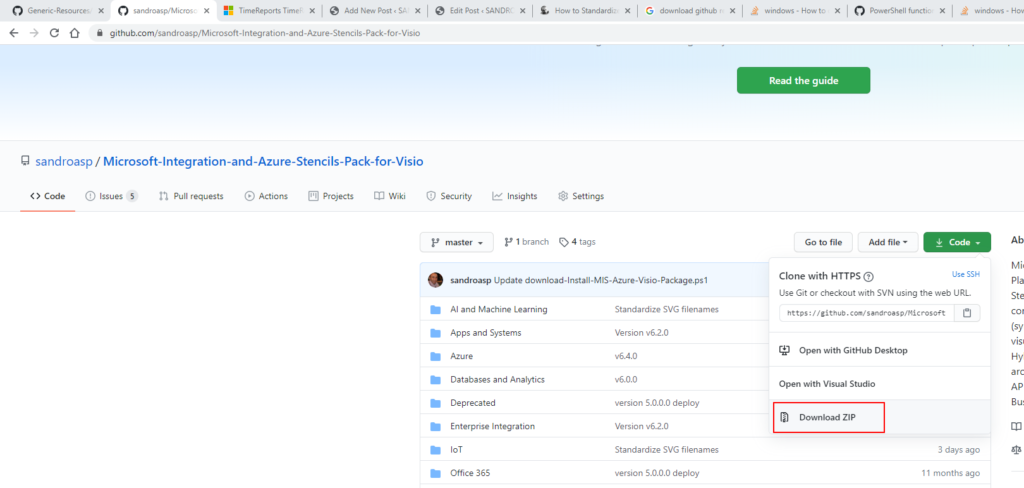
And to achieve that, you can use two ways:
- using the following URL structure:
- https://github.com/[owner]/[repo-name]/archive/[Branch].zip
- This is exactly what Code > Download ZIP does.
- or using the GitHub API using the following URL structure:
- https://api.github.com/repos/[owner]/[repo-name]/zipball/Branch]
Since I was doing all this work, I also decided to make a generic PowerShell function available that will allow you to download any GitHub Repository.
######################################################################
#                                                                                                                                                  #
# Download and Unzip GitHub Repository                                                                                 #
# Author: Sandro Pereira                                                                                                             #
#                                                                                                                                                  #
######################################################################

function DownloadGitHubRepository
{
    param(
       [Parameter(Mandatory=$True)]
       [string] $Name,

       [Parameter(Mandatory=$True)]
       [string] $Author,

       [Parameter(Mandatory=$False)]
       [string] $Branch = "master",

       [Parameter(Mandatory=$False)]
       [string] $Location = "c:\temp"
    )

    # Force to create a zip file
    $ZipFile = "$location\$Name.zip"
    New-Item $ZipFile -ItemType File -Force

    #$RepositoryZipUrl = "https://github.com/sandroasp/Microsoft-Integration-and-Azure-Stencils-Pack-for-Visio/archive/master.zip"
    $RepositoryZipUrl = "https://api.github.com/repos/$Author/$Name/zipball/$Branch"
    # download the zip
    Write-Host 'Starting downloading the GitHub Repository'
    Invoke-RestMethod -Uri $RepositoryZipUrl -OutFile $ZipFile
    Write-Host 'Download finished'

    #Extract Zip File
    Write-Host 'Starting unzipping the GitHub Repository locally'
    Expand-Archive -Path $ZipFile -DestinationPath $location -Force
    Write-Host 'Unzip finished'

    # remove the zip file
    Remove-Item -Path $ZipFile -Force
}
Download
THIS POWERSHELL IS PROVIDED “AS IS”, WITHOUT WARRANTY OF ANY KIND.
You can download this PowerShell script from GitHub:
Hope you find this helpful! If you liked the content or found it useful and would like to support me in writing more, consider buying (or helping to buy) a Star Wars Lego set for my son.





hi I tried this code but I am getting empty response.it is saying that The zip file is invalid. The content is not getting downloaded