


BizTalk Server 2020 – 20 days, 20 posts – day 9. This week I decided to start migrating a project that I enjoy and use in several of my clients: BizTalk Pipeline Components Extensions UtilityPack. And the first component I chose was the Local Archive Pipeline Component.
📝 One-Minute Brief
Introduces the Local Archive Pipeline Component for BizTalk Server 2020, a custom pipeline component that enables automatic archiving of incoming and outgoing messages from receive and send pipelines to local or shared file system locations.
Local Archive Pipeline Component
The BizTalk Server Local Archive Pipeline Component allows you to archive incoming and outgoing messages from any BizTalk adapter. In practice, you can use this component in both receive and send pipelines to persist messages to the file system for troubleshooting, auditing, or monitoring purposes.
More specifically, the component offers the following capabilities:
- You can use it in any stage of a receive or send pipeline.
- Additionally, you can place it in multiple stages within the same pipeline, depending on your requirements.
- Furthermore, it lets you define the destination folder where messages will be stored, whether that is a local folder, a shared folder, or a network location.
- Finally, it works with any BizTalk adapter.
When it comes to file naming, the behavior is straightforward:
- If the adapter promotes the
ReceivedFileNameproperty (for example, the File or FTP adapter), the component automatically uses that value and saves the message with the original filename. - Otherwise, the component falls back to the MessageID, saving the file using the MessageID as the filename, without an extension.
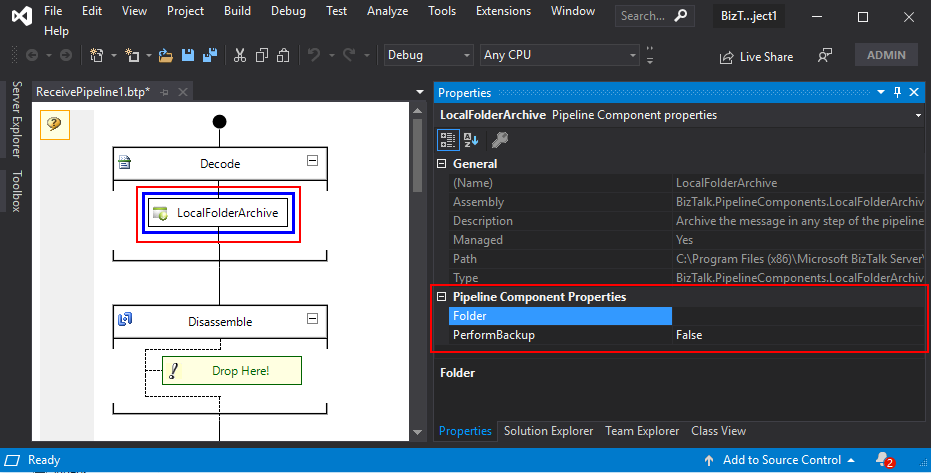
The component has two parameters:
- PerformBackup: True/False value to enable or disable the archive functionality.
- Folder: Local (or shared) folder where you want to perform the archive of the message.
What is BizTalk Pipeline Components Extensions Utility Pack?
BizTalk Pipeline Components Extensions Utility Pack is a set of custom pipeline components (libraries) that can be used in received and sent pipelines, extending BizTalk’s out-of-the-box pipeline capabilities.
The project is available on the BizTalk Server Open Source Community repository on GitHub (https://github.com/BizTalkCommunity), and everyone can contribute new pipeline components to extend or improve existing BizTalk Server capabilities.

At the moment, this project is available for:
- BizTalk Server 2020;
- BizTalk Server 2016;
- BizTalk Server 2010;
- BizTalk Server 2006-2009
Download
You can download BizTalk Pipeline Components Extensions Utility Pack from GitHub:
Hope you find this helpful! If you liked the content or found it useful and would like to support me in writing more, consider buying (or helping to buy) a Star Wars Lego set for my son.



