


Without a doubt, today I encountered one of the most bizarre situations in the BizTalk Server Administration Console: The target principal name is incorrect. Cannot generate SSPI context. (Microsoft SQL Server, Error: 0). And believe me, I have been here a long time.
Everything was working fine, and I was normally working on the environment until I tried to refresh the BizTalk Server Administration Console, and I got the following error:
TITLE: BizTalk Server Administration
——————————
Failed to load Group [SQLSERVERNAME\INSTANCE:BizTalkMgmtDb] data providers. (Microsoft.BizTalk.Administration.SnapIn)
For help, click: http://go.microsoft.com/fwlink/?LinkId=47400&ProdName=Microsoft+BizTalk+Server+2016&ProdVer=3.12.774.0&EvtSrc=Microsoft.BizTalk.Administration.SnapIn.Properties.Errors&EvtID=FailedLoadingGroupProviders&EvtChain=Microsoft.BizTalk.Administration.SnapIn.Properties.Errors+%2cFailedLoadingGroupProviders%3bMicrosoft.BizTalk.Administration.SnapIn.Properties.Errors+%2cFailedLoadingGroupProviders%3bMSSQLServer+%2c0
——————————
ADDITIONAL INFORMATION:
Failed to load Group [SQLSERVERNAME\INSTANCE:BizTalkMgmtDb] data providers. (Microsoft.BizTalk.Administration.SnapIn)
For help, click: http://go.microsoft.com/fwlink/?LinkId=47400&ProdName=Microsoft+BizTalk+Server+2016&ProdVer=3.12.774.0&EvtSrc=Microsoft.BizTalk.Administration.SnapIn.Properties.Errors&EvtID=FailedLoadingGroupProviders&EvtChain=Microsoft.BizTalk.Administration.SnapIn.Properties.Errors+%2cFailedLoadingGroupProviders%3bMSSQLServer+%2c0
——————————
Failed to load Group [SQLSERVERNAME\INSTANCE:BizTalkMgmtDb] data providers. (Microsoft.BizTalk.Administration.SnapIn)
For help, click: http://go.microsoft.com/fwlink/?LinkId=47400&ProdName=Microsoft+BizTalk+Server+2016&ProdVer=3.12.774.0&EvtSrc=Microsoft.BizTalk.Administration.SnapIn.Properties.Errors&EvtID=FailedLoadingGroupProviders&EvtChain=MSSQLServer+%2c0
——————————
The target principal name is incorrect. Cannot generate SSPI context. (Microsoft SQL Server, Error: 0)
For help, click: http://go.microsoft.com/fwlink?ProdName=Microsoft+SQL+Server&EvtSrc=MSSQLServer&EvtID=0&LinkId=20476
——————————
BUTTONS:
OK
——————————
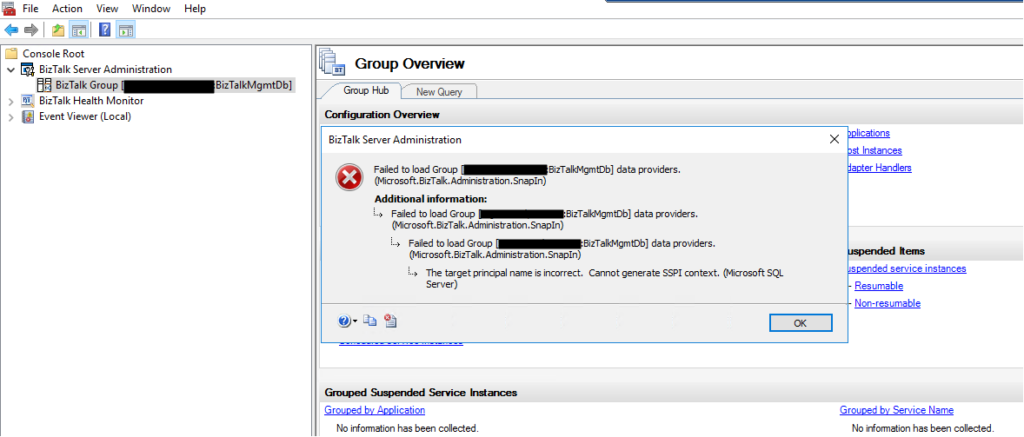
But let me give some context because problems will not happen without any reason. I was normally working with the BizTalk Server Administration Console until I got a notification that my password would expire in 5 days and, at the same time, suggested that I change it right away and… I did that for once in my life, I followed the recommendation and did not wait any longer to change the password.
Once I successfully updated my password and remote access to my environment, I started getting this issue in the admin console.
📝 One-Minute Brief
Explains how to troubleshoot and fix the BizTalk Server Administration Console error “The target principal name is incorrect. Cannot generate SSPI context”, which prevents the console from loading BizTalk group data.
Cause
Unfortunately, after I successfully updated my password and remote access to my environment, I didn’t go directly to the BizTalk Server administration console. I was doing some configuration in IIS regarding SSL, and only after a few minutes, I went to the admin console and got this bizarre issue.
I did the basic tasks you usually do in these situations, nothing related to this particular error, but in general:
- Restart the host instances and Enterprise Single Sign-On.
- Check whether the WMI service is running, or restart it.
- Close the BizTalk Administration Console and open it again.
- Open the SQL Server Management Studio and try to connect to the BizTalk SQL Instance.
The curious thing is that all host instances and the ESSO service were working fine, and they were able to restart successfully. I was able to connect to the BizTalk SQL Server Instance from the BizTalk Server machine using SSMS, but none of them resolved the issue with the BizTalk admin console.
And this error may happen for other reasons, but you have to understand my scenario:
- in one minute, everything was working fine, and now it was failing.
- And the only difference was that I had to change my password.
I do not know how to better explain the cause of the issue in my case, but, in simple words, it was related to some bizarre system credential cache.
Solution
I was able to fix this issue by simply:
- Logging out of the BizTalk Server machine, where I was executing the BizTalk Server
Administration Console. - And logging back in again.
Once I logged back in to the BizTalk Server machine, I was able to work normally with the BizTalk Administration Console once again.

Hope you find this helpful! If you liked the content or found it useful and would like to support me in writing more, consider buying (or helping to buy) a Star Wars Lego set for my son.




My issue was the Service Account was Locked out. One I got it unlocked it worked again.