

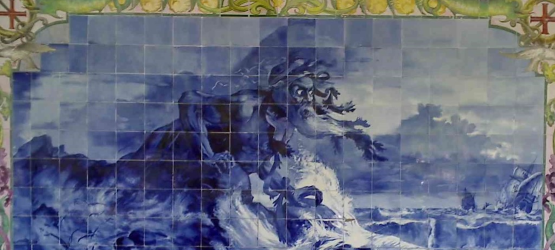
I’m not much of a historian, and I don’t read too many history books, but from what I can remember from my school days… (please be open-minded and do not think I’m completely crazy…the story will have a context and meaning at the end)
📝 One-Minute Brief
When migrating maps from BizTalk 2006 R2 to 2013 R2, functoids placed at the extreme bottom-right of the grid may become invisible due to a change in the grid’s workspace dimensions (from rectangle to square). This post explains how to recover these “vanished” functoids by moving them toward the center of the grid in the original version or manually editing the .btm XML.
The Story
A few hundred years ago many cultures around the world still believe that the planet Earth was a flat disk or a square, rather than a sphere, at the edge, there were infinite length cliffs straight down into the darkest depths.
Myths of the age of discovery, where the Portuguese ships, then Spanish, were the first to set sail to discover the world, leaving the coastal waters of the Old World and embarked on their adventure on the vast “green sea of darkness said that Europe sat in the middle of the circle, with the other continents scattered about the fringes, and parts of Africa hanging over the edge and the oceans lapped against the sides of the Earth, and in places ran over, creating currents that would pull over the edge ships that ventured too far out to sea.

Luís de Camões, considered the Portuguese language’s greatest poet, has created a mythical figure: the giant Adamastor (Northwind), as a symbol of the forces of nature Portuguese navigators had to overcome during their discoveries and more specifically of the dangers Portuguese sailors faced when trying to round the Cape of Storms, in Africa and supposedly one of the edges of the earth. A giant creature that appears to them, walking in the depths of the sea; his head reaches to the clouds; the storms, the winds, the thunder, and the lightning hang about him; his arms are extended over the waves.

It seems once again that a Portuguese sailor (me) found the giant Adamastor… this time inside BizTalk Mapper Editor! Tormenting me and not letting me go further, and my FunctoIds vanished into hell’s darkest depths.
Problem (the story’s meaning and context)
Over the last weeks, I’ve been busy performing BizTalk project migrations from BizTalk Server 2006 R2 to 2013 R2, and, unintentionally, it seems that I can pick up and detect all the “bugs”, problems, or limitations that you might imagine… or not, this is one of the cases. The problem that I faced today it is the craziest behavior that I found in the BizTalk Mapper Editor, and made me remember this story and that I reached and went over to the edge of “flat Earth”, in this case to the end of the grid page world!
In a global picture, migrating a map is a straightforward and quite simple operation; there is no rock science behind it! Most of the time, you don’t need to touch them; they are compatible.
However, it was a big surprise to me when I was in the process of optimizing one of the maps, I found out in one of the grid pages that I could not reach, and even see, some of the FunctoIds present, although I was able to see their existence through the links in the grid page

I know what you may think… zoom out the grid and/or collapse the tree view… nothing!

Ok… check the Grid preview… still nothing!

Believe me, I tried everything that I could remember, including restarting Visual Studio and so on…
So, just to be sure that I wasn’t insane, I went to Visual Studio 2005 to open the BizTalk Server 2006 R2 version of the project, to check what was in that particular part of the grid page, and voilà… I found 6 FunctoIds that were making conditional transformations

Cause: So, where are my FunctoIds on the grid page?
Before I explain the problem and the solution (or workaround) I like to say that this is not a runtime bug, which means if I had deployed this map to my BizTalk environment everything would work fine. Instead, this is a “bug”/”limitation” of the BizTalk Server SDK, which will turn your life into hell, and it will drive you crazy if you’d like to change that part of the map.
What I found out is that the configurations of the working area (space) of the grid page, at least since BizTalk Server 2013, have changed. Now the working area of the grid page is in a square format and previously it was in a rectangle format, as you can see below:

Despite this change, I never thought that this would affect the development and maintenance of my maps… but it does!
Solution (workaround)
When I check the old version of the project inside Visual Studio 2005, I realize that the FunctoIds that I was trying to reach were at the bottom right corner, at the very end of the working area of the grid page, with a large space gap for the remaining FunctoIds present in the middle of the grid page working area.

To solve this problem, I dragged the FunctoIds from the bottom right corner into the middle of the grid page working area, narrowing down the space gap between them, but most importantly, placing all the FunctoIds near the center of the grid page working area:

Then you just need to save this version of the map (Visual Studio 2005), take the .btm file, and you only need to overlay this map to the existing one in your Visual Studio 2013/BizTalk Server 2013 R2 solution.

Finally, my FunctoIds are visible! And once again, the giant Adamastor was defeated.
Hope you find this helpful! If you liked the content or found it useful and would like to support me in writing more, consider buying (or helping to buy) a Star Wars Lego set for my son.




Good article.
If anti giant Adamastor sword (VS 2005) is not available maybe a modern weapon (Text editor) can save you from Adamastor.
Open .btm file look for collection, change all X-Cell and Y-Cell coordinates to something like 1,1 2,2 … and save file. Open with VS and bingo functiods magically show at top of the page
Obrigado
ROTFL… nice to know another trick, thanks for sharing here.