


Introduction
Maps or transformations are one of the most common components in the integration processes. They act as essential translators in the decoupling between the different systems to connect. In this article, as we explore the BizTalk Mapper Designer, we will explain its main concepts, covering several themes such as product architecture, BizTalk Schemas, and some of the most widely used standards in the translation of messages.
This article intends to be an introductory note for those taking the first steps in this technology.
We can define BizTalk, in a very generic and simple manner, as a server for message routing, capable of handling, validate, transform and control numerous processes, simplifying the needs of adjustments to connect each system, i.e., is a tool and infrastructure unique, ideal to be used primarily for Enterprise Application Integration (EAI), Business to Business (B2B) Integration. Besides the patterns “Fire & Forget”, BizTalk Server is also used for more complex scenarios where the business logic (workflow) depends on various messages that need to be correlated with orchestrations – Business Process Management (BPM) solutions. In this article, we will focus only on the process of mapping and transformation of messages.
📝 One-Minute Brief
This article is the first in a comprehensive series on BizTalk Server mapping. It introduces the fundamental role of maps as translators in integration processes, decoupling systems to allow seamless communication. Sandro provides an architectural overview of how messages flow through physical ports (Receive/Send) and pipelines, explaining the critical role of XML schemas and internal routing via the MessageBox. It serves as an essential primer for beginners entering the world of Enterprise Application Integration (EAI) and Business Process Management (BPM).
Architecture
All messages are received by BizTalk through physical ports, called Receive Ports. A Receive Port is a logical container for one or several receive locations, whereas the Receive Locations are where you specify the details about the transport to be used, the exact address where the message is to be received, and any other specific properties to that transport type, as you can see in the following example:
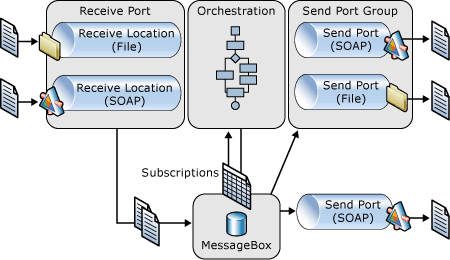
A FILE adapter could be, for example, a network folder (\\fileshare.local\orders\) with a filter (*.edifact), and in parallel, we could also be receiving orders from a Web Service (SOAP/REST/XML).
When a message is received from the adapter, it will execute a pipeline. A Pipeline is a simple sequential composition of components whose main objective is:
- Translate and transform messages, which may be in different formats: text files (Flat File), compressed files (ZIP), to the format that BizTalk uses internally to process messages: XML (Extensible Markup Language).
- Validate incoming messages: In its normal functioning, BizTalk Server only processes messages that are internally recognized. For that, it uses XML Schema that allows describing the structure (records, elements, attributes, namespace, names, data types) and that also defines the validation rules (whether it is required or not, the number of times the element may appear (occurrence), hierarchy) of the XML messages.
Then the messages are dumped inside the MessageBox (database) where the different subscribers (1 or more interested in this message) will subscribe to the message and receive it. These subscribers can be other physical ports, typically, send Ports (for message routing scenarios) or orchestrations, launching new processes or waking up those who were waiting (through correlated fields)
Note: The key to understanding port terminology in BizTalk is to understand the notions of logical ports (also called orchestration ports) and physical ports. To oversimplify, it’s the difference between creating ports in Orchestration Designer (logical) and using BizTalk Explorer or BizTalk Administration Console (physical). When a developer creates a Specify Later port in Orchestration Designer, he’s configuring a logical port, leaving the corresponding physical port properties to be configured later by the BizTalk administrator. Giving the administrator the flexibility to configure the physical port in the production environment is a key reason why Specify Later is the most frequently used option.
Related links
- BizTalk Server: Basics principles of Maps – What are maps and where BizTalk can use them? (Part 2)
- BizTalk Server: Basics principles of Maps – Introduction to map editor (Part 3)
- BizTalk Server: Basics principles of Maps – Basic maps functionalities (Document mapping) (Part 4)
- BizTalk Server: Basics principles of Maps – Organizing Maps (Part 5)
- BizTalk Server: Basics principles of Maps – Testing and Validation of maps (at design time) (Part 6)
For those looking to move beyond the basics of message transformation, I highly recommend checking out my eBook, BizTalk Mapping Patterns & Best Practices, published in partnership with BizTalk360.
This resource is a deep dive into the real-world challenges of data transformation. It covers:
- Mapping Patterns: From simple field-to-field links to complex structural shifts.
- Performance Optimization: How to build maps that don’t slow down your environment.
- XSLT vs. Functoids: Knowing exactly when to use built-in tools and when to write custom code.
Whether you are maintaining a legacy BizTalk 2010 environment or planning a migration, these patterns are the foundation of clean, maintainable integration.
Download the full eBook here: BizTalk Mapping Patterns & Best Practices
Hope you find this helpful! If you liked the content or found it useful and would like to support me in writing more, consider buying (or helping to buy) a Star Wars Lego set for my son.




Nice article Sandro! Very well explained and helpfull! Looking forward to the rest of the series.