


When trying to configure BAM features in BizTalk Server 2010 (64-bit) with a remote SQL Server 2008 R2 (64-bit), I was getting these two errors:
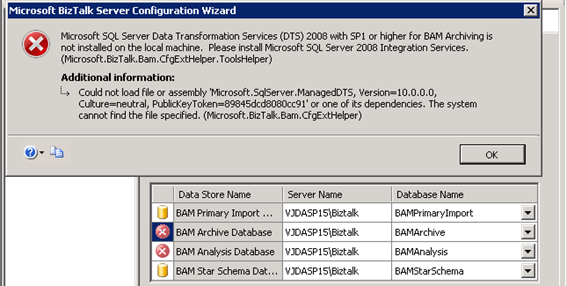
When trying to configure the BAM Archive Database
Microsoft SQL Server Data Transformation Services (DTS) 2008 with SP1 or higher for BAM Archiving is not installed on the local machine. Please install Microsoft SQL Server 2008 Integration Services. (Microsoft.BizTalk.BAM.CfgExtHelper.ToolsHelper)
And when trying to configure BAM Analysis Database
Microsoft SQL Server Data Transformation Services (DTS) 2008 with SP1 or higher for BAM Archiving is not installed on the local machine. Please install Microsoft SQL Server Integration Services 2008 with SP1 or higher. (Microsoft.BizTalk.BAM.CfgExtHelper.ToolsHelper)
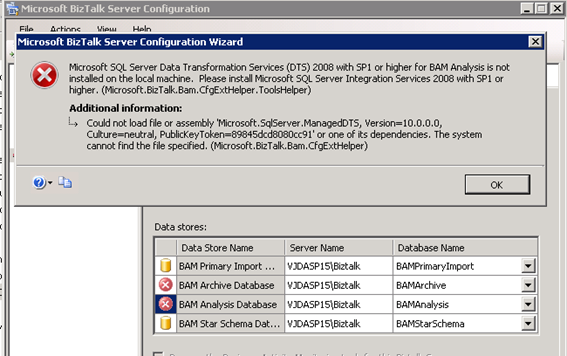
Both errors have the same additional information:
——————————
ADDITIONAL INFORMATION:
Could not load file or assembly ‘Microsoft.SqlServer.ManagedDTS, Version=10.0.0.0, Culture=neutral, PublicKeyToken=89845dcd8080cc91’ or one of its dependencies. The system cannot find the file specified. (Microsoft.BizTalk.Bam.CfgExtHelper)
📝 One-Minute Brief
When configuring BAM Tools in BizTalk Server 2010 (64-bit) with a remote SQL Server 2008 R2, you may encounter errors claiming that SQL Server DTS or Integration Services (SSIS) are missing. This is often misleading. The actual cause is that the 32-bit BizTalk Configuration Wizard requires specific 32-bit client components to communicate with a 64-bit SQL Server. To fix this, you must install the SQL Server 2008 R2 Management Tools (Basic and Complete), Connectivity Components, and Legacy Components on the local BizTalk machine.
Cause
As Kent Weare said in his post: “This error makes it sound like you need to install SQL Server Integration Services (SSIS), which is a little misleading.”
The documentation on MSDN indicates the following: What 64-bit SQL Server components are required to configure BAM tools?
The configuration wizard is a 32-bit process; therefore, it requires certain components that allow it to communicate with 64-bit SQL Server. You must install the following SQL Server client components to enable configuration of BAM tools:
- Connectivity Components
- Management Tools
- Legacy Components
Solution
- Install the SQL Server 2008 R2 Management Tools (Basic & Complete) features as shown in the screenshot onto the BizTalk Server 2010:
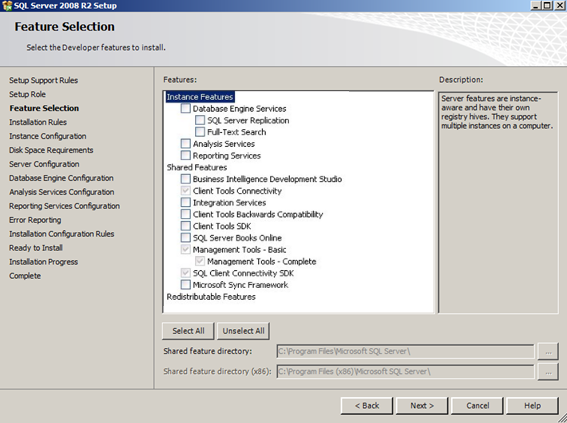
Once these components are installed, restart the BizTalk Configuration Wizard. You should now be able to configure the BAM Archive and Analysis databases without the DTS error.




Saved me a ton of time. Thanks for posting!
Sandro,
Just to say thanks for all the great information you have posted about Biztalk installation. You have helped me through a number of issues already and i’m positive i’ll be back onto your blog for more information..
keep up the good work 🙂
OldBeno…
Thanks for this!
I didn’t read this before I installed SSIS on my Biztalk servers though 🙂
But now I am up and running (withous SSIS)
Thank you SO MUCH!!!
Sandro you are a life saver.
Thanks all for the comments!
No need to install SSIS on biztalk server ????
You only need to install SQL Server client components to enable BAM tools configuration
Hi, is it possible to configure BAM pointing to a separate database machine? Let me elaborate. Due to client restrictions, the datacenter will not install the reporting, notification and analysis services on the SQL Cluster. Only the database engine resides in the cluster. So I wonder if I can install these on a separate server and use it in BizTalk. Something like this:
[BizTalk Server]——[Database Server]
|——-[Reporting Server]—–|
The BizTalk 2010 and the Reporting Server use the Database Server and BizTalk uses the Reporting Server for BAM.
Is this possible? Thank you for any help.
Hi Aecio, you can configuring BAM Tools in a multi-server environment, check Installing BizTalk Server 2010 and BAM in a Multi-Computer Environment.docx in the BizTalk Server 2010 Documentation: http://www.microsoft.com/en-us/download/details.aspx?id=11503
and some help here: http://msinnovations.wordpress.com/2009/11/05/configuring-bam-tools-on-w2k8-r2/ and http://biztalk2013.blogspot.pt/2013/03/cannot-configure-bam-on-separate-sql.html
Hi Sandro, thank you for your reply. In this article, it shows exactly how to install BAM in a multi-computer environment, but even in this scenario, you need to install SSIS and SSAS in the SQL server. What I thought of doing is installing a separate database in the BAM server (3-server configuration as in that article) and install SSIS and SSAS on that BAM server, but I don’t know if that would work, having two separate databases, one for the messagebox and other BizTalk tables and one for BAM tables in the BAM server. Have you ever seen this before?
My problem is that the datacenter does not allow installing SSIS and SSAS on the SQL Cluster.
Thanks
Ops, I forgot to paste the link to the article. But you know it already, there is a comment by you at the end 🙂
http://social.technet.microsoft.com/wiki/contents/articles/1888.install-and-configure-bam-business-activity-monitoring-in-a-multi-computer-environment.aspx#Scenario
The same stil has to be done for BizTalk Server 2013 and BizTalk Server 2013 configuration
Thank you! This saved me a lot of time!
Hello, Sandro Pereira, I follow your blogs for any help I require and I always get answers from them. You may not know but you made life easy for many people. I have a situation here. I am configuring Biztalk 2006 R2 and I am getting the same error. Our Admin confirmed that the components mentioned in the article are already installed in the server where SQL is installed. Just to Clarify, BizTalk is installed in Server A, and SQL installed in Server B. BizTalk is configured with Databases in Server B. All configurations were successful except for BAM tools. I am getting the same error. Should these
Connectivity Components
Management Tools
Legacy Components
be installed in Server A also where BizTalk is installed? Please help me with this.
Hi Sandro.
I’m dealing with this problem.
I’ve already followed your post for installing Biztalk 2010 and when configuring Biztalk on Step8
(https://sandroaspbiztalkblog.wordpress.com/2010/10/24/biztalk-2010-installation-and-configuration-installing-and-configuring-biztalk-server-part-8/)
Receive an error message when trying to configure BAM Alerts
Error: 2016-10-07 13:56:09:0516 [Error] BAMTools The version of Microsoft SQL Server Analysis Services on server LSABZTK01 must be the equivalent version as on the SQL server of the BAM Primary Import Database. (Microsoft.BizTalk.Bam.CfgExtHelper.ToolsHelper)
How can I solve this problem?
Was seeking a lot of forums and looked for many troubleshootings websites.
All seems to be just fine, however error messasegs persist when trying to configure this feature.
Regards.-