


BizTalk Server 2020 – 20 days, 20 posts – day 4. Again, a bit behind on this post, I need to recover the missing days, but I will get there. Today I have chosen to migrate another productivity tool that I use often, especially when I’m working with pure pub-sub solutions: BizTalk Filter Finder Tool, to be compatible with BizTalk Server 2020. I hope you enjoy and find this tool useful.
📝 One-Minute Brief
Introduces the BizTalk Filter Finder Tool for BizTalk Server 2020, a productivity utility that helps analyze and understand content‑based routing by quickly identifying filters used by send ports and orchestrations.
BizTalk Filter Finder Tool
BizTalk Filter Finder Tool is a simple tool that aims to simplify the process for better understanding and maintaining solutions based on pub-sub and content-based routing. By allowing you to have a quick overview of all the artifacts, send ports, or orchestrations that have filters associated.
This tool will extend default BizTalk Server capabilities transforming this tedious and sometimes complicate analyze a little simple, easy and fast.
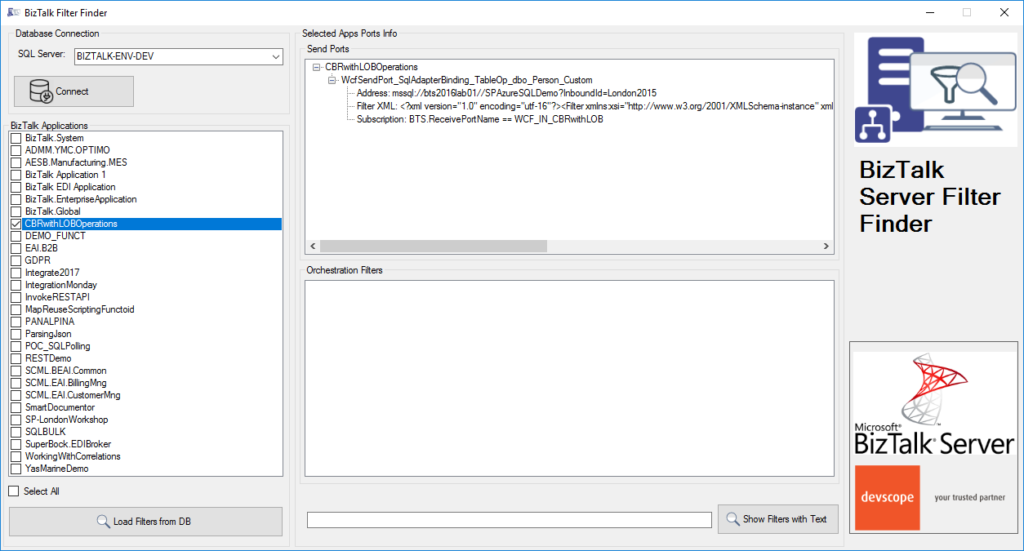
This tool will extend default BizTalk Server capabilities transforming this tedious and sometimes complicate analysis a little simple, easy and fast. You can read more details about this tool in the original post here: BizTalk Filter Finder Tool.
Other versions
This tool is also available for the following BizTalk Server versions:
- BizTalk Filter Finder Tool for BizTalk Server 2016
- BizTalk Filter Finder Tool for BizTalk Server 2013 R2
Download
You can download the BizTalk Filter Finder Tool from GitHub:
Hope you find this helpful! If you liked the content or found it useful and would like to support me in writing more, consider buying (or helping to buy) a Star Wars Lego set for my son.



