


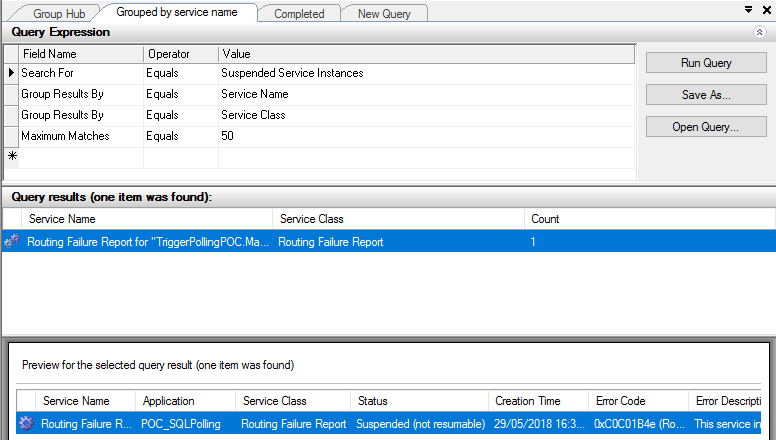
One of the annoying things about working with Direct Bound Ports in Orchestrations, especially MessageBox direct bound ports that allow us to easily implement decoupled publish-subscribe design patterns, is that you may end up with a lot of Routing Failure Report Instances in the state Suspended (not resumable).
The error-handling properties facility allows us to automated handling of messaging failures as an alternative to the traditional (now default) behavior of placing failed messages in the Suspended queue. This automated handling routes an error message to any subscribing routing destination, such as a send port or orchestration. The error message is a clone of the original message, with all previously promoted properties demoted and selected properties related to the specific messaging failure promoted to the message context.
📝 One-Minute Brief
Automate the cleanup of BizTalk Routing Failure Report service instances stuck in Suspended (not resumable) state. This guide shows how to use PowerShell and BizTalk WMI queries to find these instances and terminate them safely, especially in Direct Bound Port orchestration scenarios where standard ErrorReport subscriptions don’t apply.
Normally, the easy way to implement this is to create a Send Port with the following filter:
- ErrorReport.ErrorType = “FailedMessage”
Nevertheless, because we are using an orchestration with Direct Bound Ports, the orchestration will receive a PersistenceException that you can handle inside our business flow; however, is also create a Routing Failure Report Instance in the state Suspended (not resumable) without any ErrorReport property promoted.
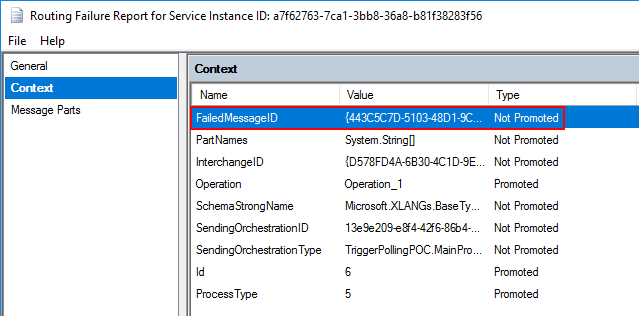
So, we cannot easily automate these kinds of instances.
An alternative solution to automate this task is, inside the Error Handler, to invoke a helper class library that deletes all these instances once they occur in a controlled fashion way:
...
using (PowerShell PowerShellInstance = PowerShell.Create())
{
    StringBuilder pscript = new StringBuilder();
    pscript.AppendLine(@"[STRING]$SQLInstance = get-wmiobject MSBTS_GroupSetting -namespace root\MicrosoftBizTalkServer | select-object -expand MgmtDbServerName");
    pscript.AppendLine(@"[STRING]$BizTalkManagementDb = get-wmiobject MSBTS_GroupSetting -namespace root\MicrosoftBizTalkServer | select-object -expand MgmtDbName");
    pscript.AppendLine(@"[STRING]$BizTalkGroup = ""$SQLInstance"" + "":"" + ""$BizTalkManagementDb""");
    pscript.AppendLine(@"[ARRAY]$suspendedMessages = get-wmiobject MSBTS_ServiceInstance -namespace 'root\MicrosoftBizTalkServer' -filter '(ServiceStatus=32 and ServiceClass=64 and ServiceName like ""<name_of_our_orchestration>"")'");
    pscript.AppendLine(@"foreach ($msgSuspended in $suspendedMessages){");
    pscript.AppendLine(@"$msgSuspended.InvokeMethod(""Terminate"",$null)}");

    PowerShellInstance.AddScript(pscript.ToString());
    PowerShellInstance.Invoke();
}
...
How to check terminate Suspended (not resumable) Routing Failure Report Instances with PowerShell
Using PowerShell is a good option to deleting all these message types; you can send a report and delete it, or simply delete it. Windows PowerShell is a Windows command-line shell designed especially for system administrators and can be used by BizTalk administrators to help them automate repetitive tasks or tasks that are time-consuming to perform manually.
Because I was controlling the error inside the main orchestration, I don’t have the need for an additional report, so this is a simple script that will allow you to delete all Routing Failure Report Instances suspended with the state Suspended (not resumable) from your BizTalk Server environment:
#Get all Suspended (not resumable) Routing Failure Report Instances
[ARRAY]$suspendedMessages = get-wmiobject MSBTS_ServiceInstance -namespace 'root\MicrosoftBizTalkServer' -filter '(ServiceStatus=32 and ServiceClass=64)'

foreach ($msgSuspended in $suspendedMessages)
{
    $msgSuspended.InvokeMethod("Terminate",$null)
}
Download
THIS POWERSHELL IS PROVIDED “AS IS”, WITHOUT WARRANTY OF ANY KIND.
You can download Terminate Suspended (not resumable) Routing Failure Report Instances PowerShell from GitHub here:
Hope you find this helpful! If you liked the content or found it useful and would like to support me in writing more, consider buying (or helping to buy) a Star Wars Lego set for my son.




With the given code i got below error:
Login failed for user ‘NT AUTHORITY\ANONYMOUS LOGON’
In my case, the errors appear when BizTalk and SQL Server are on separate servers, when run in a “multi-server” environment.
Could you please help us
Exception calling “TerminateInstance” with “1” argument(s): “Object reference not set to an instance of an object.”
+ $TerminateOperation.TerminateInstance($msgid) | Out-null
+ ~~~~~~~~~~~~~~~~~~~~~~~~~~~~~~~~~~~~~~~~~~~~~~~~~~~~~~~~
+ CategoryInfo : NotSpecified: (:) [], MethodInvocationException
+ FullyQualifiedErrorId : NullReferenceException
Hi,
I have a question. In the script the instances are saved into variable $suspendedMessages. If I want to further filter based on the context of the message will it everytime connect to Biztalk or will it retrieve from variable.
Hello;
It’s possible to terminate the instances running some queries in Sql server ? different from exec bts_CleanupMsgbox , which is not recommended by Microsoft in production environments.
Or the best (secure) option is by PowerShell?
thanks
Maybe it is possible but for me, the best way will be using PowerShell or BizTalk Server Management API
Thanks.