

Why Antivirus Software Matters for BizTalk Server Performance
Checking whether Windows Defender or another antivirus solution is running on a BizTalk Server is extremely important. Antivirus software can significantly affect BizTalk Server performance, especially in resource‑constrained environments.
I have created several BizTalk Server 2016 Developer environments on Azure using virtual machines. When doing so, I carefully choose the VM disk type and size. SSD disks offer better performance, but they are expensive. For example, a 4‑core machine with 28 GB of RAM and an HDD can cost close to €430 per month. Because of this pricing, I often select more modest configurations, such as 1 core with 3.5 GB of RAM or up to 4 cores with 8 GB of RAM.
These machines tend to be slower, which makes proper tuning essential.
Windows Defender and BizTalk Server
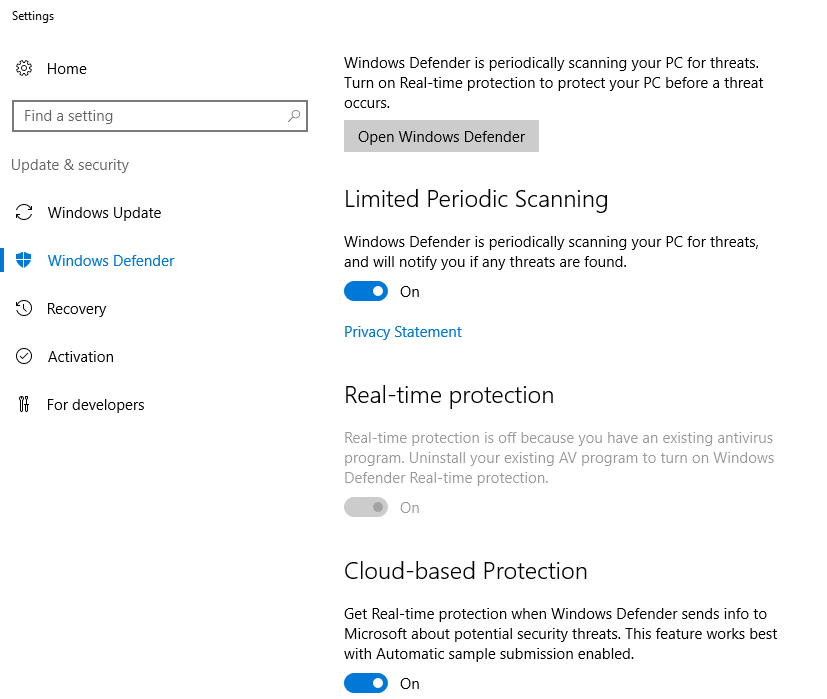
By default, Windows Defender runs on these virtual machines. This configuration can negatively impact overall machine performance and, more importantly, BizTalk Server performance.
Antivirus software performs background scanning that competes for CPU, memory, disk I/O, and file system access. BizTalk Server relies heavily on disk operations and file polling, which makes it particularly sensitive to real‑time antivirus scanning.
📝 One-Minute Brief
One-Minute Brief (TL;DR):
Recommended Antivirus Approach for BizTalk Environments
The best practice for BizTalk Server environments is a perimeter‑based antivirus approach. In this model, you protect the environment boundaries instead of running antivirus software directly on the BizTalk Server machines.
When this approach is not possible, you should at least configure the antivirus software correctly. Disable real‑time scanning for BizTalk Server executable files and file drop locations. Real‑time scanning of folders used by receive locations can severely degrade performance.
If antivirus software runs on the BizTalk Server computer, follow these minimum guidelines:
- Exclude any folders or file shares monitored by BizTalk Server
- Exclude BizTalk Server executable files from scanning
- Disable real‑time scanning of non‑executable files processed by receive locations (such as XML, CSV, or TXT files)
So, I created this simple PowerShell script to use in all my environments just to check if Windows Defender is installed and enabled by default in Windows Server 2016, which is running on the Server:
Try
{
    $defenderOptions = Get-MpComputerStatus

    if([string]::IsNullOrEmpty($defenderOptions))
    {
        Write-host "Windows Defender was not found running on the Server:" $env:computername -foregroundcolor "Green"
    }
    else
    {
        Write-host "Windows Defender was found on the Server:" $env:computername -foregroundcolor "Cyan"
        Write-host "   Is Windows Defender Enabled?" $defenderOptions.AntivirusEnabled
        Write-host "   Is Windows Defender Service Enabled?" $defenderOptions.AMServiceEnabled
        Write-host "   Is Windows Defender Antispyware Enabled?" $defenderOptions.AntispywareEnabled
        Write-host "   Is Windows Defender OnAccessProtection Enabled?"$defenderOptions.OnAccessProtectionEnabled
        Write-host "   Is Windows Defender RealTimeProtection Enabled?"$defenderOptions.RealTimeProtectionEnabled

        if($defenderOptions.RealTimeProtectionEnabled)
        {
            $windowsShell = new-object -comobject wscript.shell
            $questionResult = $windowsShell.popup("Do you want to disable Real Time Protection?", 0,"Not at this moment.",4)
            If ($questionResult -eq 6) {
             Set-MpPreference -DisableRealtimeMonitoring $true
                Write-host "Windows Defender Real Time Protection was successfully disabled" -foregroundcolor "Green"
                Write-host "Nevertheless Windows Defender is still running"
            }
        }
    }
}
Catch
{
    Write-host "Windows Defender was not found running on the Server:" $env:computername -foregroundcolor "Green"
}
Output type:
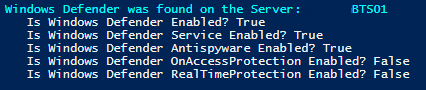

The script, not only allows you to check if Windows Defender is running on BizTalk Server but, if the Windows Defender is running and you have Real-Time Protection enabled it will allow you to disable this feature if you want – nevertheless, by disabling it the Windows Defender will still be running, the only thing is not doing is real-time protection to scan everything you download or run on Server.
Download
THIS POWERSHELL IS PROVIDED “AS IS”, WITHOUT WARRANTY OF ANY KIND.
You can download PowerShell to check if Windows Defender is running on the Server from GitHub here:
Hope you find this helpful! If you liked the content or found it useful and would like to support me in writing more, consider buying (or helping to buy) a Star Wars Lego set for my son.




1 thought on “BizTalk Assessment: How to check if Windows Defender is running on BizTalk Server with PowerShell”