


Today I want to talk to you about two small optimizations that are often forgotten but have performance implications. Some of these implications may be noticed more in the early days of our BizTalk environment when the databases are small or almost empty, and often need to increase; others can have an impact later when databases are large, and the percentage increase is also too large.
📝 One-Minute Brief
The post clarifies the technical and functional differences between Distinguished Fields and Promoted Properties in BizTalk Server. While Distinguished Fields are lightweight and ideal for internal orchestration logic (with no 256-character limit), Promoted Properties are essential for message routing, correlation, and tracking, despite their higher performance overhead and size constraints.
By default, BizTalk Server databases are defined with a small file size and with the parameter Autogrowth set to:
- Increase by 1 MB for the database file
- And by 10% for the log file
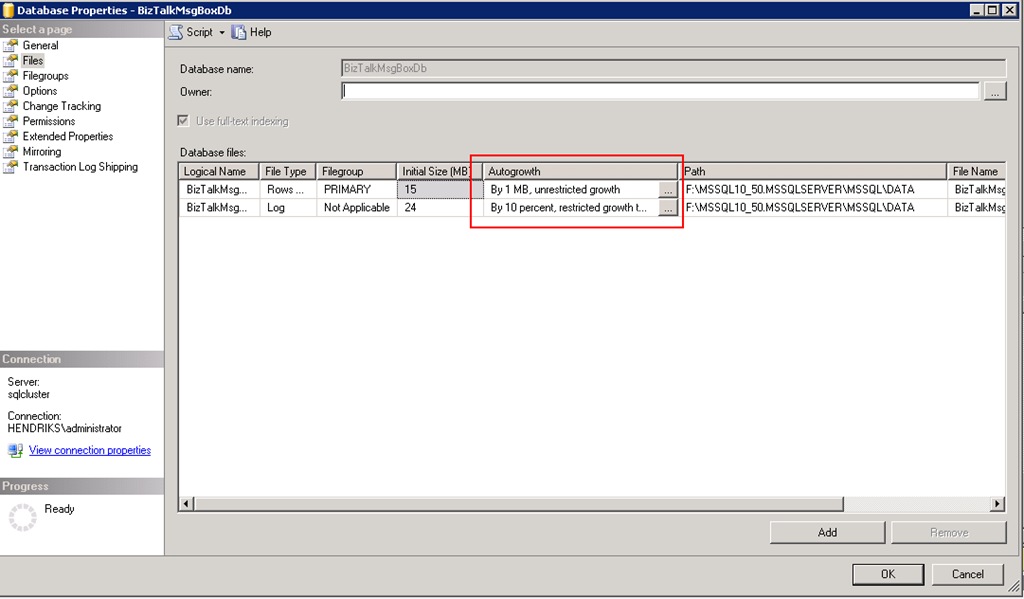
There’s a great post from Jeroen Hendriks: Checking database auto-growth settings, where it is explained how we can check all BizTalk Server database settings using an SQL query, and also Database file size – data collection, so that we can recommend the right values.


So what’s the problem with these settings?
Auto growth setting plays an important role in BizTalk configuration for performance reasons. Why?
SQL Server database auto-growth is a blocking operation that hinders BizTalk Server database performance. When SQL Server increases the size of a file, it must first initialize the new space before it can be used. This is a blocking operation that involves filling the new space with empty pages.
Therefore, it’s recommended to:
- Set this value (databases auto-growth) to a fixed value of megabytes instead of to a percentage, so SQL Server doesn’t waste its resources expanding the data and log files during heavy processing. This is especially true for the MessageBox and Tracking (DTA) databases:
- In a high-throughput BizTalk Server environment, the MessageBox and Tracking databases can significantly increase. If auto-growth is set to a percentage, then auto-growth will be substantial as well.
- As a guideline for auto-growth, for large files increment should be no larger than 100 MB, for medium-sized files 10 MB, or for small files 1 MB.
- This should be done so that, if auto-growth occurs, it does so in a measured fashion. This reduces the likelihood of excessive database growth.
- Also, allocate sufficient space for the BizTalk Server databases in advance to minimize the occurrence of database auto-growth.
How can I implement these optimizations?
You can do these optimizations in two ways:
- Manually, by opening Microsoft SQL Server Management Studio.
- Maximize your SQL Server and then the Databases.
- Right-click on the database, for example, BizTalkMsgBoxDb, and select the Properties option.
- In the Database Properties window, select the Files page option, and then you can check and change the Autogrowth property associated with the database and log file.

However, checking and changing all BizTalk databases manually is too much work and can be a little boring …
- Or you can do this by running the following SQL Script:
ALTER DATABASE BizTalkDTADb MODIFY FILE (NAME = BizTalkDTADb , SIZE = 2GB , FILEGROWTH = 100MB)
GO
ALTER DATABASE BizTalkDTADb MODIFY FILE (NAME = BizTalkDTADb_log , SIZE = 1GB , FILEGROWTH = 100MB)
GO

ALTER DATABASE BizTalkMgmtdb MODIFY FILE (NAME = BizTalkMgmtDb , SIZE = 512MB , FILEGROWTH = 100MB)
GO
ALTER DATABASE BizTalkMgmtdb MODIFY FILE (NAME = BizTalkMgmtDb_log , SIZE = 512MB , FILEGROWTH = 100MB)
GO

ALTER DATABASE BizTalkMsgBoxDb MODIFY FILE (NAME = BizTalkMsgBoxDb , SIZE = 2GB , FILEGROWTH = 100MB)
GO
ALTER DATABASE BizTalkMsgBoxDb MODIFY FILE (NAME = BizTalkMsgBoxDb_log , SIZE = 2GB , FILEGROWTH = 100MB)
GO

ALTER DATABASE SSODB MODIFY FILE (NAME = SSODB , SIZE = 512MB , FILEGROWTH = 100MB)
GO
ALTER DATABASE SSODB MODIFY FILE (NAME = SSODB_log , SIZE = 512MB , FILEGROWTH = 100MB)
GO

ALTER DATABASE BAMPrimaryImport MODIFY FILE (NAME = BAMPrimaryImport , SIZE = 150MB , FILEGROWTH = 10MB)
GO
ALTER DATABASE BAMPrimaryImport MODIFY FILE (NAME = BAMPrimaryImport_log , SIZE = 150MB , FILEGROWTH = 10MB)
GO

ALTER DATABASE BAMArchive MODIFY FILE (NAME = BAMArchive , SIZE = 70MB , FILEGROWTH = 10MB)
GO
ALTER DATABASE BAMArchive MODIFY FILE (NAME = BAMArchive_log , SIZE = 200MB , FILEGROWTH = 10MB)
GO

ALTER DATABASE BizTalkRuleEngineDb MODIFY FILE ( NAME = BizTalkRuleEngineDb , FILEGROWTH = 1024KB )
GO
ALTER DATABASE BizTalkRuleEngineDb MODIFY FILE ( NAME = BizTalkRuleEngineDb_log , FILEGROWTH = 1024KB )
GO
The execution of this SQL script will set the values for all BizTalk Server databases automatically according to what is recommended. Not only the auto-growth property, but also the database and log file size:
- BizTalkDTADb (BizTalk Tracking database): Data file has a file size of 2 GB with 100 MB growth and a log file of 1 GB with 100 MB growth.
- BizTalkMgmtdb (BizTalk Management database): Data file has a file size of 512 MB with 100 MB growth and a log file of 512 MB with 100 MB growth.
- SSODB (SSO database): Data file has a file size of 512 MB with 100 MB growth and a log file of 512 MB with 100 MB growth.
- BizTalkMsgBoxDb (BizTalk MessageBox database): Data file has a file size of 2 GB with 100 MB growth and a log file of 2 GB with 100 MB growth.
- BAMPrimaryImport (BAM Primary Import database): Data file has a file size of 150 MB with 10 MB growth and a log file of 150 MB with 100 MB growth.
- BAMArchive (BAM Archive): Data file has a file size of 70 MB with 10 MB growth and a log file of 200 MB with 10 MB growth.
- BizTalkRuleEngineDb (Rule Engine database): Data file with 1 MB growth and a log file with 1 MB growth.
Note: These values were used for a standalone environment. In a high-throughput BizTalk Server environment, you should consider dividing the BizTalkMsgBoxDb into 8 data files, each having a file size of 2 GB with 100 MB growth and a log file of 20 GB with 100 MB growth. Because the BizTalk MessageBox databases are the most active, we recommend you place the data files and transaction log files on dedicated drives to reduce the likelihood of problems with disk I/O contention, as is explained here: Post-Configuration Database Optimizations.
EXEC dbo.sp_helpdb BizTalkMsgBoxDb
ALTER DATABASE BizTalkMsgBoxDb MODIFY FILE (NAME = BizTalkMsgBoxDb , FILENAME = 'J:\BizTalkMsgBoxDb.mdf' , SIZE = 2GB , FILEGROWTH = 100MB)

ALTER DATABASE BizTalkMsgBoxDb ADD FILE (NAME = BizTalkMsgBoxDb_2 , FILENAME = 'J:\BizTalkMsgBoxDb_2.ndf' , SIZE = 2GB , FILEGROWTH = 100MB)
ALTER DATABASE BizTalkMsgBoxDb ADD FILE (NAME = BizTalkMsgBoxDb_3 , FILENAME = 'J:\BizTalkMsgBoxDb_3.ndf' , SIZE = 2GB , FILEGROWTH = 100MB)
ALTER DATABASE BizTalkMsgBoxDb ADD FILE (NAME = BizTalkMsgBoxDb_4 , FILENAME = 'J:\BizTalkMsgBoxDb_4.ndf' , SIZE = 2GB , FILEGROWTH = 100MB)
ALTER DATABASE BizTalkMsgBoxDb ADD FILE (NAME = BizTalkMsgBoxDb_5 , FILENAME = 'J:\BizTalkMsgBoxDb_5.ndf' , SIZE = 2GB , FILEGROWTH = 100MB)
ALTER DATABASE BizTalkMsgBoxDb ADD FILE (NAME = BizTalkMsgBoxDb_6 , FILENAME = 'J:\BizTalkMsgBoxDb_6.ndf' , SIZE = 2GB , FILEGROWTH = 100MB)
ALTER DATABASE BizTalkMsgBoxDb ADD FILE (NAME = BizTalkMsgBoxDb_7 , FILENAME = 'J:\BizTalkMsgBoxDb_7.ndf' , SIZE = 2GB , FILEGROWTH = 100MB)
ALTER DATABASE BizTalkMsgBoxDb ADD FILE (NAME = BizTalkMsgBoxDb_8 , FILENAME = 'J:\BizTalkMsgBoxDb_8.ndf' , SIZE = 2GB , FILEGROWTH = 100MB)
GO

ALTER DATABASE BizTalkMsgBoxDb MODIFY FILE (NAME = BizTalkMsgBoxDb_log , FILENAME = 'K:\BizTalkMsgBoxDb_log.LDF', SIZE = 20GB , FILEGROWTH = 100MB)
GO
Download
THIS SQL SCRIPT IS PROVIDED “AS IS”, WITHOUT WARRANTY OF ANY KIND.
You can download the SQL Script used from GitHub here:
Hope you find this helpful! If you enjoyed the content or found it useful, and wish to support our efforts to create more, you can contribute to purchasing a Star Wars Lego set for my son!




Sandro, you have got to be careful with VLFs (Virtual Log Files) when changing and setting autogrowth values.
VLF is a small and almost invisible thing, but wrong setting cause severe performance issues and unreasonable recovery times (think restart).
In the case of a datafile, you might be able to configure “Instant Growth” on your Windows Server, but in the case of the log files every time they grow – everything stops.
That is why it is common to say that the best practice is to set the values high enough, so that there won’t be a need for any growth, but not to high in order to waste space.
In any cases those values should be carefully monitored.