


When you need one orchestration to invoke work in another, BizTalk gives you two fundamentally different options: Call Orchestration and Start Orchestration. They look similar on the surface, but they shape your solution’s coupling, scalability, and error-handling in very different ways.
Call Orchestration vs Start Orchestration
Call Orchestration is the synchronous, “function call” model. The parent orchestration invokes a child and waits for it to finish, much like calling a method in code. The child doesn’t have an activating Receive shape; instead, you define a contract of parameters—messages and variables are the common artifacts we can pass as In, Out, or Ref—and BizTalk enforces that contract at compile time. Because the call is blocking, the parent’s lifetime includes the child’s lifetime, which makes exception bubbling straightforward and transactional behavior predictable.
Start Orchestration is the asynchronous, “publish and start” model. The parent orchestration invokes a child but doesn’t wait; it can move on or complete while the new instance runs independently. Similar to Call Orchestration, the child doesn’t have an activating Receive shape; instead, you define a contract of parameters—messages and variables are the common artifacts we can pass only as In.
📝 One-Minute Brief
This article explains how BizTalk Server orchestration parameters work, what data types you can pass, and how values are propagated at runtime. It clarifies common misconceptions and helps developers correctly design orchestrations that rely on external input.
Orchestration Parameters
Despite the common messages and variables being the standard Orchestration Parameters we usually see in our solutions, orchestration parameters can also be:
- Ports
- Configured Ports
- Correlation Sets
- and Role Links
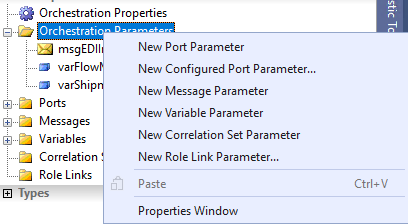
And these parameters can be passed (Parameter direction) as:
- In – caller passes value; callee reads it.
- Out – caller assigns value; caller receives it after return.
- Ref – both sides can read/write the same variable (be careful with clarity & side effects).
However, not all parameters accept the Ref direction type.
Parameters whose type is a BizTalk Message—i.e., a message constructed from:
- A schema-based message type (XSD), or
- A multi-part message type (MPMT), or
- An
XmlDocument(untyped XML).
are typically used as In (request) and Out (response). Ref is not valid for message parameters.
By contrast, variables can be simple types (such as System.String, System.Int32, System.Boolean, System.Decimal, or System.DateTime) or full .NET classes. BizTalk supports all parameter directions for variables: In, Out, and Ref.
Developers typically use variables to pass small flags, identifiers, counters, date ranges, or configuration values. They also commonly return computed results, such as status codes or tokens, through Out parameters.
In specific scenarios, you can use the Ref direction with a class instance initialized by the primary orchestration. This approach allows the child orchestration to modify the object and propagate those changes back to the primary process.
Parameter Direction Cheatsheet
| Kind | In | Out | Ref |
|---|---|---|---|
| Message (XSD/MPMT) | ✅ | ✅ | ❌ |
Message (XmlDocument) | ✅ | ✅ | ❌ |
| Variables (Simple/.NET) | ✅ | ✅ | ✅ |
Final Thoughts
Use message parameters for documents and variable parameters for control values. In most cases, rely on clear In and Out semantics to keep orchestrations testable, versionable, and easy to evolve. When you need control variables whose values change across orchestrations, use the Ref direction. BizTalk supports Out and Ref directions only with Call Orchestration.
Hope you find this helpful! If you enjoyed the content or found it useful, and wish to support our efforts to create more, you can contribute to purchasing a Star Wars Lego set for my son!



