


Historically, moving a workflow from an Azure Logic App (Consumption) to a Logic App (Standard) required manual effort, since it meant exporting templates, adjusting connections, and re-deploying or basically rewriting everything. With the new Clone to Standard feature, Microsoft has streamlined this process. Since Logic App Standard supports multiple workflows within a single resource, this feature allows you to “inject” an existing Consumption workflow into either a brand-new or an existing Standard Logic App container.
Step-by-Step
Migrating your workflow is now a guided experience directly within the Azure Portal. And to accomplish that, we just need to follow these steps:
- Initiate the clone
- Navigate to the Overview page of your Consumption Logic App. In the top command bar, you will see the Clone to Standard button. Alternatively, a notification banner may appear suggesting the feature.
- Click Clone to begin.

- Select the destination
- You will be redirected to the Clone to Standard page. Here, the source details are pre-populated. Under the Standard logic app section, select your target Subscription and Resource Group. You can then choose an existing Standard Logic App as the host for your new workflow.
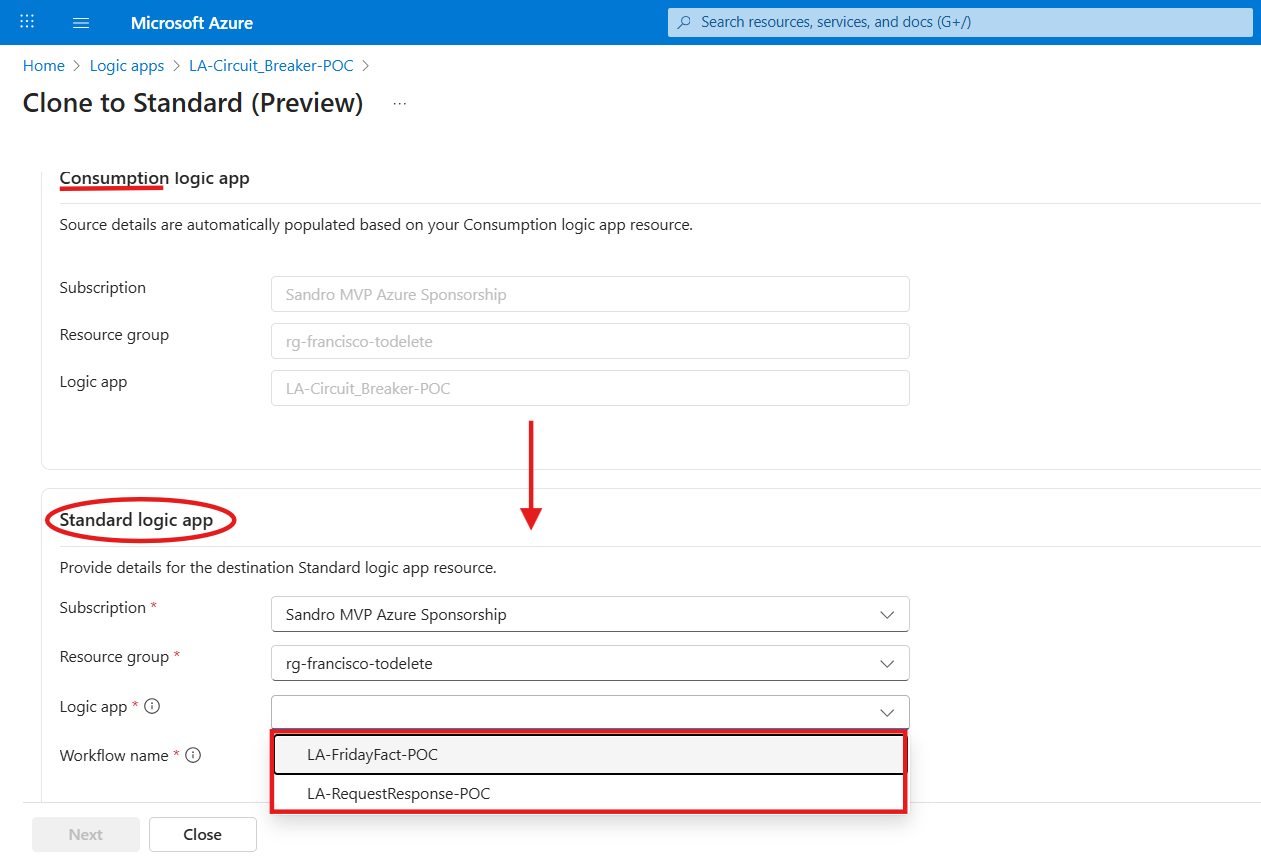
- Name the new workflow
- Once the destination Standard Logic App is selected, give your workflow a unique name. The system will validate the name to ensure it doesn’t conflict with existing workflows in that Standard resource. Click Next to proceed through the validation and final creation steps.

- Verify in Workflows
- Once the process finishes, navigate to your Standard Logic App and check the Workflows blade. You will find your cloned workflow listed there.
- Note that it typically defaults to a Disabled state to prevent accidental execution before you’ve verified your connections.

Advantages: Why this matters
This feature is a significant addition to the Azure ecosystem for several reasons:
- Consolidation: It allows teams to move away from scattered Consumption resources and consolidate logic into a single Standard plan, which is often more cost-effective for high-throughput scenarios.
- Reduced Friction: It eliminates the need for manual editing when moving between tiers.
- Modernization Path: It provides a clear, low-risk path for users to adopt the advanced features of Standard, including VNET integration, local development with VS Code, and predictable pricing.
- Multi-Workflow Management: It leverages the Standard tier’s core strength by hosting multiple workflows within a single compute context.
- Cost-Efficient Prototyping: Developers can leverage the “pay-as-you-go” model of the Consumption tier to build and test workflows at a very low cost. Once the logic is validated and ready for production-grade performance or VNET requirements, it can be seamlessly migrated to a Standard plan.
Technical constraints: What you need to know
According to the official Microsoft documentation, cloning a Logic App does not copy all required configuration:
- Connections are not cloned: credentials must be reconfigured manually
- Secure parameters (
secureString/secureObject) are cloned as sanitized placeholders - Connectors are cloned as managed connectors, even when built-in versions exist
- Cloning doesn’t support integration accounts, XML/EDI actions, nested workflows, or Azure Function calls
Clone ≠ ready to run, especially when connections are involved.
For more information, see: https://learn.microsoft.com/azure/logic-apps/logic-apps-clone-workflows#known-issues-and-limitations
Conclusion
The Clone to Standard feature is a major “quality of life” boost, simplifying the path to a modern, consolidated integration platform. While it removes the heavy lifting of recreating logic, remember that it is an assisted migration, not a magic wand; you’ll still need to re-authenticate connections and re-link secrets.
By starting small in Consumption and cloning to Standard for production, you get the best of both worlds: cost-effective development and enterprise-grade power.
“Thanks for reading! Stay tuned for more insights next week. A special shout-out to our mentor, Luís Rigueira, for the brilliant idea for this Friday Fact. See you next Friday!
To lazy to read? We’ve got you covered! Check out our video version of this content!
Hope you find this helpful! If you enjoyed the content or found it useful and wish to support our efforts to create more, you can contribute towards purchasing a Sauron’s Action Figure for Sandro’s son, yep, not for me!



