


Following my last two blog posts, How to Export BizTalk Applications resources to an XML file with PowerShell, and How to Export BizTalk Applications assemblies (resources) from the GAC to a local folder with PowerShell, I can kind of create a combination of these two ideas to make it work. Still, instead of having everything together, I decide to use two scripts and separate tasks:
- I still used the script provided in this blog post, “How to Export BizTalk Applications resources to an XML file with PowerShell,” to generate the XML files listing resources per application.
- And create a new PowerShell script that takes the XML assemblies list file and extracts the assemblies from the Global Assembly Cache (GAC), then copies them to a local folder.
📝 One-Minute Brief
This is a PowerShell script that goes to an XML File with a list of all assemblies of a specific BizTalk application and copies the DLL from the GAC to a local folder.
Here is a sample of the script:
# Namespace for XPath
$nsMgr = New-Object System.Xml.XmlNamespaceManager($xmlDoc.NameTable)
$nsMgr.AddNamespace("rs", "http://schemas.microsoft.com/BizTalk/ApplicationDeployment/ResourceSpec/2004/12")

# Pick only BizTalkAssembly resources
$nodes = $xmlDoc.SelectNodes("//rs:Resource[@Type='System.BizTalk:BizTalkAssembly']", $nsMgr)

if (-not $nodes -or $nodes.Count -eq 0) {
    Write-Warning "No BizTalkAssembly resources found in XML: $XmlPath"
    exit 1
}

$gacRoot    = Join-Path $env:WINDIR 'Microsoft.NET\assembly'
$gacBuckets = @('GAC_MSIL','GAC_32','GAC_64')

$report = @()
$errors = @()

foreach ($n in $nodes) {
    $luid = $n.GetAttribute("Luid")
    if ([string]::IsNullOrWhiteSpace($luid)) { continue }

    # Parse: "Name, Version=1.0.0.0, Culture=neutral, PublicKeyToken=abcdef1234567890"
    $name = $null; $ver = $null; $cult = $null; $pkt = $null
    if ($luid -match '^\s*([^,]+)\s*,\s*Version=([^,]+)\s*,\s*Culture=([^,]+)\s*,\s*PublicKeyToken=([0-9a-fA-F]+)') {
        $name = $matches[1].Trim()
        $ver  = $matches[2].Trim()
        $cult = $matches[3].Trim()
        $pkt  = $matches[4].Trim().ToLower()
    } else {
        $name = ($luid -split ',')[0].Trim()
    }

    if ([string]::IsNullOrWhiteSpace($name)) {
        $errors += "Skipped resource with empty Name. Luid='$luid'"
        continue
    }

    # Find DLL in GAC
    $dllPath = $null
    foreach ($bucket in $gacBuckets) {
        $nameDir = Join-Path (Join-Path $gacRoot $bucket) $name
        if (-not (Test-Path -LiteralPath $nameDir)) { continue }

        # Try exact "<Version>__<PublicKeyToken>" first
        if ($ver -and $pkt) {
            $expectedFolder = Join-Path $nameDir ("{0}__{1}" -f $ver, $pkt)
            $candidate = Join-Path $expectedFolder ("{0}.dll" -f $name)
            if (Test-Path -LiteralPath $candidate) { $dllPath = $candidate; break }
        }

        # Otherwise, search for any matching DLL under the name folder
        $hits = @(Get-ChildItem -LiteralPath $nameDir -Recurse -Filter ("{0}.dll" -f $name) -ErrorAction SilentlyContinue)
        if ($hits.Count -gt 0) {
            if ($ver -or $pkt) {
                $pref = $hits | Where-Object {
                    ($ver -and $_.FullName -match [regex]::Escape($ver)) -and
                    ($pkt -and $_.FullName -match [regex]::Escape($pkt))
                }
                if ($pref.Count -gt 0) { $dllPath = $pref[0].FullName } else { $dllPath = $hits[0].FullName }
            } else {
                $dllPath = $hits[0].FullName
            }
            if ($dllPath) { break }
        }
    }

    if (-not $dllPath) {
        $msg = "GAC path not found for $name (Version='$ver', PKT='$pkt')."
        Write-Warning $msg
        $errors += $msg
        continue
    }

    try {
        $dest = Join-Path $DestinationFolder ("{0}.dll" -f $name)
        Copy-Item -LiteralPath $dllPath -Destination $dest -Force:$Overwrite
        $report += [pscustomobject]@{
            AssemblyName   = $name
            Version        = $ver
            PublicKeyToken = $pkt
            SourceGacPath  = $dllPath
            CopiedTo       = $dest
            Result         = 'Copied'
        }
        Write-Host "Copied: $name  ->  $dest" -ForegroundColor Green
    }
    catch {
        $msg = "Failed to copy $name from '$dllPath' -> '$DestinationFolder'. Error: $($_.Exception.Message)"
        Write-Warning $msg
        $errors += $msg
        $report += [pscustomobject]@{
            AssemblyName   = $name
            Version        = $ver
            PublicKeyToken = $pkt
            SourceGacPath  = $dllPath
            CopiedTo       = $null
            Result         = 'Error'
        }
    }
}
And it works! I was able to extract all the 3 DLLs:
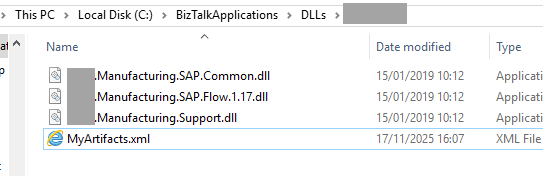
Those were identified on the BizTalk Server Administration Console associated with that BizTalk Application:

But despite working in both my local and “normal” environments, I still had a serious problem. In the client’s environment, I couldn’t export the resource list using btstask or by extracting it from the database.
Nevertheless, this is an excellent resource to use in “normal” environments.
Download
THIS POWERSHELL SCRIPT IS PROVIDED “AS IS”, WITHOUT WARRANTY OF ANY KIND.
You can download the PowerShell Script used from GitHub here:
Hope you find this helpful! If you enjoyed the content or found it useful, and wish to support our efforts to create more, you can contribute to purchasing a Star Wars Lego set for my son!



