


This week, while maintaining and fine‑tuning a BizTalk environment, I identified several non‑compliances. One of them involved the BizTalk MessageBox database, which had grown to 3.5 GB. At first glance, this size did not seem critical. In most cases, database files grow according to the volume of processed messages.
You should also keep in mind that BizTalk Server database files grow automatically when required, but they never shrink on their own. To reclaim disk space, you must run a maintenance process that stops the environment and explicitly releases the allocated space by shrinking the files.
However, when I attempted to reclaim the space, I noticed an inconsistency. SQL Server successfully shrank the transaction log file, but the data file remained stuck at 3.5 GB. After checking SQL Server Management Studio, I confirmed that no free space was available to release. This result meant that the MessageBox genuinely contained that amount of data.
At this point, the issue became critical. The environment was not processing any messages. All processes had completed successfully, and no suspended messages existed.
📝 One-Minute Brief
BizTalk Server administrators often notice that the MessageBox database size does not decrease after performing a shrink operation. This post explains why the BizTalk MessageBox database behaves this way, how internal tables and reserved space affect database size, and what maintenance tasks should be considered to properly manage growth and performance in a BizTalk environment.
Cause
To analyze the MessageBox database better and to find out where this amount of data was present, I ended up using this simple query to check the number of rows for each table in the database. This query works for all databases:
CREATE TABLE #counts
(
    table_name varchar(255),
    row_count int
)

EXEC sp_MSForEachTable @command1='INSERT #counts (table_name, row_count) SELECT ''?'', COUNT(*) FROM ?'
SELECT table_name, row_count FROM #counts ORDER BY table_name, row_count DESC
DROP TABLE #counts
I was surprised to see that almost 1 million lines were on the tracking tables, waiting to be moved to the DTA database.
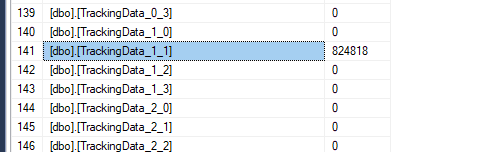
Even more surprising was to learn that the Tracking Host Instance was working, which could only be related to the performance of the tracking database and the job that moves the information.
Solution
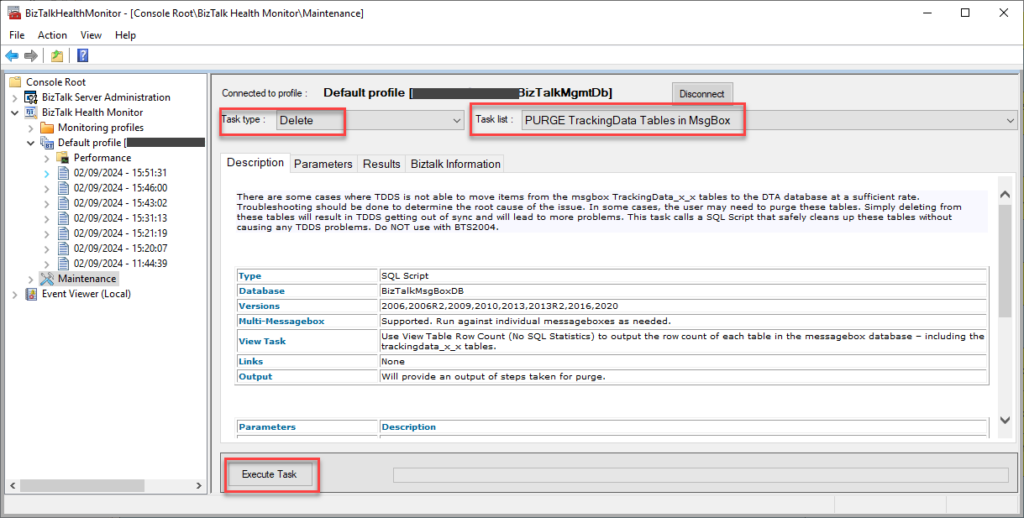
Of course, the basic answer is to guarantee that the Tracking Host Instance and the TrackedMessages_Copy job are running and waiting for the data to be moved. But we wanted to resolve this quickly and get our environment back in good shape, so we decided to discard all tracking data that was not essential to us. To do that, you need to:
- Access the BizTalk Health Monitor tool and select Maintenance.
- Select the default profile and make sure you select all options in order to connect.
- In the Task type combo box, select the option Delete. And in the Task list combo box, select the option PURGE TrackingData Tables in MsgBox.
- Click Execute Task.
And then finally:
- Shrink the MessageBox database by running the following script:
USE BizTalkMsgBoxDb
GO

ALTER DATABASE BiztalkMsgBoxDb
SET RECOVERY SIMPLE;
GO
DBCC SHRINKFILE (BizTalkMsgBoxDb)
GO
DBCC SHRINKFILE (BizTalkMsgBoxDb_Log)
GO
ALTER DATABASE BiztalkMsgBoxDb
SET RECOVERY FULL
GO
- Pre-allocate space to the MessageBox database by running the following script:
ALTER DATABASE BizTalkMsgBoxDb MODIFY FILE (NAME = BizTalkMsgBoxDb , SIZE = 2GB , FILEGROWTH = 100MB)
GO
ALTER DATABASE BizTalkMsgBoxDb MODIFY FILE (NAME = BizTalkMsgBoxDb_log , SIZE =  2GB , FILEGROWTH = 100MB)
GO
- And guarantee that the Tracking Host Instance and the TrackedMessages_Copy job are running correctly in the end.
I hope you find this helpful! If you liked the content or found it useful and want to help me write more, you can buy (or help me buy) my son a Star Wars Lego!




Hi Sandro,
Can SQL AG be used across DC -DR.
DC is primary and DR as secondary replica.
I have seen in high load scenarios the MSG log file size is not reducing. The Jobs are running continuously.
It seems the log file will reduce only after the secondary is replicated. This makes the setup dependent on DR link.if for some reason DR link goes down for prolonged period BizTalk MSG db will grow and performance degradation will happen.
Any thoughts on this DC-DR setup?
Thanks