


I posted a similar post about this issue in 2011. You can see it here. This is just a follow-up and an update to that blog post with a new possible way to solve this problem.
This problem can occur when you build a BizTalk Server project in Visual Studio that includes a custom pipeline that uses a custom pipeline component. Giving you the following error:
Unable to copy file “…\Pipeline Components\MyPipelineComponent.dll” to “bin\Debug\ MyPipelineComponent.dll”. The process cannot access the file “bin\Debug\ MyPipelineComponent.dll” because it is being used by another process

📝 One-Minute Brief
Deploying custom pipeline components in BizTalk Server can fail with a frustrating file‑lock error stating that the DLL cannot be copied because another process is using it. This article explains why this issue occurs during Visual Studio deployments, how BizTalk host instances, the GAC, and the Visual Studio environment contribute to file locking, and the practical steps required to safely release the lock and complete the deployment successfully.
Cause
The cause of that error is pretty much self-described. Someone has a lock on that file, like
- Visual Studio has a lock on the file to show the toolbox’s pipeline components.
- Some BizTalk processes are running, and the BizTalk Server host has a lock on the file.
- Or simply because there are suspended messages in the BizTalk Server Administration Console that are using that component.

Just to clarify, the previous solutions I described in the last blog post are still valid ways to solve this issue, but there is also a different way.
Solution
- Access the project containing the custom pipelines that use that component in the Visual Studio BizTalk Server solution.
- Expand the Reference, right-click the custom pipeline component DLL, and select Properties.
- On the Properties panel, set the Copy Local property to False.
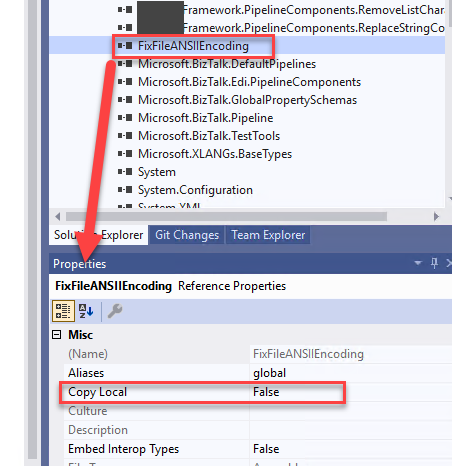
Now, if you try to deploy it, everything will work. At least those errors will disappear.
I hope you find this helpful! If you liked the content or found it useful and want to help me write more, you can buy (or help me buy) my son a Star Wars Lego!




Hello Sandro Pereira!
Thank you for your blog. You help many developers to solve their issues regarding BizTalk.
May I ask you to take into consideration an other way to fix this problem:
– If we check the standard pipeline components in the VS toolbox we will see that they all added from the GAC.
– considering this fact we can manage in the same way our custom components – add dlls to the GAC and use it for the reference in VS toolbox, or in Pipeline projects
– to guarantee that every time when we build our custom components we get the actual version in the GAC we can add a simple command into Post-build Events (pipeline component project settings):
“%programfiles(x86)%\Microsoft SDKs\Windows\v10.0A\bin\NETFX 4.8 Tools\gacutil.exe” /if “$(TargetPath)”
The only possible issue I see here is that the path to gacutil.exe might be different across different environments.
Thank you