


Welcome back to another blog post on this saga of Errors and Warnings, Causes, and Solutions. Sometimes, I think I’m a magnet for errors, or they feel sad because they are not documented, and think… let’s upset Sandro.
This week, while I was trying to deploy through Visual Studio one change on a new BizTalk Server project that I’m working on, I got the following list of errors:
Error: a porttype operation can only contain messagetypes or class types
path\<orchestration-name>.odxError: cannot find symbol ‘<namespace>.Oracle_BIZTALK_Package.INSERT_ORDERS’
path\<orchestration-name>.odxError: identifier ‘INSERT_ORDERSResponse’ does not exist in ‘<namespace>.Oracle_BIZTALK_Package’; are you missing an assembly reference?
path\<orchestration-name>.odx

Needless to say, this was not the first time I had published this solution, and the name of the orchestration presented by coincidence had not changed, which was even more curious.
📝 One-Minute Brief
BizTalk Server deployments can fail with the error “A PortType operation can only contain MessageTypes or Class types” when schema configuration changes go unnoticed. This article explains a real‑world scenario where modifying the Root Reference property of a multi‑operation schema for testing caused orchestration deployment errors. It walks through the root cause and shows how reverting the schema configuration resolves the issue quickly and safely.
Cause
In this ORACLE schema, I have two schema definitions: INSERT_ORDERS and INSERT_ORDERSResponse, which is quite normal. We often have a schema with several operations defined.
The reason I got this error was due to the fact that during the test phase, the solution was already built, at least part of it. I had the need to generate a dummy instance of the INSERT_ORDERS, and for that, I had the need to:
- Open the schema in the Schema Editor.
- Right-click on the <Schema> node and select properties.
- In the Properties panel, set the Root Reference property to INSERT_ORDERS.
- Note that by default, the value of this property is (Default)
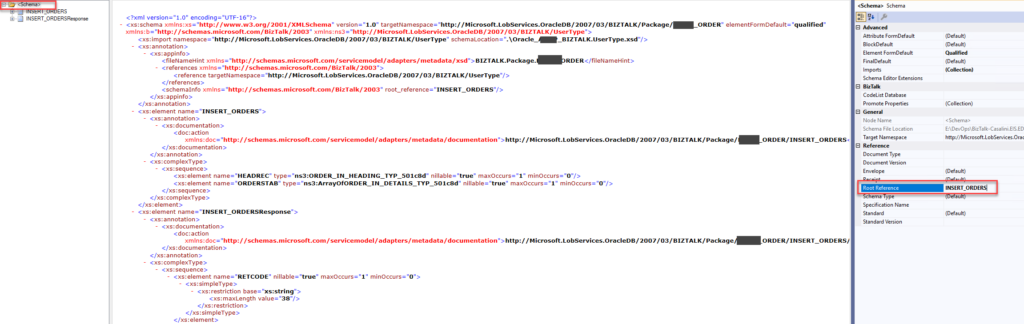
After that, I successfully generated a dummy instance of the message type… but I forgot to roll back that Root Reference property to its default value (Default).
When you try to deploy the solution with the Root Reference changed, it typically returns an error similar to this.
Solution
Once again, the solution to this problem is quite simple. You just need to revert the Root Reference property to its default value: (Default). For that, you need to:
- Once again, open the schema in the Schema Editor.
- Right-click on the <Schema> node and select properties.
- On the properties panel, on the Root Reference property, define it as (Default)
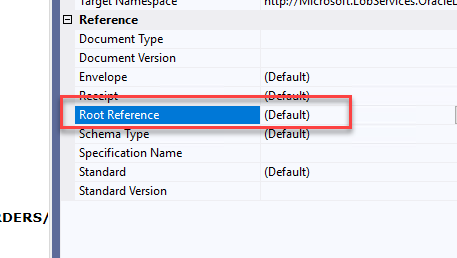
Now, if you try to deploy it, everything will work. At least those errors will disappear.
I hope you find this helpful! If you liked the content or found it useful and want to help me write more, you can buy (or help me buy) my son a Star Wars Lego!



