


Transformations are among the most common components of integration processes. They act as essential translators, decoupling systems, and enabling communication. We often associate document transformations with BizTalk Server Maps. However, in practice, integrations rely on two different types of transformations:
- Semantic Transformations: This type of transformation usually occurs only in BizTalk maps. Here, the document maintains the same represented syntax (XML) but changes its semantics (data content). This type of transformation is typically one-way, since when we add and aggregate small parts of the information that compose the document into another document, we may miss important details for its reconstruction.
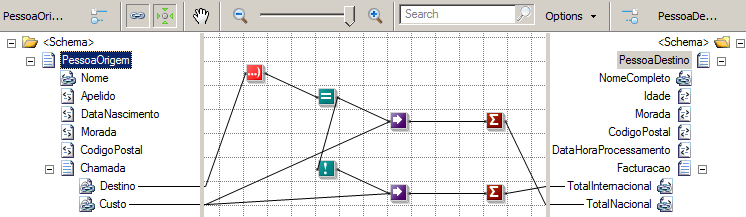
- Syntax Transformations: This type of transformation occurs in the receive or send pipelines and aims to transform a document into another representation, e.g., CSV to XML. Here, the document maintains the same data (semantics) but changes the syntax it represents. i.e., we translate the document, but typically don’t modify the structure. Usually, this type of transformation is bidirectional. Since the semantic content remains the same, we can apply the same transformation logic and obtain the document in its original format. Common examples of these transformations include conversions between HL7 and XML, or EDI and XML.
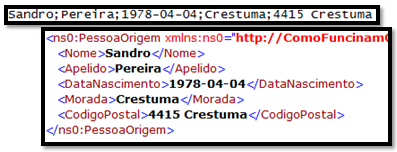
Sometimes also called Data transformation and Data translation, in that order.
This blog is an introductory note for those taking the first steps in this technology.
📝 One-Minute Brief
Flat files remain widely used in enterprise integrations. This article explains what flat files are in BizTalk Server, how they differ from XML and JSON, and how BizTalk processes them through syntax and semantic transformations.
What are Flat Files?
One of the oldest and most common ways to represent messages is through text files, also known as flat files. Common examples include CSV (Comma Separated Values) and TXT files, many of which systems still define in custom formats.
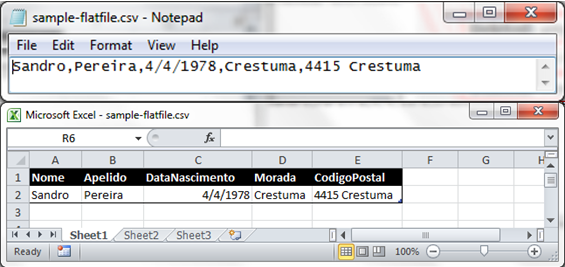
Over time, XML and, more recently, JSON became the dominant message formats. Their widespread adoption by large organizations and open‑source communities drove this shift. However, flat files are far from obsolete.
For example, many large enterprises still rely heavily on EDI messages. Because of this, integration solutions often need to transform flat files into XML or JSON, and sometimes perform the reverse conversion as well.
In the context of Microsoft BizTalk Server, a flat-file instance message is a text file that can contain three logical parts:
- A header.
- A body.
- And a trailer.
In that order. Of course, both the header and the trailer are optional. The following example shows a flat-file instance message consisting of all three parts, with the body in bold type:
Sandro Pereira
Porto, Portugal
PO,1,BOOK,4415
TRANS-1
For the flat file disassembler to correctly distinguish the header, the body, and the trailer of a flat-file instance message, you must create and configure a separate schema for each of them.
Flat File Message Headers
The flat file disassembler parses an optional message header based on the flat‑file schema you configure. You define this schema either in the Header schema design‑time property of the flat file disassembler or through the XMLNORM.HeaderSpecName message context property.
If you don’t configure a header schema using either approach, the flat file disassembler assumes the message has no header.
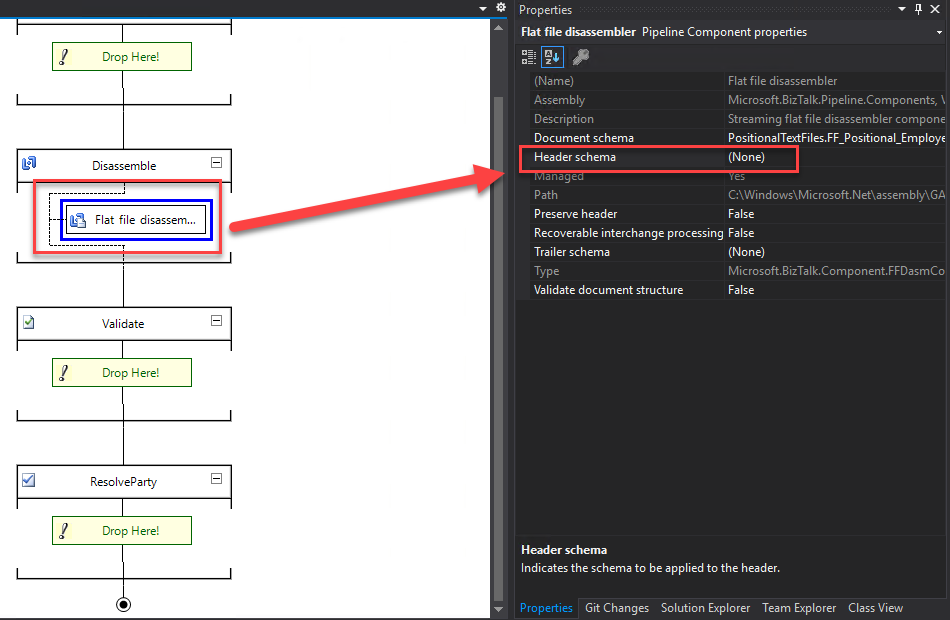
For outbound flat‑file messages, you can configure the flat file assembler to generate a header. To do this, specify the appropriate schema in the Header Specification Name design‑time property or set the XMLNORM.HeaderSpecName message context property.
You can also preserve and reuse data from inbound flat‑file headers in two different ways.
- First, you can save the entire header in the body’s message context for later reuse. To enable this behavior, set the Preserve header property in the receive pipeline. If you configure a header schema in the flat file assembler, BizTalk applies the preserved header to the outbound message.
- Second, you can promote individual fields from the flat‑file header into the message context. To do this, enable property promotion for one or more fields in the corresponding header schema. This approach lets you reuse specific header values during message processing.
Flat File Message Bodies
The flat‑file message body is mandatory and contains the data that the flat‑file disassembler processes into one or more XML instance messages.
To correctly parse an inbound flat‑file message body, you must configure the disassembler with the flat‑file schema that describes the body structure. You can define this schema by setting the Document schema design‑time property of the flat‑file disassembler or by using the XMLNORM.DocumentSpecName message context property.
Because every flat‑file message requires a body, you must configure the appropriate schema by using one of these two methods.
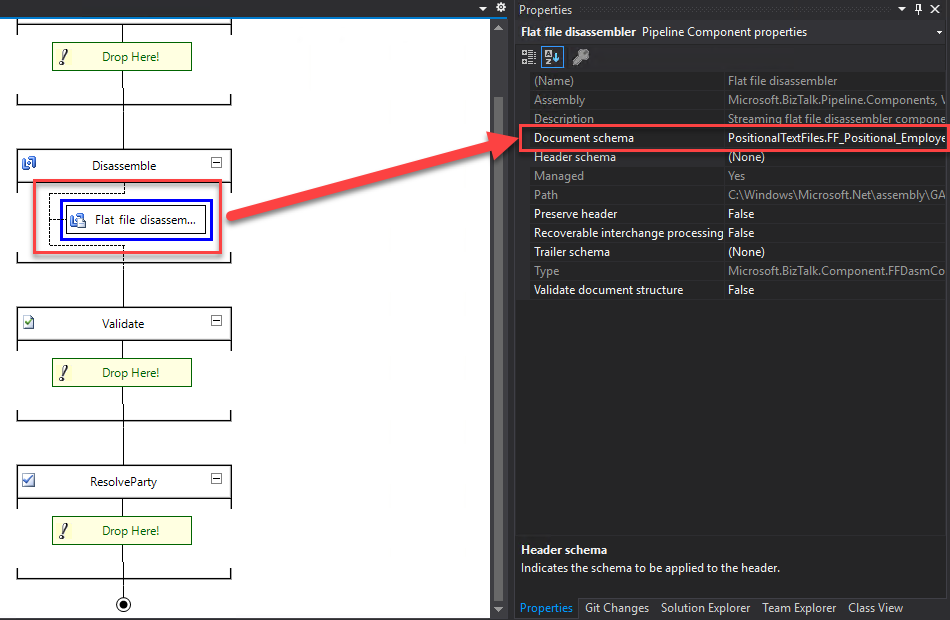
For outbound flat‑file messages, the flat file assembler can automatically determine the correct schema for the message body. It does this by inspecting the message type, which combines the target namespace and the root element name. Both values must exist in the XML version of the outbound message.
Alternatively, you can explicitly define the schema. To do that, configure the Document schema design‑time property of the flat file assembler or set the XMLNORM.DocumentSpecName message context property.
You can also move data between the message body and the message context. First, you can promote fields from inbound flat‑file message bodies by enabling property promotion in the schema used by the flat file disassembler. Likewise, you can demote context properties back into outbound flat‑file messages by configuring property demotion in the schema used by the flat file assembler.
Flat File Message Trailers
As with flat‑file message headers, the flat file disassembler parses an optional trailer based on the flat‑file schema you configure. You define this schema either in the Trailer schema design‑time property of the flat file disassembler or by setting the XMLNORM.TrailerSpecName message context property.
If you don’t configure a trailer schema using either option, the flat file disassembler assumes the message does not contain a trailer.
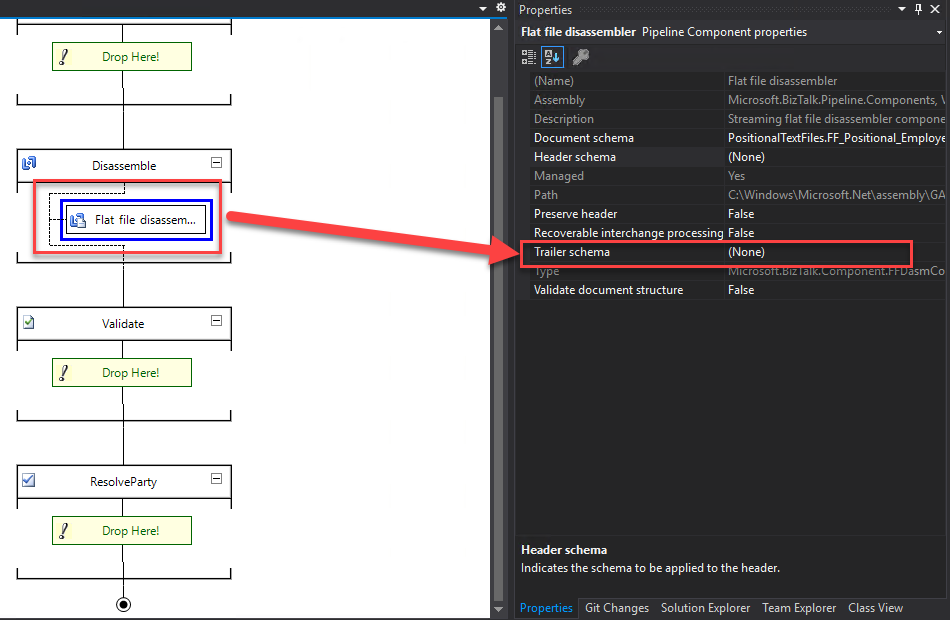
Unlike flat‑file message headers, trailers cannot be saved and restored as a single unit. They also do not support property promotion to copy individual fields into the message context.
However, you can still add a trailer to an outbound flat‑file message. To do this, configure the appropriate schema in the Trailer schema design‑time property of the flat file assembler or set the XMLNORM.TrailerSpecName message context property.
You can define the variable portion of the trailer in two ways. First, you can populate it through property demotion from the message context of the flat‑file body. Alternatively, you can use default or fixed values defined directly in the trailer schema.
Flat-File Schema Types
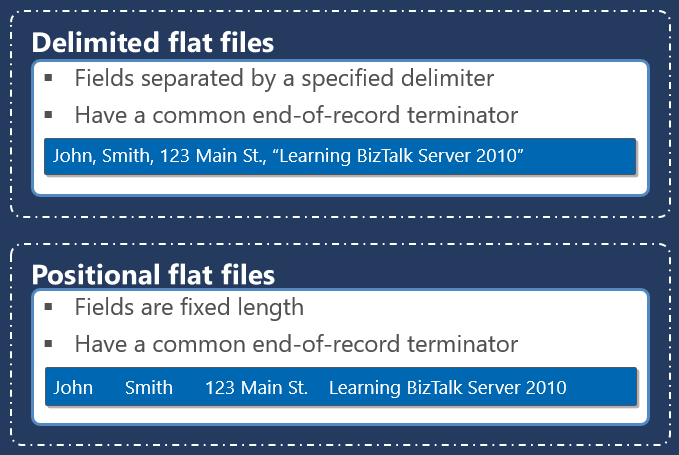
Within a particular part of a flat-file instance message, different data items are grouped into records, which themselves can contain sub-records and, ultimately, individual data items known as fields. These records and fields are distinguished from each other using one of two different basic methodologies.
- The first methodology, known as positional, defines each data item as a pre-established length, with pad characters being used to bring a shorter item of data up to its expected length.
- The second methodology, known as delimited, uses one or more special characters to separate items of data from each other. This methodology avoids the need for otherwise superfluous pad characters, but introduces some special considerations when the data itself contains the character or sequence of characters being used as a delimiter.
Positional Flat Files
Positional records within a flat-file instance message contain individual fields (items of data) that are each of a predefined length. The fields are parsed according to these lengths. For example, consider the following positional record from a flat-file instance message containing an ID, country code, client name, and Country name:
01 PT Sandro Pereira Portugal
A reasonable definition for this record in a flat-file schema can be described as follows:
- A positional record named Client contains the following fields:
- An attribute named id that is left-aligned, 3 characters in length, with a zero character offset.
- An element named countryCode that is left-aligned, 3 characters in length, with a zero character offset.
- An element named name that is left-aligned, 37 characters in length, with a zero character offset.
- An element named country that is left-aligned, and the length is until the end of the line.
Given these record and field definitions, the Flat file disassembler will produce the following XML equivalent of this record:
<Client id=01 ">
    <countrCode>PT </countrCode>
    <name>Sandro Pereira                       </name>
    <country>Portugal</country>
</Client>
There are several considerations related to positional records that will affect how the record is parsed when received and constructed when sent, including:
- The character used to fill the unused portion of each field is known as the pad character.
- An optional tag in the record can be used to distinguish it from similar records. Tags usually occur at the beginning of the record, but are allowable anywhere within it. Positional records can be defined to have a tag or not have a tag, but once defined, the tag must be present or not, based on the definition.
- How data is justified within a fixed-length field relative to the accompanying pad characters.
- Positional records nested within other positional or delimited records.
- Positional records with field lengths specified as a specific number of bytes rather than a specific number of characters.
Notes:
- If your flat file contains both delimited and positional records, you must set the Structure property of the root node to Delimited and the Structure property of subordinate record nodes to either Delimited or Positional as appropriate.
- Fields in positional records have a limit of 50000000 characters.
Delimited Flat Files
Delimited records within a flat-file instance message contain nested records and/or individual fields (items of data) that are separated by a predefined character or set of characters. The fields are parsed according to these separating delimiters. For example, consider the following delimited records from a flat-file instance message, which contain three client lines to add to our internal system hypothetically:
Sandro;Pereira;1978;Crestuma;4415
José;Silva;1972;Crestuma;4415
Rui;Barbosa;1975;Lever;4415
A reasonable definition for this record in a flat-file schema can be described as follows:
- A delimited repeating record named Client with child delimiter {CR}{LF}
- And delimited elements with a child delimiter ;
- firstName
- lastName
- birthYear
- city
- zipCode
Given these record and field definitions, the Flat file disassembler produces the following XML equivalent of these records.
<Client>
        <firstName>Sandro</firstName>
        <lastName>Pereira</lastName>
        <birthYear>1978</birthYear>
        <city>Crestuma</city>
        <zipCode>4415</zipCode>
</Client>
<Client>
   ...
</Client>
...
There are several considerations related to delimited records that will affect how the record is parsed when received and constructed when sent, including:
- The character or characters are used to override the interpretation of delimiters so that they are treated as part of the data.
- An optional tag at the beginning of the record can be used to distinguish the record from other similar records.
- How data is justified within fields with minimum lengths relative to the accompanying pad characters.
- Positional records nested within other delimited records.
- How data is justified within a fixed-length field relative to its accompanying pad characters.
Preservation and suppression of delimiters when flat-file messages are received and sent.
Notes:
- If your flat file contains both delimited and positional records, you must set the Structure property of the root node to Delimited and the Structure property of subordinate record nodes to either Delimited or Positional as appropriate.
- Delimited fields in flat files have a limit of 50000000 characters.
How are the text files (Flat Files) processed by BizTalk?
Internally, BizTalk “prefers” to use the message type XML. If messages are in XML format, BizTalk “offers” numerous automatisms that are very useful in these environments, such as message routing based on a particular field (promoted property), tracking and analysis of multidimensional values and dimensions with BAM (Business Activity Monitoring), or making logical decisions within orchestrations (business processes) using elements of the message.
If messaging is the foundation of BizTalk Server, the message schemas are the bedrock on which messaging is built. Fortunately, BizTalk supports converting text files to XML simply and intuitively using Flat File Schemas, which are simple XML schemas (XSD) with specific annotations. At first glance, this may seem strange because XML Schemas (XSD) are used to describe XML files. However, BizTalk uses them as metadata to describe XML documents and text files (flat files).
The trick is that all the necessary information, such as the delimiter symbols or the element size in a positional file, i.e., the definition of the rules of parsing (transformation rules), is embedded in the form of annotations in XML Schema (XSD), thereby simplifying the reuse of all these schemes in different parts of the process. The document can be translated back into a flat file at any point because the definition is declarative and symmetric.
Where can syntax transformations occur?
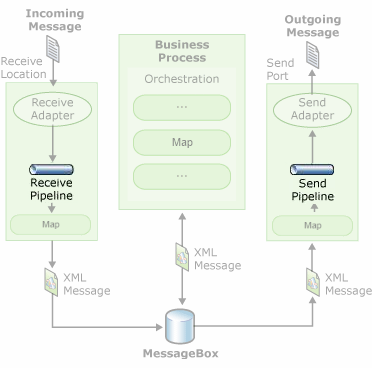
This type of transformation – Syntax Transformations – can occur in receive or send pipelines. Usually, text files (Flat Files) are processed at runtime as follows:
- The Flat Files are received by an adapter associated with a receive location (e.g., a Folder in the File System).
- A pipeline configured in the receive location will be responsible for transforming the Flat File into its equivalent XML.
- One or more interested parties in the message, such as orchestration, will subscribe to the XML document, and the message will then proceed through the business process. Note that in a pure messaging scenario, orchestrations are unnecessary.
- If and when necessary, BizTalk can send XML messages again as text files (Flat Files) by using another pipeline in the send ports, which will be responsible for transforming the XML into its equivalent, the Flat File.
As the image below shows:
The receive pipeline consists of four stages, in which syntax transformations may occur in two of them:
- Decode Stage: This stage processes components that decode or decrypt the message. The MIME/SMIME Decoder pipeline component, or a custom decoding component, should be placed in this stage if incoming messages need to be decoded from one format to another. The syntax transformations can occur in this stage through a custom component.
- Disassemble Stage: This stage is used for components that parse or disassemble the message. The syntax transformations should occur at this stage. In the example demonstrated in this article, we will use the “Flat file disassembler” to convert a text file into XML.
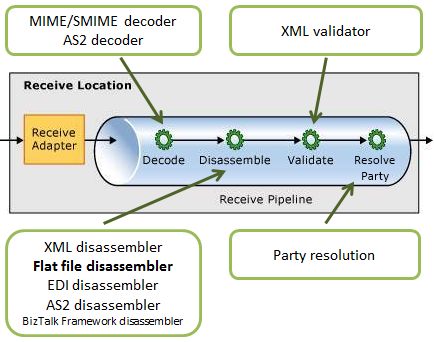
- Validate Stage: This stage is used for components that validate the message format. A pipeline component processes only messages that conform to the schemas specified in that component. If a pipeline receives a message whose schema is not associated with any component in the pipeline, that message is not processed. Depending on the adapter that submits the message, the message is either suspended or an error is issued to the sender.
- Resolve Party Stage: This stage is a placeholder for the Party Resolution Pipeline Component.
Regarding the send pipelines, they consist of three stages, during which syntax transformations may also occur in two of them:
- Pre-assemble Stage: This stage is a placeholder for custom components that should perform an action on the message before it is serialized.
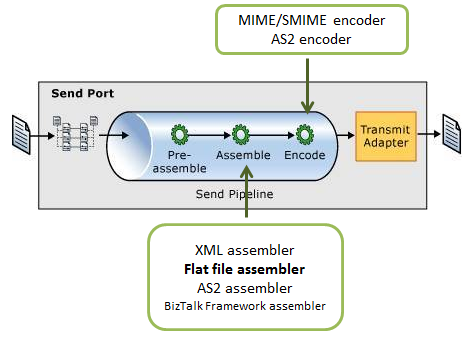
- Assemble Stage: Components in this stage are responsible for assembling or serializing the message and converting it to or from XML. The syntax transformations should occur at this stage.
- Encode Stage: This stage is used for components that encode or encrypt the message. Place the MIME/SMIME Encoder component or a custom encoding component in this stage if message signing is required. The syntax transformations can occur in this stage through a custom component.
Hope you find this useful! So, if you liked the content or found it useful and want to help me write more content, you can buy (or help buy) my son a Star Wars Lego!



