


In many integration projects, especially with Azure Integration Services, we often work with JSON messages. Although the Logic App Designer can generate a JSON schema from a JSON payload, we often need to create a schema outside the Logic App. A common example is when building a map in the new Data Mapper.
Unfortunately, the Data Mapper does not provide a built‑in way to generate a JSON Schema from a JSON message. Because of this limitation, we currently have only two options.
- First, we can create a dummy Logic App to generate the schema. Then, we manually copy it and save it in the Artifacts folder.
- Second, we can use free online tools, such as the Liquid Technologies JSON‑to‑Schema converter. However, these tools store data in log files. For this reason, they can raise privacy and security concerns in enterprise environments.
Because of these limitations, my team and I decided to create free tools with the source code available on GitHub. This approach avoids privacy concerns while making schema generation faster and safer.
📝 One-Minute Brief
Working with JSON messages often requires a reliable schema. This article introduces a free JSON document‑to‑JSON Schema converter tool that helps generate schemas locally, making it easier to test and build Logic Apps and Data Mapper solutions without relying on online services.
JSON Document to JSON Schema Converter Tool
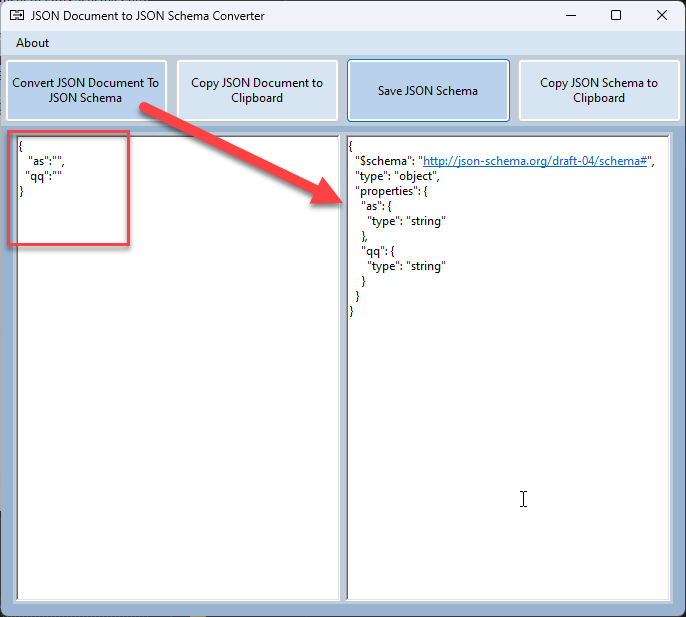
The JSON Document to JSON Schema Converter Tool is a straightforward Windows application that allows you to generate a JSON Schema from the sample JSON Document we provide.
No data is stored in log files.
Where can I download
Hope you find this useful! So, if you liked the content or found it useful and want to help me write more content, you can buy (or help buy) my son a Star Wars Lego!

Credits
- Luis Rigueira | Member of my team and one of the people responsible for developing this tool.


