

Almost 3 years ago, I wrote a blog post about How to get Key-values from Azure App Configuration within Logic Apps, and this is still valid today since we still don’t have an App Configuration Connector available out of the box. But I realize I’ve never blogged about this resource on my blog.
There are many ways to store application configurations in Azure. At the top of the list is Key Vault, which is ideal for storing secrets like passwords that should have limited access to the number of people who can see and modify these values.
However, not all configurations require that level of restricted access. Not all configurations are secrets. Of course, you can also use Key Vault to store non-secret information. But there are other options available, like:
- Using a SQL database with an app configuration table to store key values.
- Depending on the services you are using, you can also use the default built-in App Configuration settings. For example, Azure Functions have it:
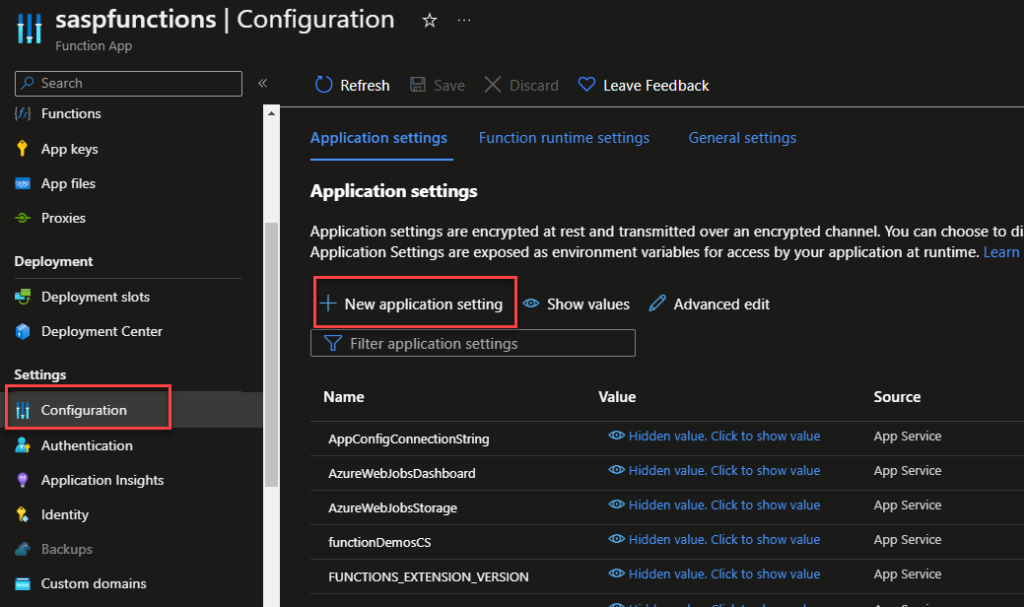
But you can also make use of the Azure App Configuration service.
📝 One-Minute Brief
Centralizing application settings is essential for modern integrations. This article explains how to use an Azure Function to read key values from Azure App Configuration, enabling dynamic configuration management for Logic Apps and other Azure services without redeployments.
Azure App Configuration stores configuration data as key-value pairs. Key-values are a flexible and straightforward way to represent developers’ application settings, making configuration dynamic without redeploying your application when changes are required. However, they are not encrypted like Key Vault, so they are a good solution to storing non-sensitive data that you want to make dynamic in your application.
Combining Azure App Configuration to store and manage your configurations and Azure Key Vault to store your secrets, we will obtain a powerful configuration management system nearly for free.
App Configuration makes it easier to implement the following scenarios:
- Centralize management and distribution of hierarchical configuration data for different environments and geographies
- Dynamically change application settings without the need to redeploy or restart an application
- Control feature availability in real-time
The only problem was that, unlike Key Vault, which has a connector available to Logic Apps, App Configuration doesn’t have one.
Get Azure App Configuration Value Function
This Function App is intended to close this gap and for you to be able to use it inside Logic Apps (or any other resource) and read App Configurations.
You can download the complete code for the function from GitHub. The link is below at the bottom of the blog post. Here is a small code snippet:
public static class GetAzureAppConfigurationValue
    {
        [FunctionName("GetAzureAppConfigurationValue")]
        public static async Task Run(
            [HttpTrigger(AuthorizationLevel.Function, "get", Route = null)] HttpRequest req,
            ILogger log)
        {
            string appKey = req.Query["appKey"];

            ....

            try
            {
                ...
                var builder = new ConfigurationBuilder();
                builder.AddAzureAppConfiguration(connectionString);
                var build = builder.Build();

                string keyValue = build[appKey.ToString()];

                if (string.IsNullOrEmpty(keyValue))
                {
                    ...
                }
                else return new OkObjectResult(keyValue);
            }
            catch(Exception ex)
            {
                var result = new ObjectResult(ex.Message);
                result.StatusCode = StatusCodes.Status500InternalServerError;
                return result;
            }
        }
    }
This function requires that you pass as a query parameter the appKey parameter:
- https://URL?appKey='<key-name>’
Where can I download it?
You can download the complete Azure Function source code here:
Hope you find this helpful! So, if you liked the content or found it helpful and want to help me write more content, you can buy (or help buy) my son a Star Wars Lego!



