


I just updated my BizTalk Pipeline Components Extensions Utility Pack project available on GitHub with two new components. The first one was the Archive Pipeline Component for BizTalk Server, which I blogged about on the BizTalk360 blog, and this new one I will address here is the BizTalk PDF2Xml Pipeline Component.
For those who are pt familiar, this project is a set of custom pipeline components (libraries) that can be used in received and sent pipelines, extending BizTalk’s out-of-the-box pipeline capabilities.

📝 One-Minute Brief
A custom BizTalk pipeline decode component that extracts text from PDF files and converts it into XML so BizTalk Server can process the content. Built on the iTextSharp library and extended from an old CodePlex project, the component can output HTML, raw XML, or XSLT‑transformed XML, giving you flexibility when integrating PDF‑based business documents.
BizTalk PDF2Xml Pipeline Component
BizTalk PDF2Xml Pipeline Component is, as the name suggests, a decode component that transforms the content of a PDF document to an XML message that BizTalk can understand and process. The component uses the iTextSharp library to extract the PDF content. The original source code was available on CodePlex (pdf2xmlbiztalk.codeplex.com). Still, I couldn’t validate who the original creator was. So, the component first transforms the PDF content to HTML, and then, using an external XSLT, applies a transformation to convert the HTML into a known XML document that BizTalk Server can process.
My team and I kept that behavior, but we extended this component and added the capability also to, by default, convert it to a well-known XML without the need for you to use an XSLT transformation directly on the pipeline.
How does this component work?
This is the list of properties that you can set up on the PDF2XML pipeline component:
| Property Name | Description | Sample Values |
| InternalProcessToHTML | Value to decide if you want the component to transform the PDF content to HTML or XML | True/False |
| IsToApplyTrasnformation | Value to decide if you want to apply a transformation on the pipeline component or not | True/False |
| XsltFilePath | Path to an XSLT transformation file | C:\transf\mymap.xslt |
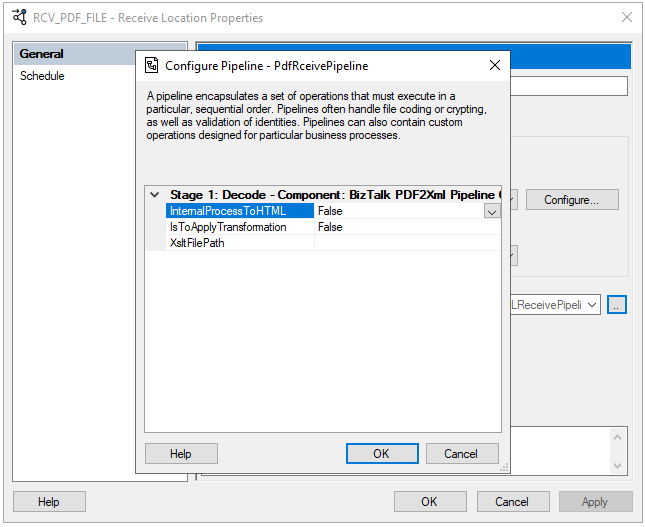
Once you pass the PDF by this component, and depending on how you configure it, the outcome can be:
- All PDF content is in an HTML format.
- All PDF content is in an XML format.
- Part of the PDF content on an XML format (if you apply a transformation).
Unfortunately, on my initial tests, this component works well with some PDF files, but others simply ignore its content. Nevertheless, I make it available as a proof-of-concept.
Download
THIS COMPONENT IS PROVIDED “AS IS”, WITHOUT WARRANTY OF ANY KIND.
You can download BizTalk PDF2Xml Pipeline Component from GitHub here:
Hope you find this helpful! If you liked the content or found it useful and would like to support me in writing more, consider buying (or helping to buy) a Star Wars Lego set for my son.



