

Today I was involved in a BizTalk Schema importation that includes not-so-used restrictions on Date and Time element formats. And that gave me the idea and inspiration to create this blog post.
When we work with DateTime on Schemas, by default, we can choose from the following data types:
- xs:dateTime: The dateTime data type is used to specify a date and a time in the following form “YYYY-MM-DDThh:mm:ss.fffK” where:
- YYYY indicates the year
- MM indicates the month
- DD indicates the day
- T indicates the start of the required time section
- hh indicates the hour
- mm indicates the minute
- ss indicates the second
- fff indicates the milliseconds
- K represents the time zone information of a date and time value (e.g., +05:00)
- xs:date: The date data type is used to specify a date in the following form “YYYY-MM-DD” where:
- YYYY indicates the year
- MM indicates the month
- DD indicates the day
- xs:time: The time data type is used to specify a time in the following form “hh:mm:ss.fffK” where:
- hh indicates the hour
- mm indicates the minute
- ss indicates the second
- fff indicates the milliseconds
- K represents the time zone information of a date and time value (e.g., +05:00)
Or you could use an xs:string that basically accepts everything. The only problem here is that by default, we can’t do a schema validation to see if it is a valid DateTime format.
But not all systems respect the DateTime formats expected by the XSD default values. So, what are my options if a system expects other types of DateTime, Date, or Time formats? Like:
- MM/DD/YYYY
- YYYY-DD-MM
- YYYY-MM-DD HH:mm:ss
- YYYYMMDD
- HHmmss
- HH:mm:ss
- and so on.
📝 One-Minute Brief
Learn how to apply custom DateTime, Date, and Time format restrictions in BizTalk schemas using the restriction mechanism and Regex patterns. This guide explains how to derive simple types, enforce non‑standard date formats, and improve validation when systems exchange dates that don’t follow XSD defaults.
Simple Type Derivation Using the Restriction Mechanism
Luckily for us, BizTalk Schema Editor and schemas, in general, allow us to derive a simple type, for example, xs:string, by using the restriction mechanism, i.e., we are typically restricting the values allowed in a message for that attribute or element value to a subset of those values allowed by the base simple type. A good and common sample of these types of restrictions is to restrict a string type to be one of several enumerated strings.
Luckily for us, again, we can also apply a pattern (that uses Regex expression) to validate the element or attribute value.
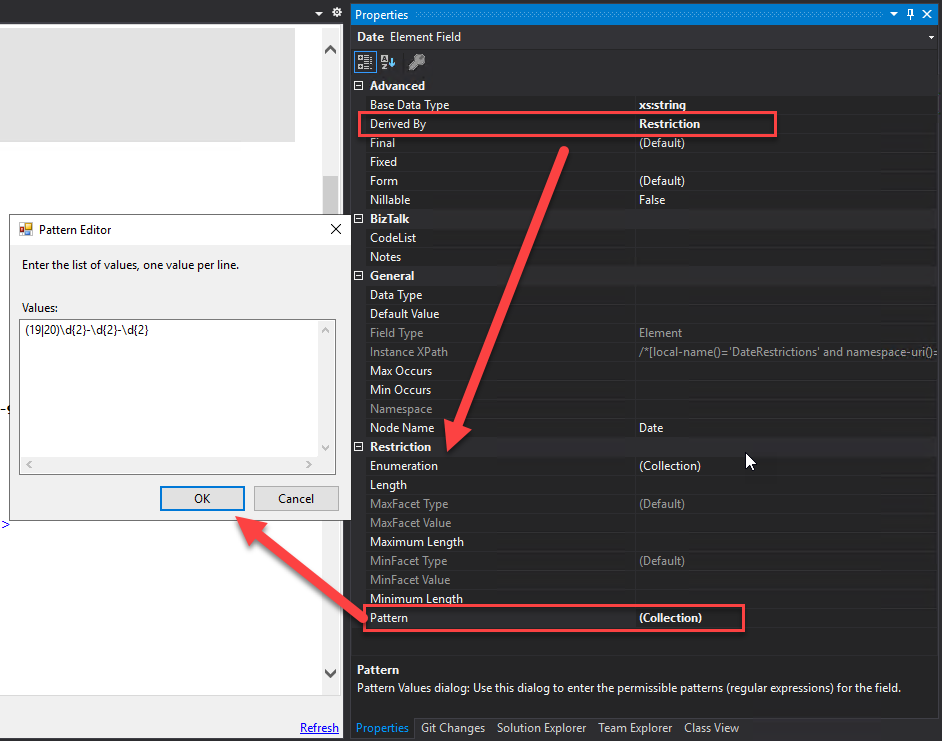
To derive a simple type by using restriction:
- Select the relevant Field Element node or Field Attribute node in the schema tree.
- And then, in the Properties window, the Derived By property is set as Restriction.
- This will add/present the Restriction properties on the Properties window.
- On the Restriction properties, click on the … (3 dots) on the Pattern property to define the RegEx.
Regular expression samples to validate date formats
Here is where the fun starts. There are many ways to achieve this goal:
- One’s more simple but probably not that efficient since they may not validate all cases (Leap year, and so on).
- Others are more complex and require more knowledge, but are more accurate.
In a general overview, the use of regex to validate the date format supports a variety of situations and possibilities, like:
- Rule to validate the year:
- \d{4} – it says that accepts 4 digits like: 2022.
- (19|20)[0-9][0-9] -accepts years starting with 19 or 20, i.e., from 1900 to 2099.
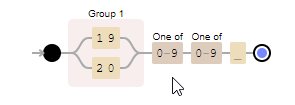
- Rule to validate the month:
- \d{2} – it says that accepts 2 digits like: 12, but the problem here is that it also accepts invalid months like 24 or 99.
- 0?[1-9]|1[012] – accepts 01-09 (leading zero), 1-9 (single digit), and 10,11,12.
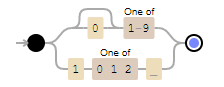
- Rule to validate the day:
- \d{2} – it says that accepts 2 digits like: 12, but the problem here is that it also accepts invalid days like 32 or 99. It also doesn’t validate what the month is; we define it to validate if it accepts 28, 29, 30, or 31.
- 0?[1-9]|[12][0-9]|3[01] – accepts 01-09 (leading zero), 1-9 (single digit), 10-19, 20-29, and 30-31. It doesn.t check if it is a Leap year or not.
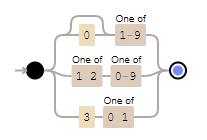
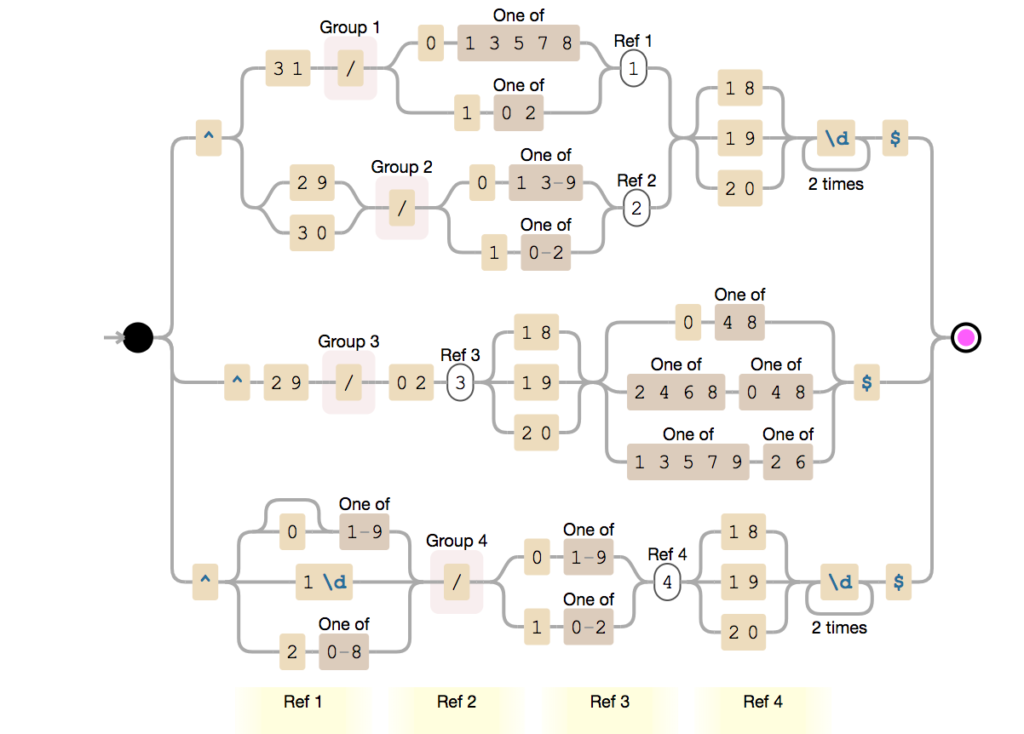
- To implement the lead year that needs to be with a concatenation of several rules, like this sample:
- ^(?:(?:31(/)(?:0[13578]|1[02]))\1|(?:(?:29|30)(/)(?:0[13-9]|1[0-2])\2))(?:(?:18|19|20)\d{2})$|^(?:29(/)02\3(?:(?:(?:(?:18|19|20))(?:0[48]|[2468][048]|[13579][26]))))$|^(?:0?[1-9]|1\d|2[0-8])(/)(?:(?:0[1-9])|(?:1[0-2]))\4(?:(?:18|19|20)\d{2})$
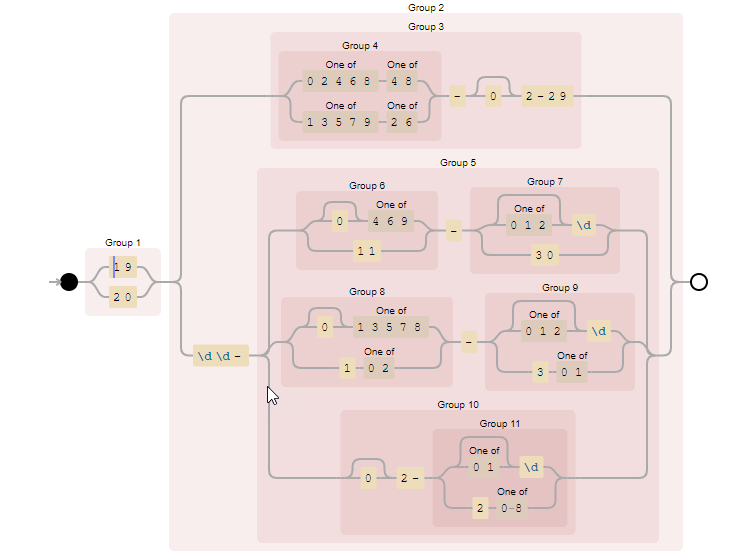
This is a different approach to do the same as above:
- (19|20)((([02468][48]|[13579][26])-0?2-29)|\d\d-((0?[469]|11)-([012]?\d|30)|(0?[13578]|1[02])-([012]?\d|3[01])|(0?2-([01]?\d|2[0-8]))))
But we can go further and allow different types of formats like:
- ^(?:(?:31(\/|-|.)(?:0?[13578]|1[02]|(?:Jan|Mar|May|Jul|Aug|Oct|Dec)))\1|(?:(?:29|30)(\/|-|.)(?:0?[1,3-9]|1[0-2]|(?:Jan|Mar|Apr|May|Jun|Jul|Aug|Sep|Oct|Nov|Dec))\2))(?:(?:1[6-9]|[2-9]\d)?\d{2})$|^(?:29(\/|-|.)(?:0?2|(?:Feb))\3(?:(?:(?:1[6-9]|[2-9]\d)?(?:0[48]|[2468][048]|[13579][26])|(?:(?:16|[2468][048]|[3579][26])00))))$|^(?:0?[1-9]|1\d|2[0-8])(\/|-|.)(?:(?:0?[1-9]|(?:Jan|Feb|Mar|Apr|May|Jun|Jul|Aug|Sep))|(?:1[0-2]|(?:Oct|Nov|Dec)))\4(?:(?:1[6-9]|[2-9]\d)?\d{2})$
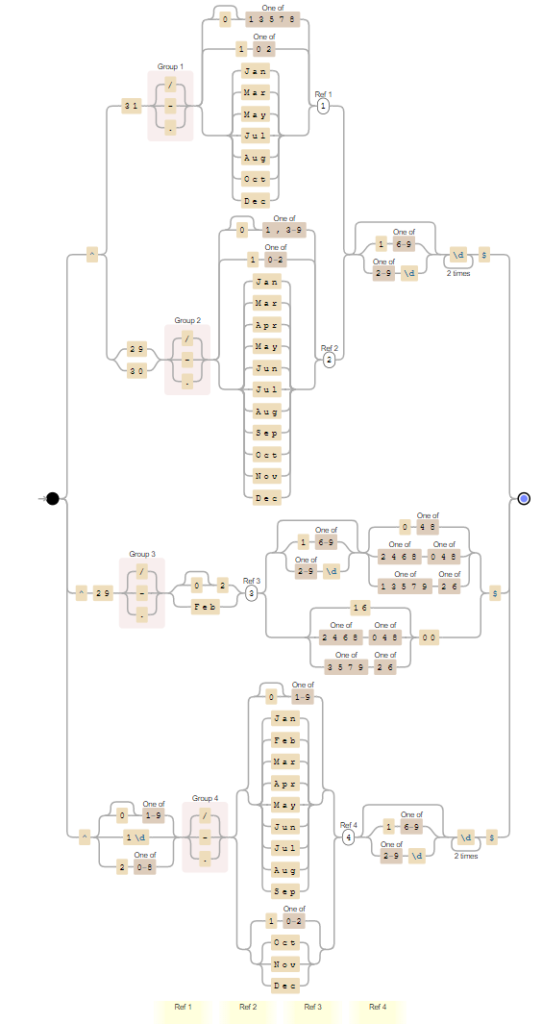
Your imagination and skills are the limit.
Note: images and debug RegEx at https://www.debuggex.com/.
Using multiple patterns to simplify complexity
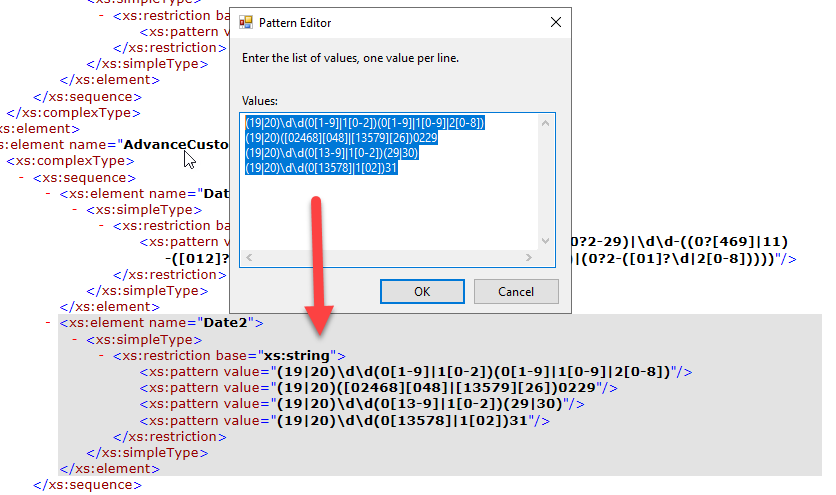
As you saw above, things can go out of control and become quite complex. Fortunately, the BizTalk Schema Editor and the schemas, in general, allow us to apply multiple patterns to simplify the overall expression.
So, for example, if I want to have the following Date format: YYYYMMDD with Leap year validated, I can use the combination of these 4 expressions:
- (19|20)\d\d(0[1-9]|1[0-2])(0[1-9]|1[0-9]|2[0-8])
- (19|20)([02468][048]|[13579][26])0229
- (19|20)\d\d(0[13-9]|1[0-2])(29|30)
- (19|20)\d\d(0[13578]|1[02])31

Some samples
Date in the following format: YYYY-MM-DD, like 2022-12-11
Simple formats
- \d{4}-\d{2}-\d{2} – simple format without validating month or day
- (19|20)\d{2}-\d{2}-\d{2} – restricting the year
Complex formats
- (19|20)((([02468][48]|[13579][26])-0?2-29)|\d\d-((0?[469]|11)-([012]?\d|30)|(0?[13578]|1[02])-([012]?\d|3[01])|(0?2-([01]?\d|2[0-8]))))
Date in the following format: YYYYMMDD, like 20221211
Simple formats
- \d{4}\d{2}\d{2} – simple format without validating month or day
- (19|20)\d{2}\d{2}\d{2} – restricting the year
Complex formats
- (19|20)\d\d(0[1-9]|1[0-2])(0[1-9]|1[0-9]|2[0-9]) – do not control Leap year
Date in the following format: MM/DD/YYYY, like 12/11/1999
Simple formats
- \d{2}\/\d{2}\/\d{4} – simple format without validating month or day
- \d{2}\/\d{2}\/(19|20)\d{2} – restricting the year
Complex formats
- ^(?:(?:31(\/|-|.)(?:0?[13578]|1[02]))\1|(?:(?:29|30)(\/|-|.)(?:0?[1,3-9]|1[0-2])\2))(?:(?:1[6-9]|[2-9]\d)?\d{2})$|^(?:29(\/|-|.)0?2\3(?:(?:(?:1[6-9]|[2-9]\d)?(?:0[48]|[2468][048]|[13579][26])|(?:(?:16|[2468][048]|[3579][26])00))))$|^(?:0?[1-9]|1\d|2[0-8])(\/|-|.)(?:(?:0?[1-9])|(?:1[0-2]))\4(?:(?:1[6-9]|[2-9]\d)?\d{2})$
- ^([0]\d|[1][0-2])\/([0-2]\d|[3][0-1])\/([2][01]|[1][6-9])\d{2}(\s([0-1]\d|[2][0-3])(\:[0-5]\d){1,2})?$
Date in the following format: YYYY-MM-DDZ, like 2019-06-12Z
Simple formats
- \d{4}-\d{2}-\d{2}Z – simple format without validating month or day
- (19|20)\d{2}-\d{2}-\d{2}Z – restricting the year
Complex formats
- ^\d\d\d\d-(0?[1-9]|1[012])-(0[1-9]|[12][0-9]|3[01])Z?(-+:([0-5][0-9]))?$
Time in the following format: HH:mm:ss, like 23:59:59
Simple formats
- \d{2}:\d{2}:\d{2} – simple format without validating valid hours, minutes or seconds
Complex formats
- (([01][0-9]|2[0-3]):[0-5]:[0-9])
Time in the following format: HHmm, like 2359
Simple formats
- \d{2}\d{2} – simple format without validating month or day
Complex formats:
- (([01][0-9]|2[0-3])[0-5])
Download
THIS SAMPLE CODE IS PROVIDED “AS IS”, WITHOUT WARRANTY OF ANY KIND.
You can download the POC: BizTalk Schemas Handle Restrictions on Date from GitHub here:
Hope you find this helpful! If you liked the content or found it useful and would like to support me in writing more, consider buying (or helping to buy) a Star Wars Lego set for my son.



