


Unfortunately, some good BizTalk Server resources have disappeared over the years, and they are no longer available. A lot of these resources are custom adapters. One of these adapters was the BizTalk WCF Loopback Adapter, initially developed by Synthesis Consulting (I think), which provided the source code back then.
📝 One-Minute Brief
Explore the BizTalk WCF-Loopback Adapter, a two‑way send adapter that returns a copy of the outbound message. This resurrected version allows you to execute pipelines and maps on both outbound and inbound stages without complex orchestration logic. It’s ideal for scenarios where you want pipeline‑like behavior without calling pipelines directly inside orchestrations, enabling faster changes, better maintainability, and cleaner design.
What is the WCF-Loopback Adapter?
The Loopback adapter is simply a two-way send adapter that, in its essence, returns a copy of the outbound message. This capability can be used in several situations or scenarios:
- One of them is to replace the need to call pipelines inside an orchestration. Calling pipelines within orchestrations is a good option, but it complicates the orchestrations’ logic with loops and expressions. You’ll also end up repeating the “code” for each message type/orchestration.
- Atin Agarwal described another example in his blog: Simulating LOB Application using WCF LoopBack Adapter Binding in BizTalk.
The Loopback adapter gives you two opportunities:
- To execute the pipeline and maps on the way out.
- And when it comes back in without the overhead of some repository.
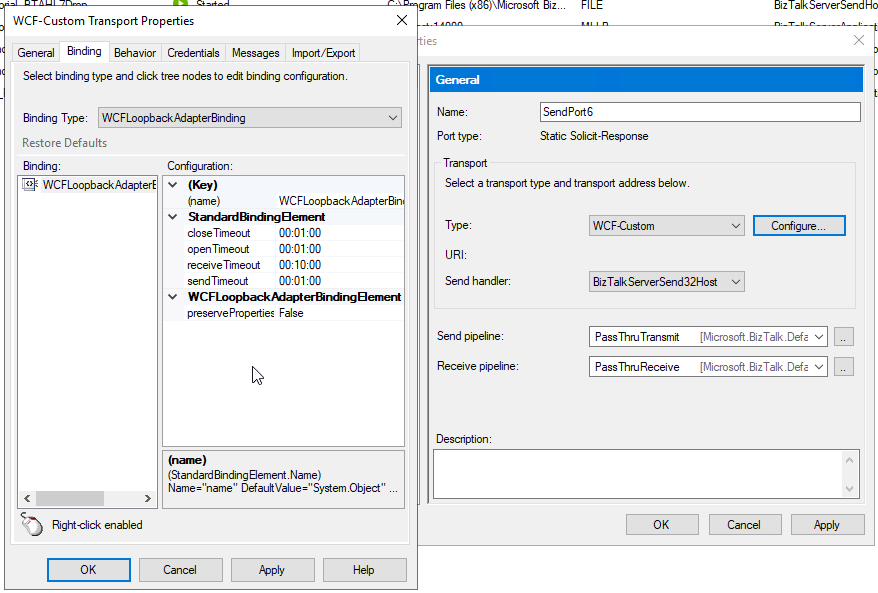
I was recently doing a proof-of-concept for a client and needed to invoke a receive pipeline within the orchestration. That approach worked fine, but it feels like a static black hole that you don’t know is there, and if there is a need to apply any changes, you need to redeploy the orchestration. You cannot simply modify a setting on the pipeline. So, I decided to use the Loopback adapter to recreate the same experience, implementing a different approach. Unfortunately, this adapter was no longer available for download, and all references to it were wiped from the face of the Earth. Luckily, I had some old screenshots in my vast list of internal resources, and I decided to recreate this WCF adapter (king of re-creating) and make it available again.
It was also a good training experience to create a WCF Adapter.
How to install it?
This is a WCF adapter, so installing this adapter is the same as installing any other BizTalk Server WCF extension. And you have two options:
- Using the machine.config files – This is the most complicated option, but it is the one I prefer to use.
- Or using the availability of registering WCF extensions on the receive and send handlers will not explain this approach.
You can choose to register this WCF adapter to run under 32-bit host instances, 64-bit host instances, or, of course, both.
To install it, you need to:
- Download the runtime folder from the WCF-Loopback Adapter GitHub page.
- Install/register the Microsoft.BizTalk.WCFLoopback.Adapter.Runtime.dll in the GAC.
- And add these settings to the machine.config files:
<system.serviceModel>
    <extensions>
        <bindingElementExtensions>
            <add name="WCFLoopbackAdapter" type="Microsoft.BizTalk.WCFLoopback.WCFLoopbackAdapterBindingElementExtension, Microsoft.BizTalk.WCFLoopback.Adapter.Runtime, Version=1.0.0.0, Culture=neutral, PublicKeyToken=5c92120f39ef9d11" />
        </bindingElementExtensions>
        <bindingExtensions>
            <add name="WCFLoopbackAdapterBinding" type="Microsoft.BizTalk.WCFLoopback.WCFLoopbackAdapterBindingCollectionElement, Microsoft.BizTalk.WCFLoopback.Adapter.Runtime, Version=1.0.0.0, Culture=neutral, PublicKeyToken=5c92120f39ef9d11" />
        </bindingExtensions>
    </extensions>
</system.serviceModel>
- To run under 32-bit host instances
- Open the machine.config present in the folder: C:\Windows\Microsoft.NET\Framework\v4.0.30319\Config
- I will also recomend, not mandatory, to change also the machine.config present in the folder: C:\Windows\Microsoft.NET\Framework\v2.0.50727\CONFIG
- To run under 64-bit host instances
- Open the machine.config present in the folder: C:\Windows\Microsoft.NET\Framework64\v4.0.30319\Config
- I will also recomend, not mandatory, to change also the machine.config present in the folder: C:\Windows\Microsoft.NET\Framework64\v2.0.50727\CONFIG
Restart the services.
Where can you use it?
This version available on GitHub is currently compiled on .NET 4.7.2 and optimized for BizTalk Server 2020. Nevertheless, you can take this code and compile it in other versions of .NET and BizTalk Server. It will be 100% compatible.
Download
THIS ADAPTER IS PROVIDED “AS IS”, WITHOUT WARRANTY OF ANY KIND.
You can download the BizTalk Server WCF-Loopback Adapter from GitHub here:
Hope you find this helpful! If you liked the content or found it useful and would like to support me in writing more, consider buying (or helping to buy) a Star Wars Lego set for my son.



