


Recently, my team and I developed and released several tools that extend the out-of-the-box capabilities of BizTalk Server 2016, helping developer and administration teams to be more productive by saving time on simple but time-consuming tasks that should not be. One of these tools was the BizTalk Filter Finder Tool.
Because many clients are still using BizTalk Server 2013 R2 and I have received some requests from the community, I will be releasing these tools for BizTalk Server 2013 R2 as well. And today, we will start with the BizTalk Filter Finder Tool.
📝 One-Minute Brief
Introduces the BizTalk Filter Finder Tool for BizTalk Server 2013 R2, a lightweight utility that helps administrators quickly identify and analyze content‑based and pub‑sub routing filters across BizTalk applications, send ports, and orchestrations.
BizTalk Filter Finder Tool
“BizTalk Filter Finder Tool” is a simple tool that aims to simplify the process for better understanding and maintaining solutions based on content-based routing. By allowing you to have a quick overview of all the artifacts, send ports, or orchestrations that have filters associated.
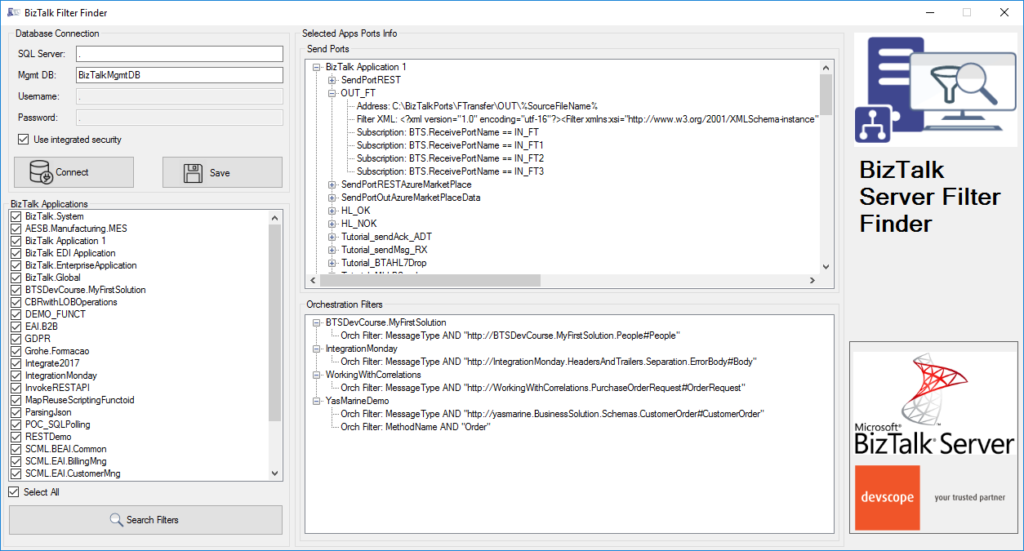
This tool will extend default BizTalk Server capabilities, transforming this tedious and sometimes complicated analysis into a simple, easy, and fast one.
It may not be an amazing tool; it may not be beautiful, but for me, it is a timesaver tool.
Credits
Credits also to my team member at DevScope, Pedro Almeida, who collaborated with me in developing this tool.
Download
You can download the BizTalk Filter Finder Tool from GitHub:
Hope you find this helpful! If you liked the content or found it useful and would like to support me in writing more, consider buying (or helping to buy) a Star Wars Lego set for my son.



